
A purchase order approval workflow is the predefined set of rules that decides who must approve a purchase before a supplier-facing purchase order is issued, and what record is kept. Price is a weak router on its own. Supplier risk, budget ownership, entity and the evidence that still exists at invoice match should decide the path.
Manual handling still consumes a full-time job at many companies. A 2024 survey by HTWK Leipzig of 181 companies across 18 European countries, covered by Spendesk, found that only 15% had fully digitized and integrated procurement, while approximately 40% still relied on tools not designed for procurement, including Excel. A typical company in that survey processed about 2,500 purchase orders a year, at an average of 38 minutes each. That is roughly 1,600 staff hours, close to one full-time employee, before exception resolution, delayed approvals or supplier follow-up.
Table of Contents
- What a Purchase Order Approval Workflow Controls
- Routing Rules by Spend, Risk and Entity
- How to Build the Workflow Step by Step
- Segregation of Duties Across the Approval Chain
- Escalation, Exceptions and Three-Way Match Holds
- Audit Evidence an Auditor Will Ask For
- Pilot One Approval Workflow Before You Scale
What a Purchase Order Approval Workflow Controls
A purchase order approval workflow controls the commitment, not the shopping. It decides whether a request may become a purchase order, who is allowed to say yes, and which record proves that decision later.
Four stages carry that control. Requisition creation captures the need. Approval-matrix routing applies policy. Purchase order generation turns an approved request into a supplier document. Invoice reconciliation checks that the bill matches what was approved and received. Skip a stage and the later argument is about memory, not evidence.
Why the requisition comes before the purchase order
A purchase requisition is the internal instruction that lets an employee or department ask for a purchase order. The Chartered Institute of Procurement & Supply treats that requisition as the authority raised before the supplier-facing document exists. The split matters. Identifying a need is not the same act as committing funds.
Put the requester, legal entity, cost center, supplier, amount and business reason on the requisition. Validate those fields before anyone routes the request. A purchase order created from a blank email has no budget owner and no policy version. Your auditors can’t sample what was never written down.
The workflow protects three things at once.
- Budget: the request is checked against the cost center before the supplier is promised a price.
- Segregation of duties: the person who wants the goods is not the only person who can release money.
- A sampleable record: timestamps, approver and document version sit with the purchase order, not in a side thread.
Practical rule: Multiply your annual purchase order count by the minutes your team spends on each one. Compare that total with the hours already lost to chasing signatures, rework and supplier follow-up.
Disconnected spreadsheets hide that load inside “quick checks.” A governed path, including procure-to-pay automation that still leaves a human on the exception, is how the same control stops depending on who is online.
Routing Rules by Spend, Risk and Entity
Routing rules decide whether a purchase auto-releases, stops with the budget owner, or also needs procurement, legal or a finance controller. Set the thresholds by entity and budget. Treat the figures below as a starting matrix, not a universal price list.
| Purchase type | Routing trigger | Approval route | Evidence kept |
|---|---|---|---|
| Any amount, contract-sensitive | Contract terms or a legal clause are present | Budget owner, procurement and legal | Contract reference and legal review record |
| New supplier, any amount | Supplier is not yet approved | Procurement vendor check, then budget owner | Vendor onboarding and bank verification record |
| Cross-entity purchase | Paying entity differs from the budget entity | Approvers in both entities | Intercompany allocation record |
| Prepayment or unusual terms | Terms sit outside standard policy | Finance controller and legal | Signed exception and terms version |
A catalog buy from an approved supplier, inside budget and under the delegated limit, can take a fast lane. A new supplier, a prepayment, odd terms or a purchase that crosses entities takes the stronger route. The amount can be small and the risk can still be large.
When no formal policy exists yet
Plenty of companies are not starting from a finished policy. A European Council working paper records that 37% of organizations surveyed had no purchase order approval process, rising to 54% among companies with fewer than 50 employees. Even among organizations with more than 500 employees, 8% lacked a formal process, according to that Council working paper. Companies without a formal process split roughly evenly between always requiring a purchase order and relying on senior-purchaser sign-off, either always or above a value threshold.
That split is a design choice, not a maturity badge. Always requiring a purchase order creates paper. Senior sign-off above a value creates a bottleneck and a blind spot under the line. A graduated model sits between them.
Use four questions before you copy a threshold from another company.
- Supplier risk: Is the vendor approved, and are the bank details already verified?
- Budget ownership: Which cost center absorbs the spend, and who owns that budget?
- Recurring commitment: Is this a one-off, or a subscription that renews without a fresh request?
- Boundary crossing: Does the purchase change entity, add unusual terms or need a contract clause reviewed?
If the same person requests, approves and pays, you don’t have a workflow. You have a diary.
Each rule should name the approver role that owns the decision and the one piece of evidence that proves it. “Finance will look at it” is not a route. A named role plus a retained document is.
How to Build the Workflow Step by Step
Build the purchase order approval workflow in the order the request moves, so each stage has one owner and one record. Before you automate anything, name the triggering event, the source-of-truth system, the owner of each exception, and the final record that proves the work happened.
The picture below is the short version your team can walk in a review. The eight steps under it are the control design.
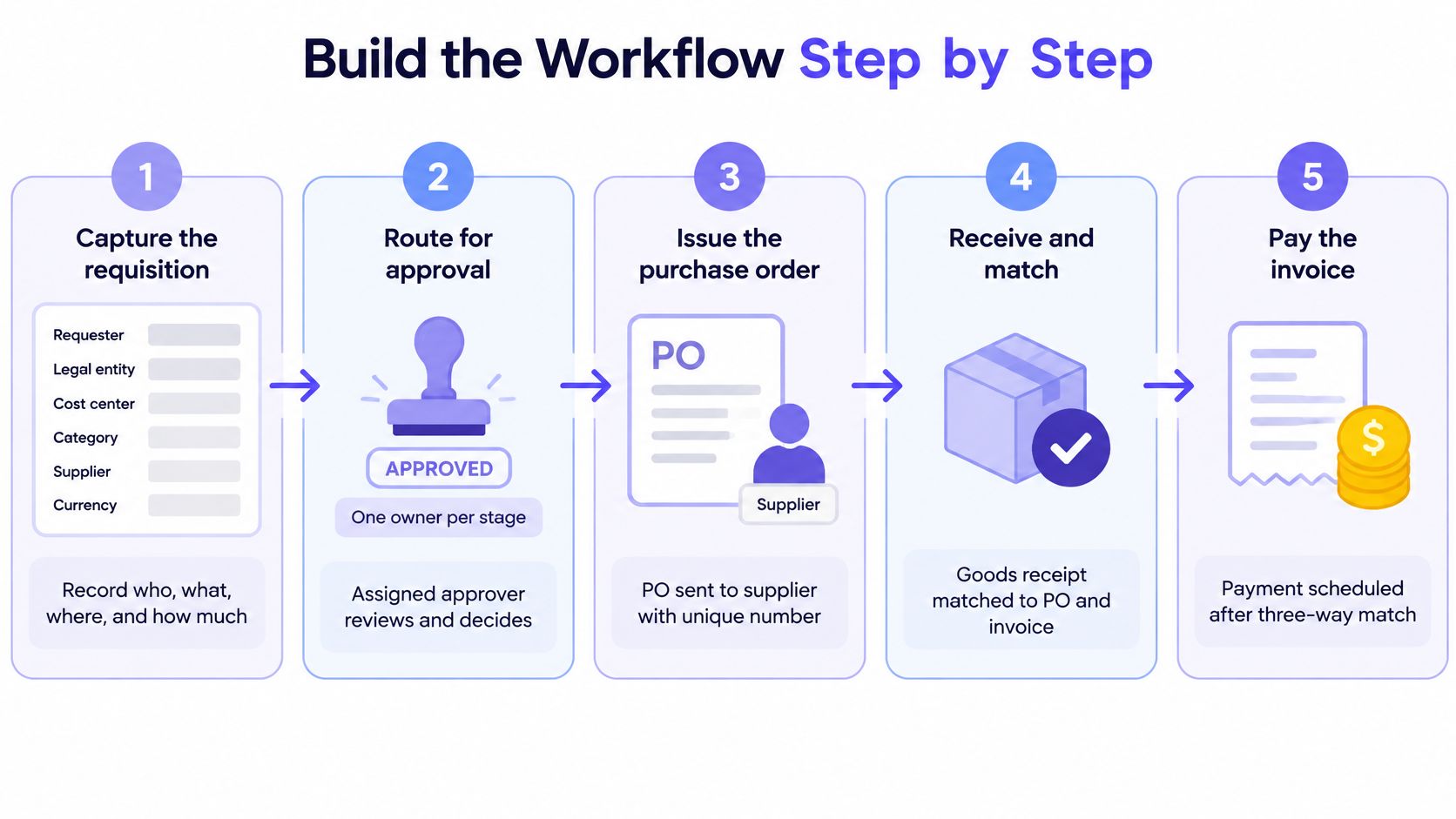
- Capture the requisition. Record requester, legal entity, cost center, category, supplier, currency, amount, budget, requested delivery date, contract reference and supporting documents. One field missing here becomes a stalled approval later.
- Validate before routing. Check mandatory fields and supplier status first. An unapproved vendor should not enter the budget owner’s queue as if it were a routine reorder.
- Run the automated checks. Look for duplicate requisitions, budget availability, contract price, tax treatment, currency, restricted categories, and a required receipt or statement of work. These checks are deterministic. They don’t negotiate.
- Choose auto-release or the matrix. Apply the risk rules from your routing table. Low-risk catalog spend from an approved supplier can move. Everything else waits for the named approver.
- Route where people already work. Send the decision through Slack, Microsoft Teams or email, with an escalation timer, a substitute approver and a rejection reason code. Email-only reminders are the common slip, because the decision then lives outside the system record.
- Issue the purchase order from the approved requisition. Lock controlled fields, transmit the document to the supplier and write it back to the ERP. Don’t let someone retype the price on the way out.
- Match purchase order, receipt and invoice. Set tolerances for quantity, price, tax and freight. A failed match holds payment. It doesn’t “close enough” the bill.
- Keep the evidence chain on the same record. Timestamps, approvers, delegated authority, policy version, comments, revisions and the ERP write-back belong together.
How you know the path is working
Measure requisition-to-purchase-order cycle time from submission to issuance, not from the moment procurement happens to open the email. Supply Chain Management Review, citing APQC-derived benchmarks, reports that top-performing organizations can issue a purchase order in roughly one day, while lower performers take more than twice as long.
Also watch approval aging by queue, first-pass accuracy, rejection rate and spend that never got a purchase order. Identical approval layers on every purchase hide the bottleneck. People then buy off process because the official path treats a toner cartridge like a new plant contract.
Segregation of Duties Across the Approval Chain
The person who requests a purchase should not approve it, and neither the requester nor the approver should pay the invoice. That split is the control. A missing boundary lets one person create an unauthorized purchase and conceal it in payment processing.
Tradogram’s guide to the purchase order approval process puts the same rule on requisition, approval, receipt validation and payment. Separating those acts is what makes a later sample meaningful. If one login touched every stage, the sample only proves that the login worked.
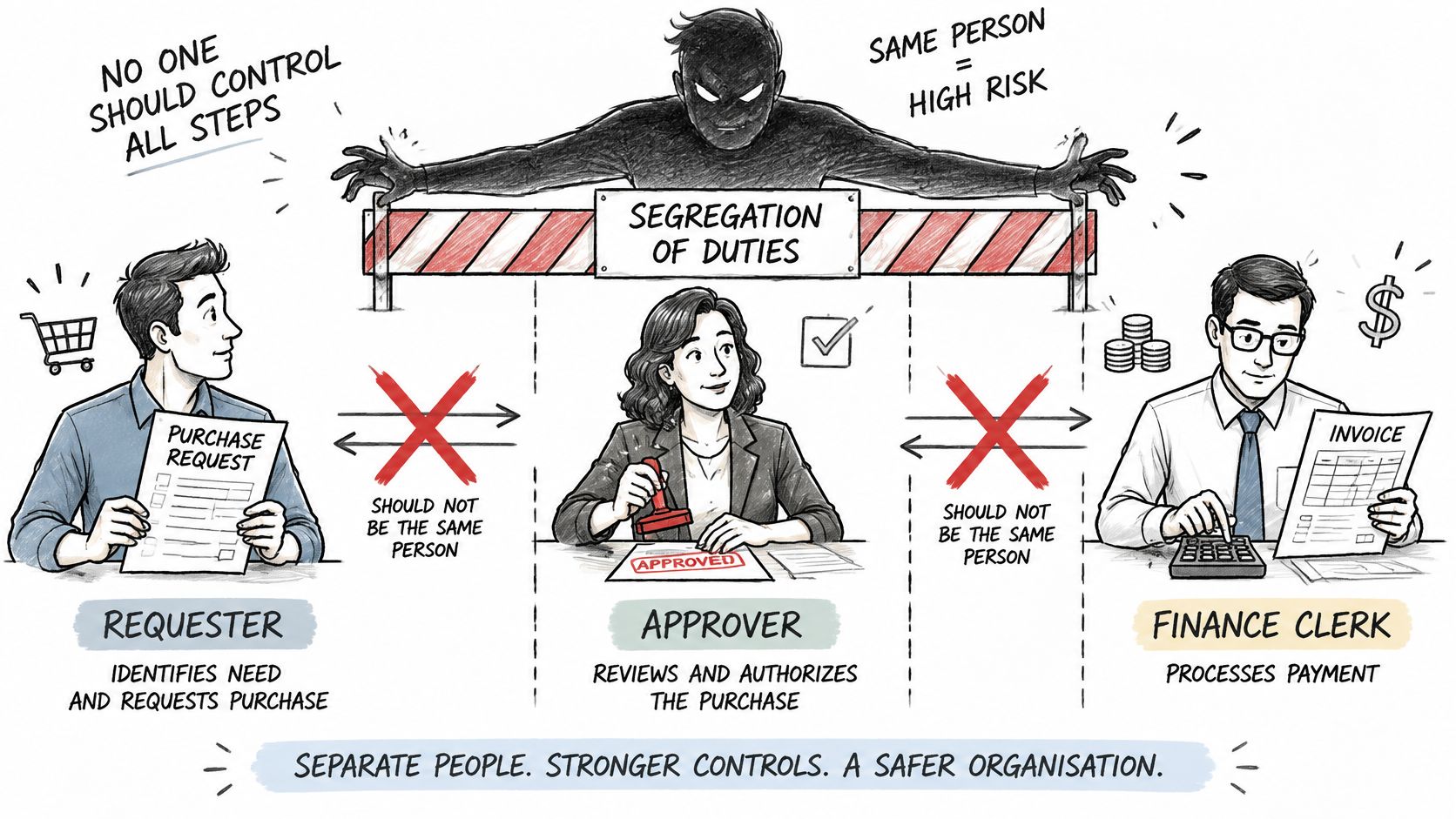
| Role | Raise requisition | Approve purchase order | Confirm receipt | Release payment |
|---|---|---|---|---|
| Requester | Yes | No, cannot approve own request | No | No |
| Budget owner | Yes, for own cost center | Yes, within delegated limit | No | No |
| Receiving manager | No | No | Yes | No |
| Accounts payable clerk | No | No | No | Yes, after three-way match |
| Finance controller | No | Yes, above threshold | No | Only for approved overrides |
Where the boundary usually breaks
A deterministic workflow enforces this with predefined permissions. It blocks a request when requester and approver are the same person. It also blocks the case where the approver holds payment release. Escalation follows the same map. A substitute isn’t a back door.
The delegated-authority table is the usual weak point. Someone changes role on Monday and still holds approval rights on Thursday. The org chart moved. The permission did not. Nobody notices until a sample asks why a former budget owner approved a purchase in a cost center they no longer own.
Check that table against the org chart on a set schedule. A substitute approver can’t be the original requester. Then run a simple test. Pull ten recent purchase orders and confirm that no single person touched more than one stage. If the same name appears on request and payment, the matrix is decorative.
Escalation, Exceptions and Three-Way Match Holds
A stalled approval or a failed match holds the payment. The workflow doesn’t guess, and it doesn’t post. Each exception has an owner, an action and a clock, and nothing moves until that owner resolves it.
No workflow should go live without the approvals your controls require. Exceptions wait for the right owner before anything posts.
| Exception | Owner | Action | Clock |
|---|---|---|---|
| Approval past escalation timer | Substitute approver | Reassign and log the delay | Timer set per approval level |
| Price variance above tolerance | Accounts payable lead | Hold payment and request a corrected invoice | Set per tolerance rule |
| Quantity mismatch | Receiving manager | Confirm receipt and pay the received quantity | Before the next payment run |
| Receipt missing | Receiving manager | Block payment until receipt posts | Tracked as blocked-payment aging |
| Vendor bank details changed | Finance controller | Verify by call-back before any change | Before the next payment run |
| Edit after approval | Original approver | Re-approve the revised version | Immediate, through versioning |
| Duplicate requisition | Procurement | Reject and link to the original | At intake |
What never auto-clears
Auto-release is narrow. Use it only when the supplier is approved, the purchase is within budget and policy, the amount is below the delegated threshold, and no segregation-of-duties conflict exists. Anything else goes to the budget owner, procurement, legal, security or an executive approver, as the matrix says.
Three-way matching compares the purchase order, the receipt and the invoice, with tolerances for quantity, price, tax and freight. A miss suspends payment and routes to the owner with a documented resolution. The same discipline belongs on the AP invoice approval process, where a held bill is safer than a polite overpayment.
Speed without exception visibility creates maverick spend. Procurement guidance cited by Cflow places average maverick purchasing near 30%, while top performers stay below 10%, and it recommends purchase order compliance above 95%. Those figures are why a held payment is a result, not a failure of the workflow.
Watch for three failures that look like automation. Overly broad auto-approval. A stale delegated-authority table. Silent master-data edits, especially bank details, that wipe the audit trail while the payment still goes out.
Audit Evidence an Auditor Will Ask For
An auditor needs to rebuild any purchase order from request to payment without asking the person who handled it. If the story only exists in someone’s inbox, the control did not hold.
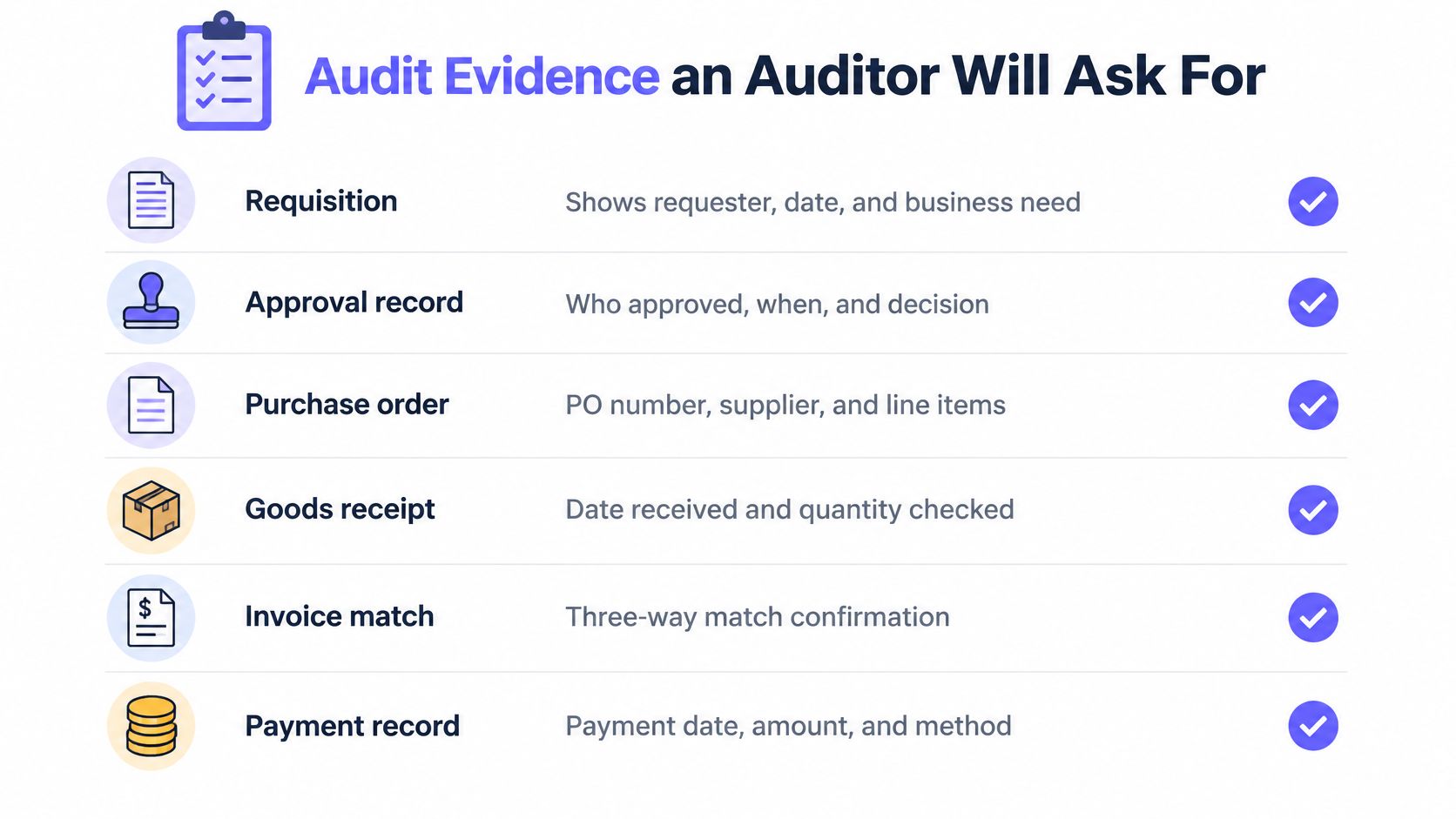
Keep these fields on every purchase order, produced by the system that ran the step.
- Timestamps: one per action, from intake through posting.
- Approver identity: the person, the role and whether a substitute acted.
- Delegated-authority version: the limit table in force that day, not today’s table.
- Policy version: the rule set that allowed auto-release or forced a route.
- Comments, revisions and ERP write-back: stored on the same record as the purchase order.
An immutable reference has to connect the approved commitment to the structured invoice, the receipt and the posting. Faster approval that drops this link increases compliance risk. It doesn’t reduce it.
What the sample usually picks
Three cases show up more often than a clean catalog order. A changed vendor bank detail needs a verified change record, including the call-back. An amended invoice needs a link back to the original purchase order. A failed data validation needs a named person who resolved it, not a cleared exception with no owner.
The EU’s 2025 VAT in the Digital Age directive, as described by the European Commission’s interoperability programme, allows member states to mandate domestic e-invoicing from April 2025 and makes electronic invoicing the default for intra-EU transactions from July 2030. It also adds mandatory data elements, including corrected-invoice references and bank-account identifiers. The European Commission defines e-invoicing as structured data exchange that enables automated processing without manual input. Your purchase-order-to-invoice link has to carry those elements, or the structured invoice can’t be tied to the decision you approved.
For the audit committee, report straight-through approval rate, median and 95th-percentile approval latency, rework percentage, match rate and non-purchase-order spend. Give each metric a named owner. A metric without an owner is a slide.
Your auditors want the workflow to hold up when they pull a purchase order from last March, not only the one you demonstrate in the meeting.
A practical external checklist, such as the UK purchase order audit checklist from Lighthouse Consultants, is a useful way to see which documents a reviewer expects in a file. Pair that expectation with an internal audit trail process so the evidence is produced by the run, not assembled the week before fieldwork.
Pilot One Approval Workflow Before You Scale
Pilot one purchase order approval workflow, not the whole of procurement. Pick a purchase type you can still check by hand, such as catalog orders from approved suppliers, and compare the system output with a manual sample.
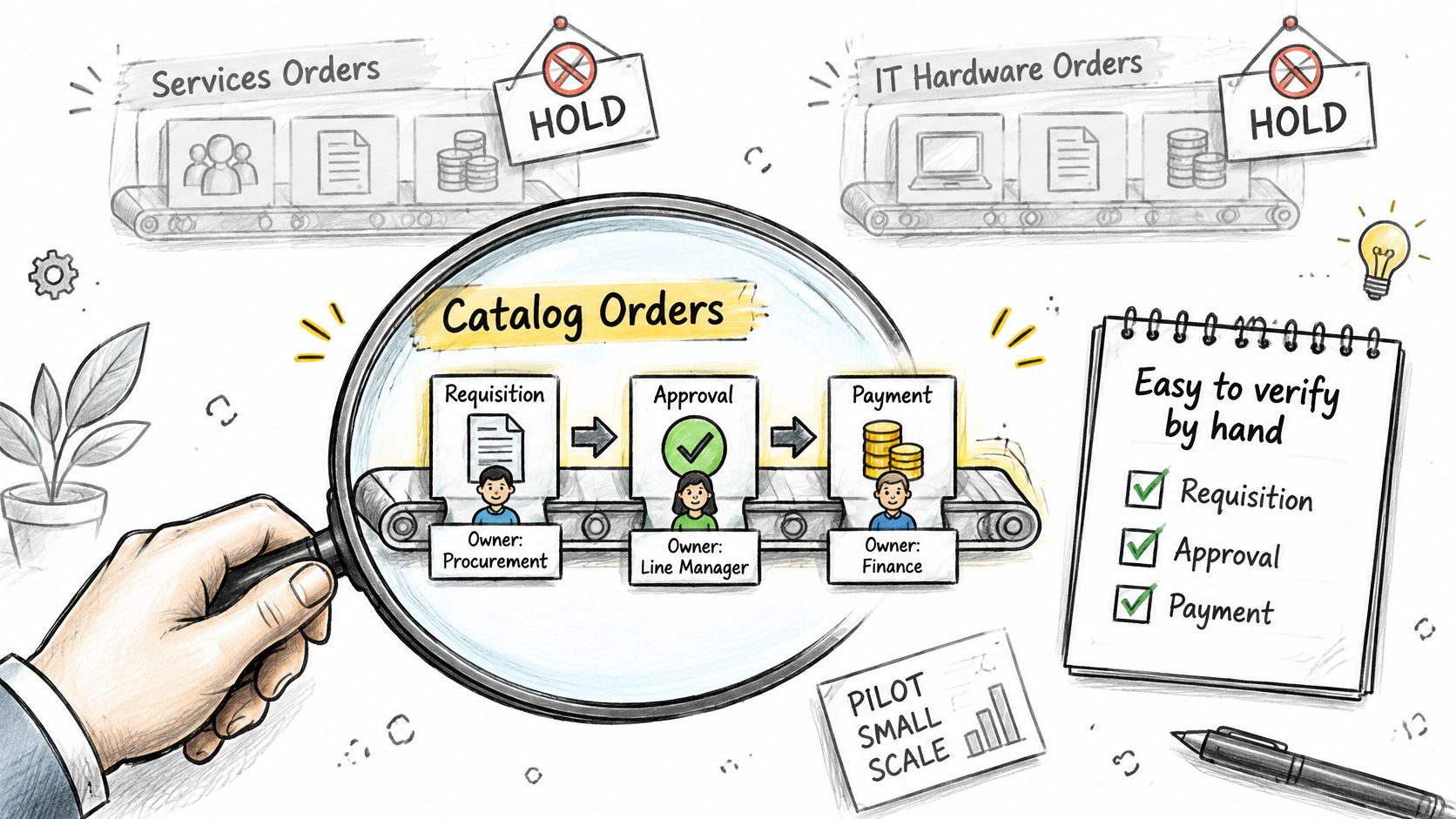
A good first workflow is one your team can verify without a forensic rebuild. Catalog orders qualify because the supplier, price and cost center are already known. New vendors, prepayments and cross-entity buys come later, after the path has survived a sample.
- Name three owners. One person owns credentials, one owns workflow logic, and one owns business approval. Those jobs don’t collapse into a single admin login.
- Book a 45-minute workflow review. Map the trigger, the controls, the integrations and the approval loop. You leave with a scoped plan for running that process on your stack, whether the first pass is purchase orders, billing, cash application or reconciliation.
- Approve a dry run against recent purchase orders. Confirm the route, the hold and the evidence before anything touches a live supplier.
- Watch it in observability mode. Read the run log before the workflow acts on new events.
- Go live with a human on the exception. The path runs on events. Exceptions still wait for approval. Nothing posts early to “keep the queue clear.”
Email does the chase and then loses the decision. Loopfour, the deterministic finance workflow automation platform, runs that route as predefined code on the ERP and chat tools you already use, instead of asking you to replace the system of record.
The short walkthrough below shows how a scoped finance workflow moves from review to a run your team can inspect.
Questions finance teams actually ask
Does a small team need a formal purchase order approval matrix? Yes. A one-page matrix still names who approves a new supplier, a prepayment and a cross-entity purchase. Without it, teams either demand a purchase order every time or leave sign-off with one senior purchaser. The matrix is the auditable middle, even when headcount is under 50.
Can approvals run in Slack, Microsoft Teams or email? Yes. The message can reach the approver in Slack, Microsoft Teams or email. The decision, the timestamp, the policy version and any rejection reason still have to land in the system record. A chat reply alone is not the evidence file.
How long should you wait before escalation? Set the timer by approval level, not by a company-wide guess. A catalog reorder can escalate the same day. A contract review needs a longer clock and a named substitute. Log the delay either way, so aging is visible by queue.
Does this workflow replace the ERP? No. The ERP stays the source of truth for the purchase order and the posting. The workflow reads the requisition, applies predefined rules, routes the human decision and writes the approved document back. Your auditors still sample the ERP. They also sample the evidence attached to the run.
Loopfour turns a purchase order approval workflow into deterministic, auditable runs on the ERP, chat and document tools your finance team already uses, and it holds every exception until the right owner decides. Approvals, permissions and the evidence chain stay on the run, from requisition through the matched invoice. Visit Loopfour to map the first workflow on your stack.