
ERP CRM integration is the governed exchange of customer and commercial records between CRM and ERP systems. Its value depends on accurate, owned writes, not merely owning both systems or turning on a connector.
The popular advice to synchronize everything in real time misses the controller’s concern. A successful transfer can still create an incorrect invoice, overwrite approved terms, or leave no explanation for a journal entry. Speed isn’t proof of control.
By Zuny Fester, Head of Operations and Marketing.
Table of Contents
- What ERP CRM Integration Actually Means
- Records That Must Stay in Sync
- API Middleware and Browser Automation
- Governance, Evidence, and Exception Routing
- Quote to Cash From Deal to Ledger
- Checklist Before You Go Live
- Questions Finance Teams Ask Next
What ERP CRM Integration Actually Means
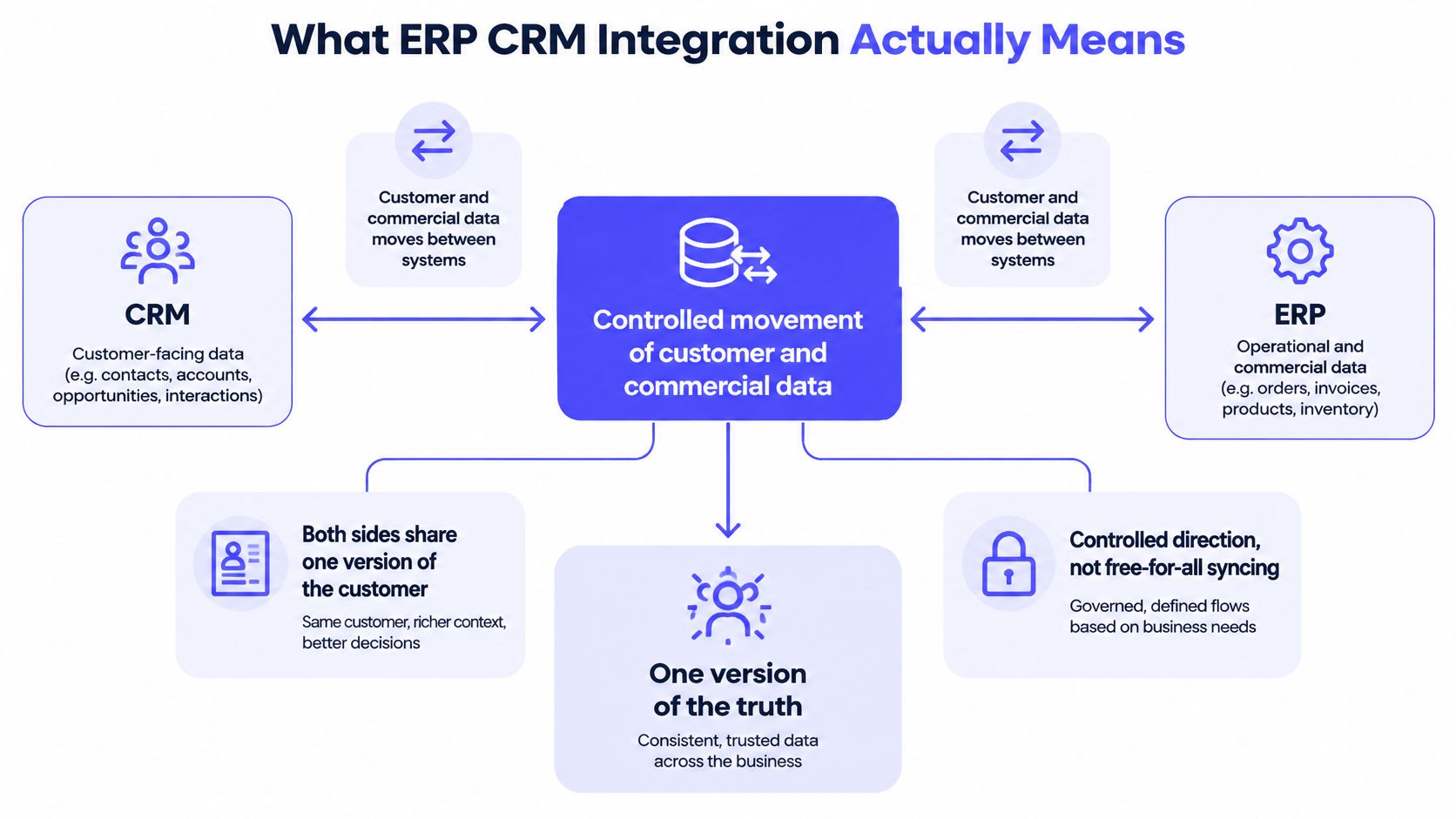
ERP CRM integration connects customer context to financial execution under predefined rules. The CRM records the commercial agreement. The ERP records the resulting order, receivable, payment, and accounting treatment.
The demand for connected systems is clear. In the 2024 Intuit QuickBooks Business Solutions Survey, 95% of surveyed US businesses with 10–99 employees said integration between their apps and software programs was essential for growth. That finding establishes demand, not a guarantee that every integration produces reliable financial records.
A finance team isn’t just buying a connector. The team is deciding which system owns each field and how a commercial event becomes a financial write.
The diagram shows the relationship between controlled movement and shared records.
A field copy isn’t a finance posting
A field copy transfers a value. A finance posting creates an accounting consequence. The posting therefore needs a predefined result, an identifiable source, and a stored response from the destination system.
Suppose Salesforce sends payment terms to an ERP customer record. The integration can report success even if those terms contradict an approved credit policy. Transport success establishes that the system accepted the request, not that accounting approved the result.
| Integration result | What the result establishes | What finance still needs |
|---|---|---|
| Field copied | A value reached a destination | Ownership and business validation |
| Invoice created | The ERP accepted a billing request | Correct customer, period, entity, and lines |
| Journal posted | An accounting transaction exists | Approved treatment and source-to-ledger evidence |
Integration value needs a narrower claim
System integration can contribute value independently of owning ERP and CRM software. The distinction matters because software adoption and controlled execution aren’t interchangeable.
The empirical study The ERP and CRM business value reported standardized coefficients of 0.260 for ERP capability and 0.346 for system integration, both statistically significant. CRM capability alone scored 0.023, and process integration scored 0.173, neither statistically significant. These are relationships within the study, not promised financial returns.
Adoption also doesn’t establish control quality. According to Eurostat’s E-business integration release, 28.51% of EU enterprises used CRM software in 2025.
Record ownership, connection architecture, security, exception routing, and reconciliation determine whether that software supports finance. The practical test is simple:
If nobody can identify the CRM event behind a journal entry, the integration isn’t finance-grade yet.
Records That Must Stay in Sync
ERP CRM integration is a master-data and meaning problem before it’s a connector problem. Accounts, products, contracts, and transactions need explicit owners and stable identifiers before either system writes to the other.
CRM and ERP records, owners, and direction
| Shared concept | CRM object | ERP record | System of record | Direction |
|---|---|---|---|---|
| Customer identity | Account | Customer or subsidiary | CRM for name and hierarchy; ERP for credit and terms | CRM to ERP, credit status back |
| Deal at close | Opportunity or quote | Sales order | CRM until close; ERP after the order exists | One way at won or booked |
| Product and price | Product or price book | Item and price level | ERP item master | ERP to CRM for sellable items |
| Contract terms | Contract or CPQ quote | Revenue schedule or subscription | CRM or CPQ for terms; ERP for the posting | Terms in, schedule back as status |
| Billing document | Closed deal or order | Invoice and AR balance | ERP | ERP creates; CRM receives status |
| Cash | Payment or case note | Cash application | Bank or processor, then ERP | Into ERP; status back to CRM |
| Credit block | Opportunity warning | Credit hold | ERP | ERP to CRM, block new orders |
A systematic review of 94 peer-reviewed studies identifies infrastructure readiness, executive sponsorship, training, and cross-departmental collaboration as important to integration outcomes. The review also identifies fragmented architectures, interoperability constraints, and continuing maintenance costs as barriers. A connector doesn’t resolve those organizational decisions.
Give every relationship a stable key
Each CRM-to-ERP relationship needs an immutable cross-system identifier. Names, email addresses, and document descriptions can support matching, but they shouldn’t become the permanent identity of a financial record.
For customer identity, store the CRM account ID alongside the ERP customer ID. Keep the subsidiary or legal-entity relationship explicit. A parent account isn’t automatically the legal customer responsible for an invoice.
For a closed deal, preserve the opportunity or quote ID against the resulting sales order. Product mappings need the ERP item ID, not merely the sales-facing product name. Contract mappings need the contract ID and the relevant approved revision.
Billing and cash require separate relationships. An invoice request needs its source event ID linked to the ERP invoice ID. A payment needs the bank or processor reference linked to the ERP cash application. A credit hold should identify the ERP customer and the authoritative hold record.
| Relationship | Immutable reference to retain |
|---|---|
| Account to customer | CRM account ID and ERP customer ID |
| Opportunity to order | Opportunity or quote ID and ERP order ID |
| Product to item | CRM product ID and ERP item ID |
| Contract to schedule | Contract ID, revision, and ERP schedule ID |
| Billing request to invoice | Source event ID and ERP invoice ID |
| Payment to cash application | Processor or bank reference and ERP application ID |
| Credit block to warning | ERP customer ID and hold record ID |
Define two-way exchange as separate permissions
Two-way exchange should mean different authoritative fields moving in different directions. It shouldn’t mean both systems can overwrite the same field without a conflict rule.
Suppose a CRM update changes credit terms. The ERP rejects the change under its credit policy and sends the original terms back. Without ownership controls, each update can trigger another update, creating a loop rather than a resolution.
Customer creation presents a related risk. A retry that searches only by name can create another customer after a timeout, even though the original request succeeded.
Version the mapping rules. Validate legal entity, currency, item references, and customer relationships before posting. Quarantine records with missing references rather than filling gaps with defaults that accounting hasn’t approved.
Retain the source ID, timestamp, mapping version, and ERP response for each attempted write. A rejected record should retain enough context for its owner to repair the cause, not merely dismiss an alert.
Practical rule: Mark every shared field as CRM-owned, ERP-owned, or derived before selecting the integration tool.
API Middleware and Browser Automation
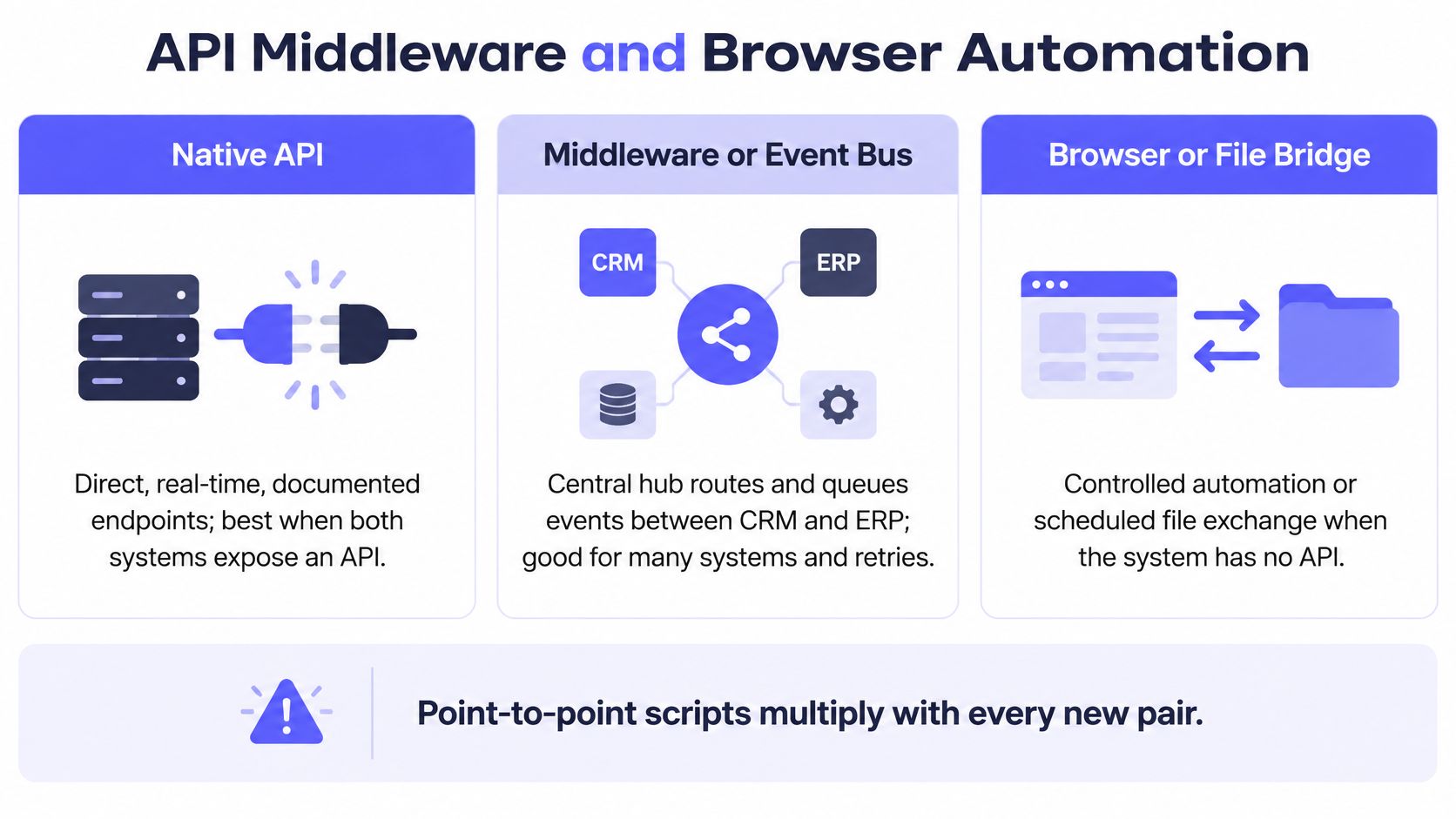
ERP CRM integration can use native APIs, middleware or an event bus, a controlled browser or file bridge, or point-to-point scripts. The right choice depends on endpoint reliability, recovery requirements, and the evidence retained after a write.
| Connection pattern | Best fit | Typical failure to test | Evidence to require |
|---|---|---|---|
| Native API | Stable, documented endpoints on both systems | Timeout, quota exhaustion, partial write | Request ID, response, destination record ID |
| Middleware or event bus | Shared events and independent subscribers | Backlog, duplicate delivery, mapping drift | Event ID, mapping version, processing history |
| Browser or file bridge | Legacy system without a reliable API | Changed screen, rejected import, interrupted session | Session or file history, validation results, confirmation |
| Point-to-point scripts | Narrow, tightly governed handoff | Unowned changes or hard-coded assumptions | Versioned code, run logs, named maintainer |
The diagram summarizes the main connection methods; scripts remain a separate implementation pattern.
Salesforce limits are architecture requirements
Salesforce API integrations need bounded requests and explicit quota management. Correct field mappings won’t rescue a request that exceeds a platform boundary.
The Salesforce Platform API limits documentation sets a 10-minute timeout for REST and SOAP calls, except query calls, and a 16,384-byte combined URI-and-header limit for REST requests. Oversized headers can return HTTP 431; an oversized URI can return HTTP 414.
The Salesforce REST API Developer Guide documents API usage information showing calls used and the organization’s limit. For applicable Connect REST resources, Salesforce’s rate-limit documentation describes session-based and OAuth allocations and HTTP 503 responses when a limit is exceeded.
The Salesforce Limits resource reports usage values accurate within five minutes of consumption, not an instantaneous quota state.
Salesforce API limits that shape ERP CRM syncs
| Limit | Documented value | What breaks | Design response |
|---|---|---|---|
| REST and SOAP call timeout | 10 minutes, except query calls | Long-running calls time out | Asynchronous processing and batches |
| Combined URI and header size | 16,384 bytes per REST request | HTTP 431 for headers, HTTP 414 for URI | Compact requests and bounded request construction |
| API usage visibility | API usage information shows calls used and organization limit | Quota exhaustion goes unnoticed | Usage dashboards and throttling |
| Rate-limit response | HTTP 503 for applicable Connect REST limits | Infrastructure failures treated as permanent record errors | Backoff and managed OAuth credentials |
| Usage accuracy | Values accurate within five minutes | Instant quota assumptions fail | Avoid rapid requests when consistent values matter |
These limits concern different resources and request properties. The URI-and-header limit isn’t a general invoice-body size allowance. Paginate reads, bound write batches, and move long-running work outside the user’s synchronous request.
Separate acceptance from completion
A durable queue lets the CRM accept a commercial event without requiring the ERP to finish immediately. Finance still needs a completion status and reconciliation, not merely confirmation that an event entered the queue.
A preprint on event-driven integration architecture describes asynchronous publishers and subscribers, replay, and delivery mechanisms for recovery. The operational implication is concrete: an ERP outage shouldn’t force a salesperson to resubmit a deal blindly.
An API isn’t automatically the lowest-risk route. A permissioned browser session with recorded confirmation and a stop-on-failure rule can be safer than an opaque API transfer. The API integration platforms guide provides additional architecture context.
Use APIs for stable endpoints, middleware for shared events, and browser or file bridges when reliable APIs aren’t available. Require evidence and a tested recovery path in every case.
The accompanying video provides another view of the integration workflow.
Governance, Evidence, and Exception Routing
A finance-grade ERP CRM integration produces reconstructable evidence for every material write. Reviewers should be able to identify the actor, source record, rule version, destination response, and approval.
Auditors need the run to hold up after its builder has left. A green dashboard and a current invoice balance aren’t enough. The evidence must explain what happened at execution time, including rejected attempts and later corrections.
Tipalti’s 2025 release, Tipalti Releases New Report Revealing Widening AI Trust Gap Across Finance Teams, identifies privacy and security, data quality and provenance, and legacy integration among barriers to scaling AI in finance. Those concerns belong in the integration design, not in a separate policy document nobody consults during close.
Make permissions and rules inspectable
Integration credentials should authorize only the actions required by the workflow. Reading account information and posting a journal aren’t equivalent permissions.
Use dedicated integration identities rather than shared employee logins. Separate read access from invoice creation, journal posting, rule changes, and evidence deletion. Assign an owner who reviews access when responsibilities or systems change.
The control design should include:
- Least privilege. Restrict each identity to its required records, entities, and actions.
- Idempotency. Build a stable key from the source system and event ID, then retain the destination result.
- Effective-dated rules. Apply the approved mapping and accounting policy relevant to the transaction’s effective date.
- Protected evidence. Retain immutable execution history with encryption in transit and at rest.
- Financial-data restrictions. Prohibit model training on customer financial data through contractual and technical controls.
An idempotency key needs more than a field in a payload. The receiving workflow must check it, prevent concurrent duplicate execution, and return the existing result after a successful prior write.
Rule changes need comparable discipline. A revised price mapping shouldn’t alter historical treatment. Store both the effective date and the deployed version so a reviewer can distinguish transaction timing from configuration timing.
Keep AI outside posting authority
Probabilistic interpretation shouldn’t determine an uncontrolled financial write. Predefined validation and approval rules should govern posting, even when AI helps interpret a contract or document.
For example, a document parser might propose a billing frequency. The workflow should test that proposal against approved values and the contract context. Missing or conflicting terms should trigger review, not an invented default.
The distinction isn’t that every deterministic result is correct. A predefined rule can still encode the wrong policy. The advantage is inspectability: a controller can identify the rule, test its application, and approve a corrected version.
A technically successful transfer can still be financially wrong. Reconciliation must test the accounting result, not just the transport status.
Route work through explicit states
ERP CRM exception routing needs states that distinguish validation problems from infrastructure failures. A malformed customer reference requires a different response from an unavailable ERP.
| State | Required evidence | Next action |
|---|---|---|
| Received | Source event, arrival time, payload reference | Check required fields and permissions |
| Validated | Rule version and validation results | Submit the permitted write |
| Posted | ERP transaction ID and stored response | Reconcile and publish status |
| Failed | Failure category, attempted action, owner | Retry safely or request correction |
| Manually resolved | Human decision, reason, corrected references | Close the exception or resume the approved step |
A timeout after submission needs special handling. The ERP may have committed the transaction before the response disappeared. Check the idempotency record or destination reference before sending another create request.
A validation failure shouldn’t enter an infrastructure retry loop. Repeatedly submitting an invalid subsidiary won’t improve the subsidiary. Preserve the rejected payload, explain the failed rule, and route the record to the person authorized to correct it.
Manual resolution must also leave evidence. Record who changed the source, who approved an override, and whether the workflow resumed or a separate correcting transaction was required.
Assign ownership beyond launch
Integration operations need named owners across RevOps, IT, and Controllership. An implementation team shouldn’t become the permanent, unnamed owner of every exception.
In a 2025 survey cited by Arccus’s CRM integration coverage, 76% of respondents considered less than half of their CRM data accurate and complete, while 37% reported revenue loss linked to poor data. Those figures describe that survey’s respondents, not every CRM deployment, but they justify explicit source-data accountability.
| Owner | Accountability | Escalation trigger |
|---|---|---|
| RevOps | CRM field quality, contract context, commercial corrections | Missing or contradictory source information |
| IT | Credentials, endpoint access, quotas, delivery infrastructure | Authentication failures, outages, growing queue |
| Controllership | Accounting treatment, period, entity, reconciliation | Incorrect posting or unresolved cutoff exposure |
Monitor event age, processing latency, retry rate, duplicate suppression, rejected postings, and reconciliation breaks. A healthy endpoint doesn’t establish that every expected invoice reached the ledger.
Define cutoff handling before month-end. An unresolved exception remains open with a named owner until the CRM event and financial result agree. Closing an alert isn’t the same as resolving the financial exposure.
The audit trail process guide provides a useful framework for organizing action, approval, and outcome evidence. Retention should follow the organization’s approved audit and records policy, including access restrictions and correction history.
Quote to Cash From Deal to Ledger
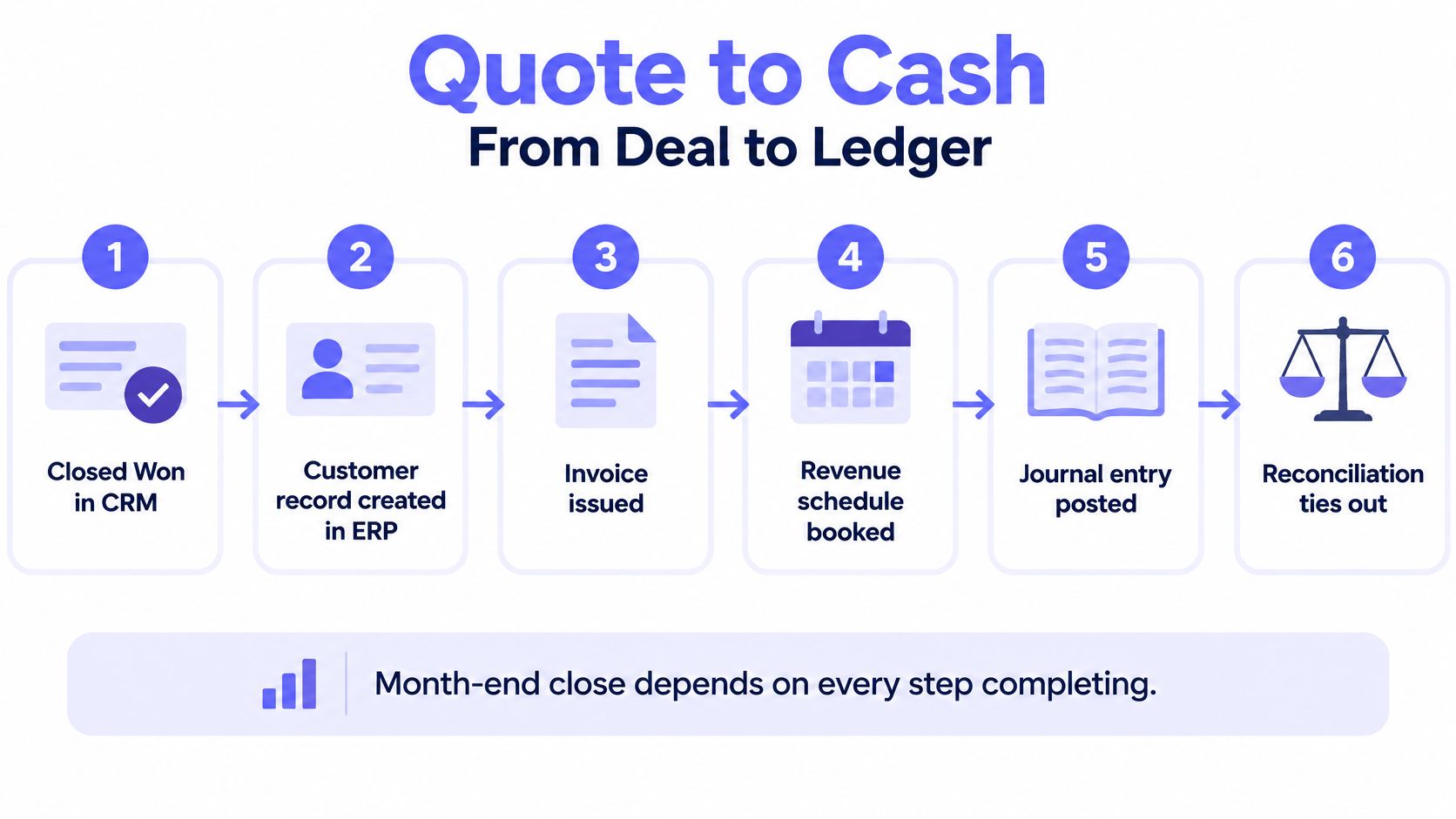
A closed-won deal becomes a ledger entry through predefined validation, posting, and reconciliation steps. The CRM’s sales status initiates the workflow; it doesn’t independently authorize every accounting consequence.
Consider a deal marked Closed Won on the last day of the month. Sales expects an invoice. Accounting needs the correct legal customer, booked lines, revenue treatment, and posting period.
The process diagram shows the business milestones, not permission to skip validation between them.
Follow a defined path through the exception
Quote-to-cash execution should pause at an unresolved financial exception without losing the original commercial event. The workflow resumes only after an authorized correction or approval.
The workflow reads the account and approved contract. It checks the existing customer mapping before creating an ERP customer. It then prepares the invoice from booked lines, checking entity, currency, items, and terms.
Suppose the contract identifies a different billing subsidiary from the CRM account. The workflow flags that conflict and attaches both records. A person resolves the discrepancy and approves the batch before posting.
After approval, the workflow writes the permitted records and captures their ERP identifiers. Reconciliation checks that the posted documents represent the approved commercial event. Nobody needs to re-key invoice lines merely to move the transaction between systems.
The order-to-cash business process flow guide places that billing handoff within the broader collection and cash-application process.
Compare the pattern with operating examples
The useful proof is a defined financial workflow with a known destination and retained evidence. The following examples describe different finance processes, not interchangeable connector installations.
- Industrial manufacturer, anonymized example. An industrial manufacturer replaced manual revenue-recognition workarounds with a six-step pipeline from Epicor to posted, auditable journal entries. The endpoint was a posted accounting result, not an exported calculation.
- Healthcare technology company, anonymized example. A healthcare technology company replaced a 4,000-row manual reconciliation spreadsheet with a deterministic four-way match across pricing, orders, GL, and invoices. The workflow evaluated agreement across financial records rather than merely transferring them.
- Everyset. The workflow writes customer, invoice, and journal entry records into QuickBooks Online. People review flagged exceptions and approve each daily batch before it posts.
Loopfour, the deterministic finance workflow automation platform, runs this pattern on the ERP and CRM the company already has. Loopfour pulls contract terms from Salesforce, CPQ, and the billing system, generates the revenue schedule, and posts it to the ERP as a connected flow.
A generic sync copies fields and leaves accounting correctness unresolved. Loopfour executes versioned finance steps and retains the execution evidence instead.
A practical starting definition is Salesforce or HubSpot Closed Won to ERP invoice. The finance team can write the path as read, match, validate, post, and reconcile, with a human gate before posting flagged transactions. The important work is defining that gate before expanding the automation.
Checklist Before You Go Live
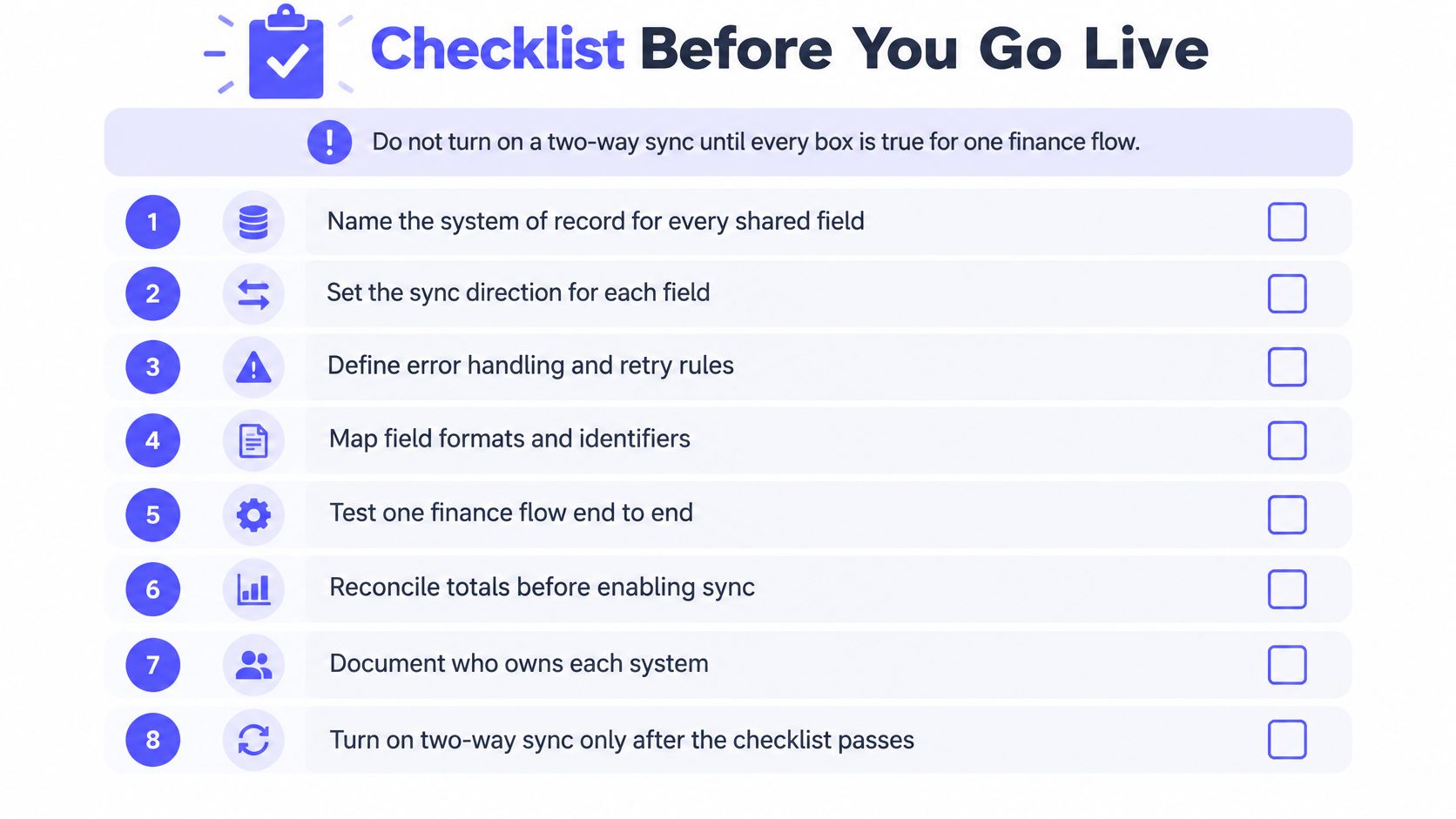
A finance team shouldn’t enable broad two-way synchronization until a bounded finance flow passes ownership, recovery, and reconciliation checks. Go-live approval should apply to a documented workflow version, not an undefined integration project.
The checklist image provides a compact readiness view. The operating checklist beneath it assigns the detailed responsibilities.
- RevOps and Controllership: Name the system of record for every shared field and approve each write direction.
- IT and RevOps: Set immutable cross-system IDs, match-before-create behavior, and a customer duplicate rule.
- Controllership: Approve a versioned mapping definition that includes currency, legal entity, and posting treatment.
- IT: Select the API, middleware, or controlled browser or file path and document the fallback.
- Integration owner: Test idempotency, validation rejection, and a dead-letter path for records that can’t proceed.
- Operations owner: Route exceptions through Slack, Microsoft Teams, or email with a secure payload reference and accountable recipient.
- Controller: Require approval before the initial posting run and before material rule changes.
- Accounting: Trace sampled CRM events to ERP invoices and journals, including rejected and corrected events.
- Audit or compliance owner: Retain execution history under the approved audit-period policy and restrict deletion rights.
- IT and process owner: Assign responsibility for vendor field changes, permissions changes, regression testing, and maintenance.
Define acceptance after deployment
A successful launch leaves the ledger in the existing ERP and directs people toward exceptions rather than routine re-entry. Acceptance testing should establish that outcome before the workflow’s scope expands.
Loopfour keeps the customer’s ERP, CRM, payment processor, document tools, and approval process in place rather than requiring replacement. Cleared matches post back to the ERP system of record with the audit trail attached.
An outage exercise should confirm that an interrupted write can be recovered without a duplicate invoice. A correction exercise should confirm that a changed contract doesn’t erase the original approval or historical posting evidence.
Go-live condition: Accounting can explain both the completed transaction and the unresolved exception without asking the workflow’s original builder.
The next working session should test these checks against a contract-to-cash or billing flow. Leave unrelated objects outside the release until the selected flow reconciles and its owners accept operational responsibility.
Questions Finance Teams Ask Next
Finance teams should resolve ownership, recovery, and evidence questions before expanding ERP CRM integration. These answers apply to both API-based and legacy-system workflows.
What is ERP CRM integration?
ERP CRM integration is the governed exchange of customer and commercial records between CRM and ERP systems. A CRM such as Salesforce or HubSpot supplies account and deal context, while an ERP such as NetSuite or Sage Intacct records the financial result under explicit ownership rules.
Is two-way CRM and ERP sync always better?
No. Two-way synchronization is useful only when each field has an authoritative owner and a permitted direction. Salesforce may own commercial account context while NetSuite owns credit status, receivables, and ledger records; neither system should overwrite the other’s authoritative fields indiscriminately.
Should finance teams use an API or middleware?
Use native APIs for stable endpoints and middleware when multiple systems need the same event or independent recovery. A Salesforce-to-ERP workflow still needs quota management and destination confirmation, while a controlled browser or file bridge is appropriate when the legacy ERP lacks a reliable API.
How can ERP CRM integration prevent duplicate customers?
Match an account before creating an ERP customer, then preserve the CRM-to-ERP identity relationship. A HubSpot account linked to a QuickBooks customer should retain that mapping through retries; ambiguous matches should enter review rather than create another customer.
What makes ERP CRM integration auditable?
Auditable integration retains the source event, applied rule version, destination response, and human approval. A Salesforce opportunity and its resulting ERP invoice should have a traceable relationship, including failed attempts, corrections, and the identity that authorized posting.
Where should a finance team start with ERP CRM integration?
Start with a bounded billing or quote-to-cash workflow that accounting can reconcile to the ledger. Salesforce or HubSpot Closed Won to ERP invoice is a practical candidate, provided the release includes exception ownership, approval criteria, and recovery testing rather than every custom field.
Loopfour offers deterministic finance workflows across existing CRM and ERP systems, with exception routing and retained execution evidence. Visit Loopfour to arrange a working session around a billing or contract-to-cash flow, identify its owners, and test its readiness against the go-live checklist.