
In 2025, 63% of accounts-payable teams spent more than 10 hours per week processing invoices, according to IFOL’s global Accounts Payable Automation Trends study. Procure to pay automation connects purchasing, receipt confirmation, invoice matching, approval, and payment through predefined rules, rather than treating invoice capture as the finish line.
For controllers, the design priorities are exception ownership, supplier-side readiness, and a reproducible audit record. Straight-through processing is the outcome to measure. It shouldn’t be the target that persuades a team to bypass an unresolved control.
Table of Contents
- What Procure to Pay Automation Actually Covers
- Benchmarks That Show the Business Case
- Where Automation Belongs in the Lifecycle
- How to Implement Without Losing the Match
- Exception Routing Your Auditors Can Follow
- Why Deterministic Workflows Hold Up in Audit
- Questions to Settle Before You Automate
What Procure to Pay Automation Actually Covers
Procure to pay automation runs requisition through payment as one controlled workflow. Each stage uses defined inputs, applies predefined rules, and retains evidence of the result. Scanning an invoice is only one task within that process.
Consider a services purchase. A department requests work, procurement approves the supplier, and the ERP creates a purchase order. The supplier later submits an invoice, but the requester hasn’t confirmed completion.
An invoice-capture tool can extract that invoice perfectly. A governed procure-to-pay workflow must still hold it because the service receipt is missing. Document accuracy doesn’t establish that the business received what it purchased.
The automation baseline is still fragmented
The 2025 accounts payable automation baseline below comes from IFOL’s Accounts Payable Automation Trends survey, covering surveyed finance professionals in procure-to-pay and accounts-payable roles, with the published prior-year comparison.
| Measure | Share of respondents |
|---|---|
| Not fully automated | 73% |
| No automation at all | 27% |
| Still keyed invoices into an ERP or finance system | 66% |
| Used a purchase order for every invoice | 6% |
| Spent more than 10 hours per week on invoice processing | 63% (52% in 2024) |
| Processed more than 5,000 invoices per month | 36% |
| Planned to fully automate within the following year | 44% |
| Said automation was not a priority | 21% |
Tool adoption has outrun process integration. A digital invoice, an emailed approval, and a payment file can still represent disconnected controls.
The process map makes those handoffs visible.
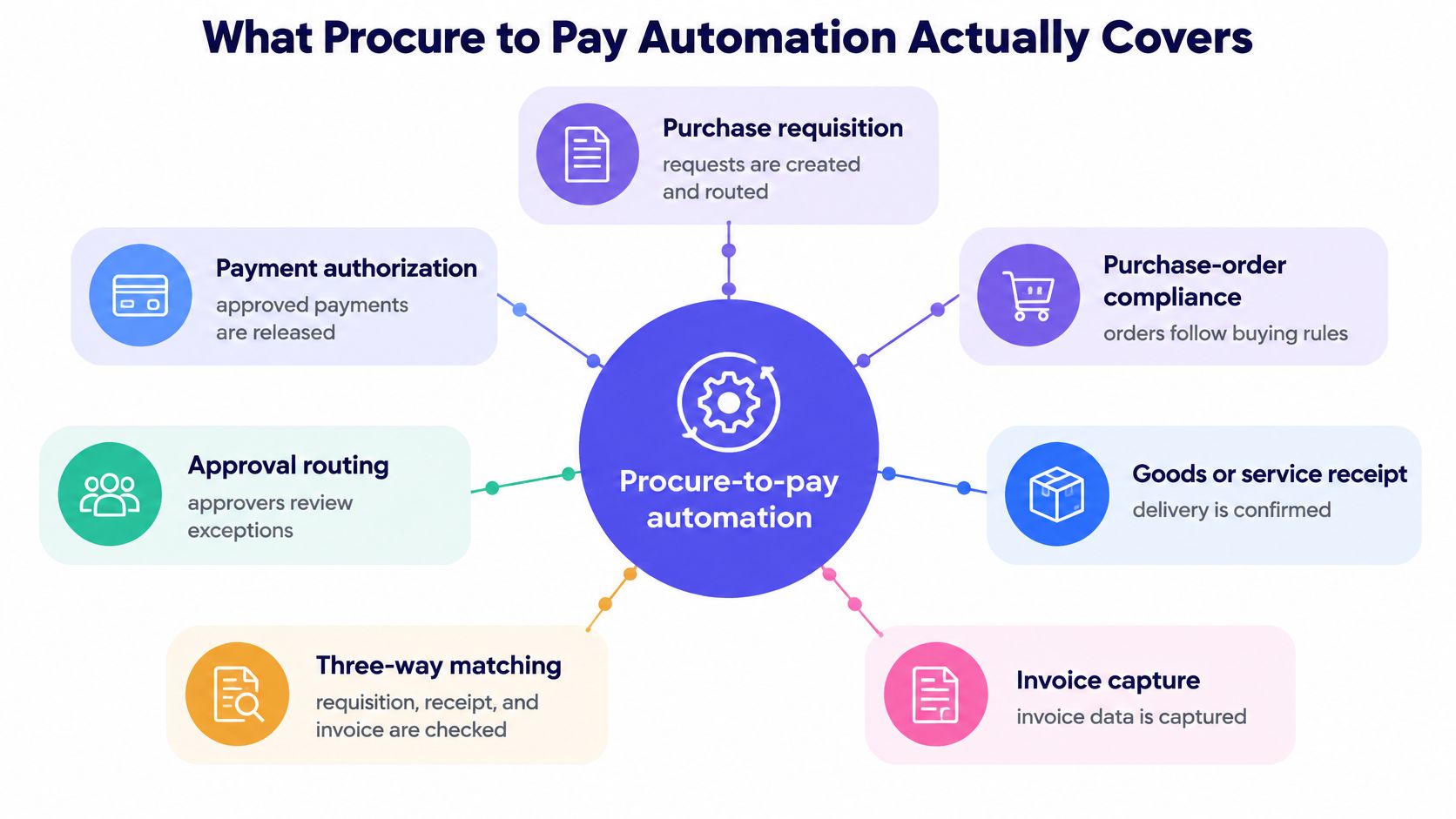
The operational test is whether each handoff preserves the transaction’s identity and control status. The invoice must reference the approved purchase order. The receipt must identify what arrived or which service was accepted. Payment authorization must use the resolved transaction, not a detached spreadsheet.
Control test: An extracted invoice isn’t an authorized liability merely because every field is readable.
For teams mapping broader system dependencies, AY Automate’s resource on finance process automation provides additional context beyond invoice intake. The practical boundary remains specific: procurement, receiving, AP, and treasury need an agreed workflow, not separate definitions of completed work.
A credible business case starts by measuring that connected process before changing it.
Benchmarks That Show the Business Case
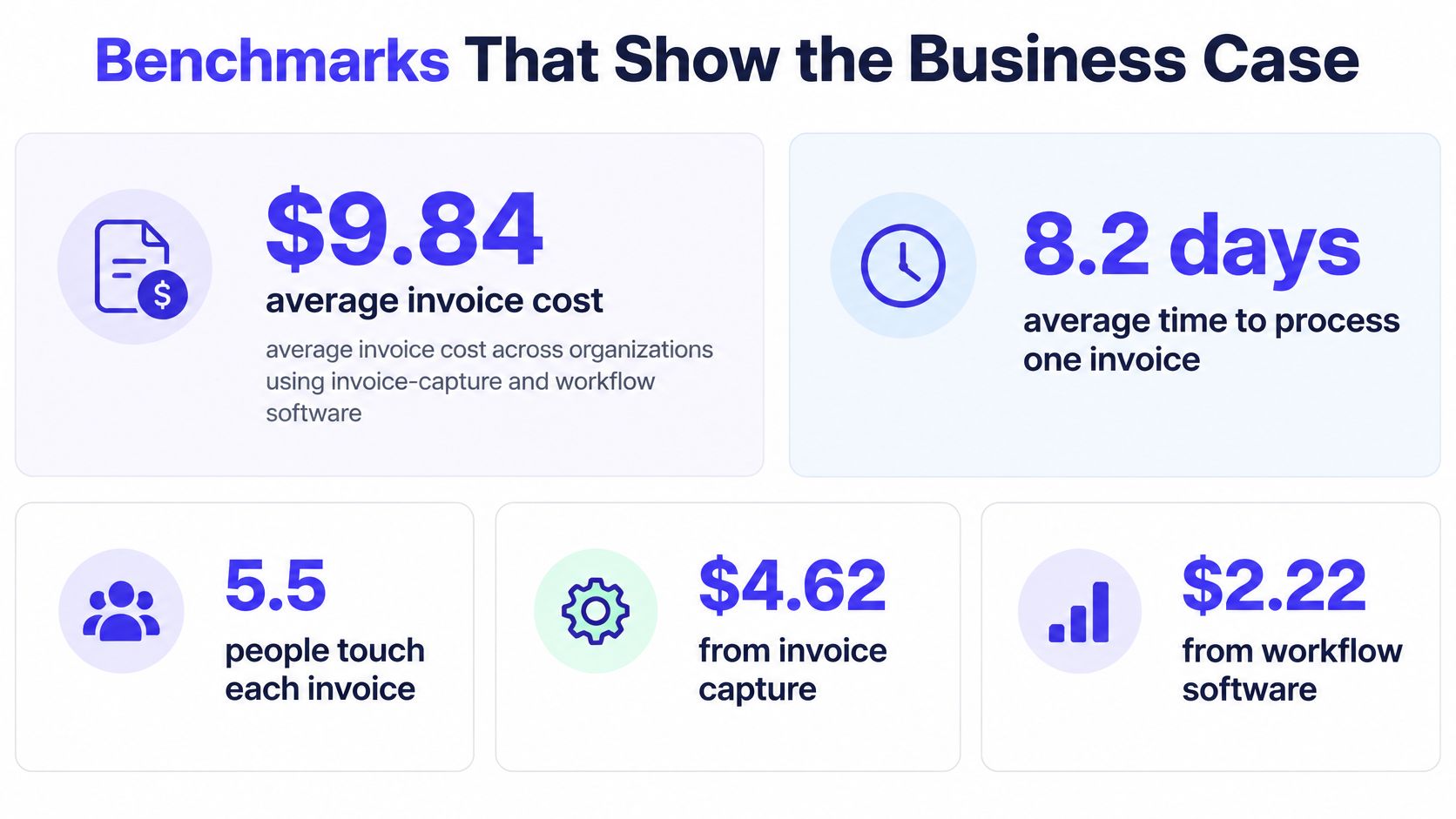
Procure to pay automation needs a measured baseline, not an assumed saving. AppZen’s invoice-processing benchmark discussion puts average performance among organizations using capture and workflow software at about $9.84 per invoice, 8.2 days, 32.6% straight-through processing, and an 18.4% exception rate. SAP Concur’s AP automation guide reports best-in-class comparisons of roughly $2.07–$2.78 per invoice, 3.1 days, 49.2% touchless processing, and a 9% exception rate.
Average versus best-in-class invoice performance
| Metric | Average with capture and workflow | Best in class |
|---|---|---|
| Cost per invoice | About $9.84 | $2.07–$2.78 |
| Cycle time | 8.2 days | About 3.1 days |
| Straight-through or touchless rate | 32.6% straight-through | About 49.2% touchless |
| Exception rate | About 18.4% | About 9% |
These are reference points, not a guaranteed improvement curve. Straight-through and touchless labels also require consistent definitions before a controller treats them as directly comparable.
The benchmark graphic summarizes the cost and cycle-time problem.
Turn the benchmarks into an operating scorecard
A useful automation scorecard separates PO-backed invoices from non-PO invoices. Non-PO transactions lack the same machine-verifiable purchasing record, so combining both populations obscures the work required to authorize them.
Before go-live, finance should record cost, cycle time, touchless processing, and exceptions for each path. Follow-up reviews should use the same definitions, population boundaries, and cost allocation method. Otherwise, an apparent improvement may reflect excluded invoices rather than a better process.
Instrument the working queue as well:
- Receipt-to-posting latency: Separate processing time from waiting time.
- First-pass match rate: Identify invoices that satisfy controls without correction.
- Exception reason: Distinguish supplier errors from internal data failures.
- Rework time: Count investigation, correction, and resubmission effort.
- Entity and supplier: Locate recurring problems that a consolidated average conceals.
Standardized purchase orders, clean vendor records, supplier e-invoicing, and deterministic matching create the conditions for unattended posting. Missing receipts, inconsistent terms, and bad supplier data create exceptions that software must not bypass.
Exception rate, not OCR speed, is the design metric. Faster extraction has limited value if AP still spends the afternoon finding a receiver.
A practical review of accounts payable automation benefits should therefore connect labor savings to fewer interventions and retained posting evidence. Controllers need the before-and-after record, including the invoices that stayed blocked.
The accompanying video offers another format for examining the automation workflow.
Where Automation Belongs in the Lifecycle
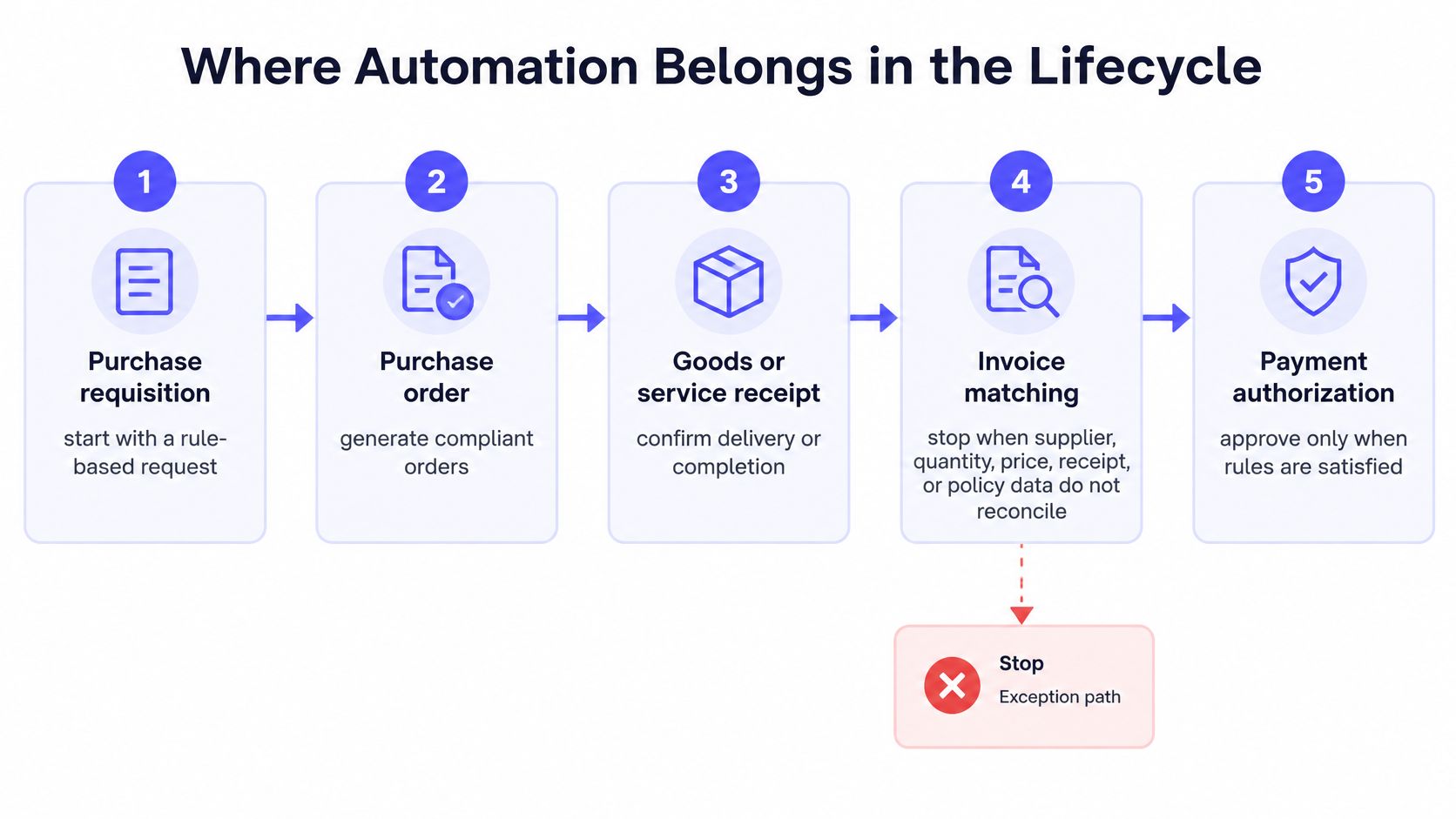
Procure to pay automation belongs at rule-based handoffs, with explicit stops when transaction data doesn’t reconcile. Supplier identity, quantity, price, receipt, and policy status should determine progression. A confidence score shouldn’t substitute for missing business evidence.
Build the stage map around control decisions
Requisition and purchase-order automation should validate the request before creating a commitment. Goods receipt, invoice intake, matching, and payment then need distinct controls, even when the same platform coordinates them.
Requisition and purchase order. Apply preferred-vendor, amount, coding, and purchasing-policy checks to an approved request. Preserve the purchase-order version used for matching, particularly when a buyer later changes the order.
Goods or service receipt. Record the receiver, accepted quantity, and receipt date. For services, require an accountable requester to confirm completion against the purchase terms. A partial delivery remains partial until receiving evidence changes.
Invoice capture. Prefer structured intake rather than asking OCR to reconstruct data already available electronically. The European Commission’s eInvoicing guidance defines an eInvoice as issued, transmitted, and received in a structured, machine-readable format permitting automatic processing; an image or scanned PDF alone doesn’t qualify, and EN 16931-1 defines the core semantic elements.
Three-way matching. Compare the purchase order, goods or service receipt, and supplier invoice. Evaluate line-level price and quantity against approved tolerances, rather than relying only on matching document totals.
Approval and payment. Route eligible invoices through the required authorization path. Hold duplicates, changed bank details, and over-threshold items until the designated control owner resolves them.
The lifecycle diagram shows where those controls belong.
What to automate at each procure-to-pay stage
| Stage | Automate | Hold for a human | Evidence to keep |
|---|---|---|---|
| Requisition and purchase order | Policy checks, preferred vendor, PO from an approved request | Non-catalog buys and policy exceptions | Requester, amount, vendor, PO version |
| Goods or service receipt | Receipt quantity, date, and receiver | Partial delivery and missing receipt | Quantity, date, receiver identity |
| Invoice capture | Structured eInvoice and high-confidence field parse | Image-only files and low-confidence fields | Source file, extracted fields, confidence |
| Three-way match | Price, quantity, and PO match inside tolerance | Variances outside tolerance | Rule result and source documents |
| Approval and payment | In-tolerance routing and payment instruction | Duplicates, bank changes, over-threshold items | Approver, timestamp, payment instruction |
For an ERP-specific implementation reference, SIX ERP explains how to manage invoice approvals in SIX ERP. The useful exercise is to mark which decisions the ERP already enforces and which require an external workflow.
The same boundary matters in invoice processing automation. Extraction supplies candidate fields. Validation establishes whether those fields can support an accounting action.
A match cannot invent a receipt. A payment workflow shouldn’t behave as though it can.
How to Implement Without Losing the Match
Procure to pay automation should begin with master data and intake rules, then matching, then volume. Automating a defective match faster only creates a larger correction queue. A controlled rollout proves both the successful path and the blocked path before expanding.
-
Repair the master data. Reconcile vendor identities, item references, tax treatment, payment terms, and bank records. Establish who can change each record and how changes become effective. Duplicate supplier records can defeat otherwise sound matching logic.
-
Separate PO and non-PO paths. Give PO-backed invoices a defined matching route. Give non-PO invoices explicit coding, business-purpose, and authorization requirements instead of pretending they passed a purchase-order control.
-
Classify intake on arrival. Distinguish structured eInvoices, portal submissions, email PDFs, and images. European Commission compliance guidance states that public contracting authorities must receive and process compliant eInvoices using the published syntax list; mere image files don’t qualify. For applicable transactions, validate the required data model and remediate or reject unsuitable files before posting.
-
Enable matching with hard stops. Use two-way matching where the approved control design permits it. Use three-way matching where receipt confirmation is required. Define tolerances by relevant transaction characteristics, not a single permissive setting.
-
Code failures before expanding automation. Assign a reason code, owner, escalation route, and resolution requirement to each failed control. Test corrected invoices and resubmissions, not just clean documents.
-
Gate payment release. Require retained match evidence and the necessary approval before producing an executable payment instruction. Confirm that a retry can’t create another posting or payment.
Treat supplier enablement as implementation work
Supplier enablement should match the supplier’s capabilities and transaction volume. A portal mandate alone won’t resolve every intake problem.
- High-volume suppliers: Prioritize structured e-invoicing, network connectivity, or portal integration. Validate line-item references during onboarding.
- Mid-tier suppliers: Offer controlled email intake with clear templates and required purchase-order references.
- Small suppliers: Provide a human-assisted route with visible handling effort. Assisted processing shouldn’t be reported as touchless.
Measure adoption, first-pass matching, and exception aging for each segment. Distinguish a supplier that submits unusable documents from an internal receiver who hasn’t recorded delivery.
An interpretation model can suggest a field mapping. It can’t settle a commercial disagreement between the invoice price and the purchase order. That decision belongs to the buyer under an authorized resolution path.
Exception Routing Your Auditors Can Follow
Procure-to-pay exception routing needs a named owner, a stop rule, and a retained resolution record. Otherwise, automation creates alerts while AP inherits the investigation. That is the burden controllers should challenge before approving another workflow tool.
In the Ardent Partners State of ePayables 2025 report, 48% of AP executives identified invoice exceptions as a major challenge. The practical response is a controlled taxonomy, not a larger shared inbox.
Exception classes, owners, and stop rules
| Exception | Typical cause | Owner | System action |
|---|---|---|---|
| Price variance | Invoice price differs from the PO | Buyer | Block and request approval |
| Quantity variance | Invoice quantity exceeds the receipt | Receiver | Block until the receipt is corrected |
| Missing or partial receipt | No receipt, or delivery is incomplete | Requester | Hold payment |
| Duplicate invoice | Same supplier and invoice number | AP | Reject the duplicate |
| Invalid supplier or bank change | Vendor inactive or bank details changed | Vendor-master owner | Block payment |
| Policy violation | Non-PO spend or amount over threshold | Controller | Require an approval gate |
Ownership should identify the person responsible for resolution, not everyone who might contribute. For a warehouse purchase, the designated receiver may replace the requester as the receipt owner. The workflow still needs one accountable assignee.
Make resolution inspectable
An auditable exception record must explain what failed and why the invoice later progressed. Store the evaluated rule, source documents, owner assignment, supporting correspondence, and authorized decision together.
Set a service-level target for each exception class. Start the clock when the failure occurs, and preserve reassignment history. Escalate first to the accountable owner, then to the controller at a predefined deadline.
- Unresolved failure: Keep payment blocked, even if the invoice approaches its due date.
- Authorized override: Capture the approver, timestamp, rationale, and supporting evidence.
- Corrected transaction: Re-run the relevant controls against the changed source records.
- Closed exception: Retain the resolution and resulting posting or payment reference.
A partial delivery requires corrected receiving evidence or an approved commercial resolution. A late receipt requires the receiver’s confirmation. Neither becomes valid because an extraction model expresses high confidence.
Audit requirement: Exception closure should explain the release decision, not merely show that someone clicked approve.
A reproducible audit trail process connects the original failure to its resolution and subsequent system write. An approval screenshot without the underlying rule result leaves the controller reconstructing the decision.
Why Deterministic Workflows Hold Up in Audit
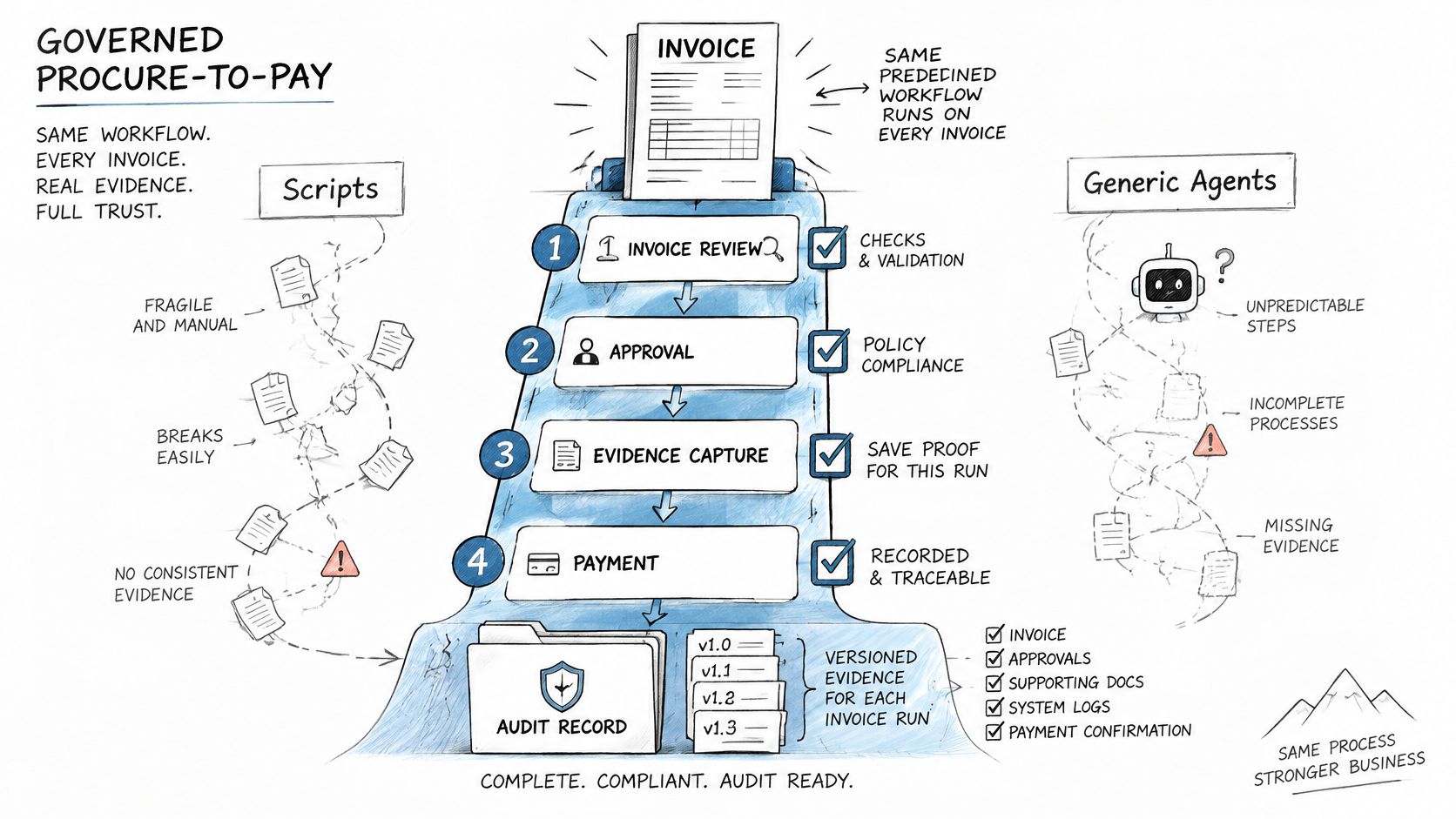
Deterministic procure-to-pay workflows make control execution inspectable by retaining the inputs, predefined rule version, decision, and resulting action. The evidence supports a controller’s explanation of why an invoice progressed or stopped.
In its 2023 survey of 500 purchase-to-pay managers, the IBM Institute for Business Value found that only 33% reported implementing, operating, or optimizing a procurement platform automating significant procurement activity; optimized AP platforms reported 33% fewer erroneous or duplicate payments than more manual processes.
Those findings support integrated automation, not the assumption that every automated action is controlled. Procurement, receiving, invoice, approval, and payment records still need to remain synchronized.
The comparison below separates governed execution from fragile automation approaches.
Separate interpretation from execution authority
Deterministic execution means the same recorded inputs and workflow version follow the same predefined decision path. It doesn’t mean upstream systems never change or that every transaction succeeds.
A spreadsheet macro can break when its dependencies change. A generic probabilistic agent, without versioned controls and retained evidence, doesn’t provide a sufficient accounting decision record.
Loopfour, the deterministic finance workflow automation platform, runs predefined, versioned workflows across existing finance systems. It is one finance workflow automation option for teams retaining their ERP and document stack, with exception routing and execution evidence attached to the run.
A loose script does the system write without a governed decision record. Loopfour does predefined execution with recorded inputs, outputs, approvals, and exceptions instead.
The control boundary should remain explicit:
- Interpretation: AI may parse a document subject to confidence thresholds and human fallback.
- Execution: Approved code applies matching rules, permissions, and posting requirements.
- Change control: Workflow revisions require version history, impact review, and appropriate approval.
- Operations: Run logs, latency, errors, and execution trees expose failures for investigation.
AI isn’t the ledger. A model’s proposed value must pass the same validation and authorization requirements as any other input.
Controllers should also test interrupted runs. A timeout after an ERP write must trigger status verification, not an unconditional retry. Retained request identifiers and posting references help distinguish an incomplete response from an incomplete transaction.
Auditors want the workflow to hold up in year three, not on demo day. That requires maintained integrations and governed changes as well as a successful initial deployment.
Questions to Settle Before You Automate
Procure to pay automation should have an agreed scope, control model, and exception owner before deployment. These questions turn an automation proposal into a reviewable operating decision.
What is procure to pay automation?
Procure to pay automation connects purchasing and payment through a predefined workflow with retained execution evidence. The scope includes requisition, purchase order, receipt, invoice, matching, authorization, and payment.
Is procure to pay automation the same as AP automation?
Procure to pay automation includes upstream purchasing controls that an AP-only deployment may leave outside its scope. AP automation can cover invoice handling effectively without establishing purchase-order compliance or receipt ownership.
What is three-way matching?
Three-way matching compares the purchase order, goods or service receipt, and supplier invoice. A controlled match evaluates relevant prices and quantities against approved tolerances and stops transactions that require resolution.
What should an invoice cost to process?
Invoice-processing cost should be measured against the organization’s own transaction mix and control requirements. Finance should include investigation and rework, then compare PO-backed and non-PO paths separately rather than assigning both the same expected cost.
Who should own invoice exceptions?
Each invoice exception class needs an accountable business owner with authority to resolve its cause. AP can coordinate the queue, but procurement must resolve commercial variances and receiving must confirm delivery facts.
Does AI belong in procure to pay automation?
AI belongs in bounded interpretation tasks, such as extracting candidate invoice fields with confidence-based review. Deterministic validation and authorized workflow steps should govern accounting writes and payment release.
Before deployment, finance should record baseline cost, cycle time, first-pass match, and exception rate. Separate PO and non-PO invoices, assign an owner to every open exception class, and require evidence of the release decision.
Loopfour offers predefined finance workflows across existing ERP, document, and payment systems, with exception routing and retained execution evidence. Visit Loopfour to discuss a procure-to-pay implementation grounded in a measured baseline, named exception owners, and auditable payment controls.