
Enterprise Resource Planning integration connects an ERP with the CRM, billing, payment, document, and approval systems around it, so one business event updates every system that needs it, under predefined controls. The popular advice says to pick a connector and turn on the sync. That advice is backwards. Connectivity is easy to demonstrate. Correct, auditable posting is harder to prove.
By Daniel Reyes, senior finance systems practitioner focused on ERP controls and close automation.
Table of Contents
- What Enterprise Resource Planning Integration Connects
- Direct Connectors, Middleware or Browser Automation Compared
- Mapping Master Data Before Any Workflow Goes Live
- Controls and Permissions That Survive Connected Systems
- Measuring Integration Value After Go-Live
- A Month-End Close Example From Start to Evidence
- Frequently Asked Questions About ERP Integration
- Is an API Required for Enterprise Resource Planning Integration
- How Long Does ERP Integration Take
- Do Auditors Accept Automated ERP Integrations
- Which Integration Method Is Safest for Finance
- How Is Integration Success Measured After Go-Live
- Does Browser Automation on a Supplier Portal Break Vendor Terms or Security Policy
- Confirm Your Integration Plan Before the Next Release
What Enterprise Resource Planning Integration Connects
An ERP can hold the official records and still leave key workflows disconnected. Integration connects it to the finance and operational systems around it, so data, approvals, and evidence move between the tools that need them. An ERP typically covers accounting, procurement, inventory, production, sales, human resources, and reporting. The work around those functions often happens elsewhere.
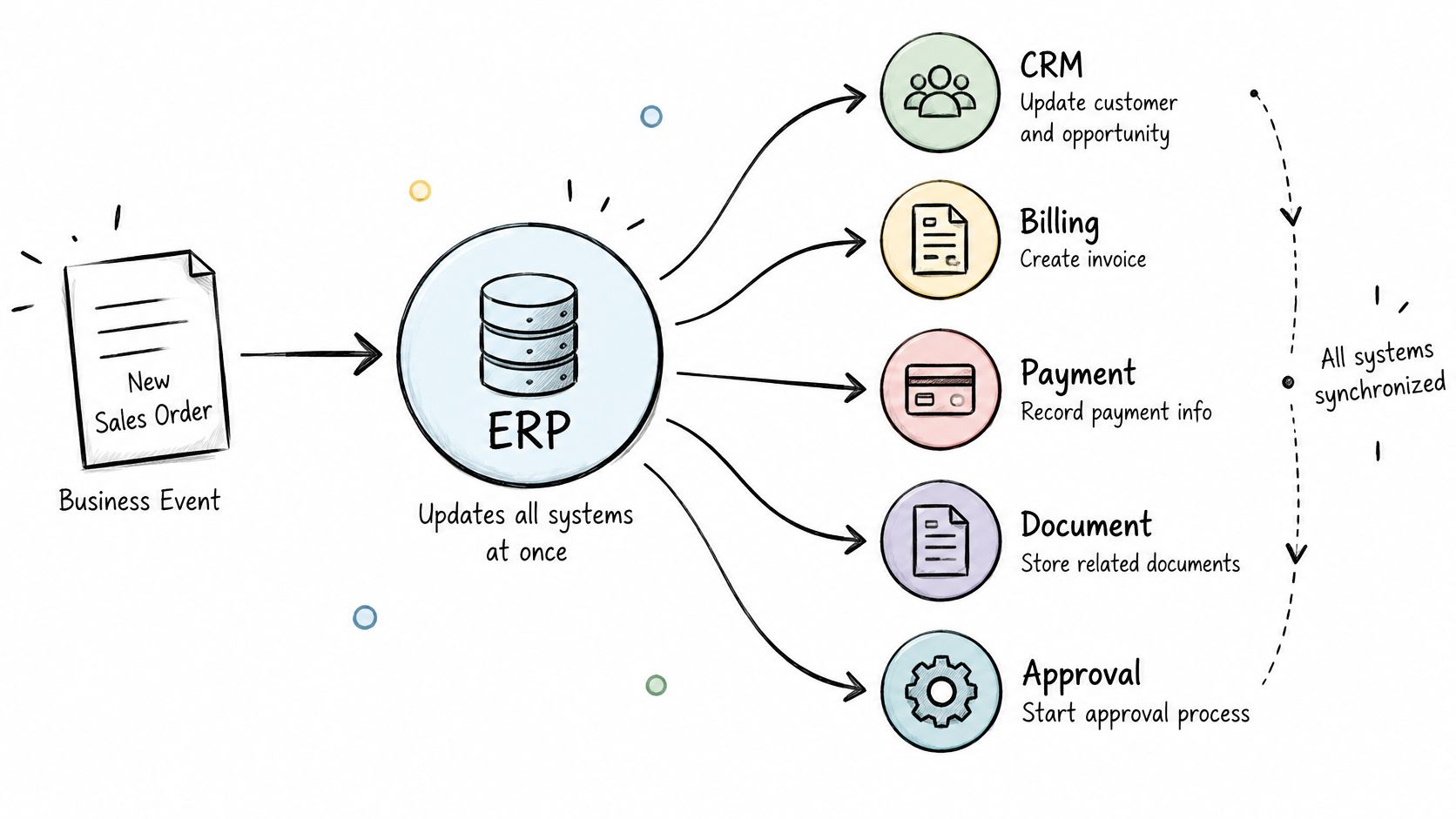
Integration determines which system receives data, how fields are shaped, when updates run, and what gets recorded. Those decisions affect more than whether a sync completes. A mapping error can send a valid transaction to the wrong account; weak exception handling can leave a failed update unnoticed.
Owning an ERP Is Not the Same as Integration
ERP adoption is widespread, but not universal. Owning an ERP does not mean workflows are connected: finance teams may still re-key invoices or route approvals by email.
Teams seeking to reduce manual spreadsheet consolidation may find that spreadsheets are compensating for missing system connections. They can become an unofficial integration layer, with formulas and versions that are difficult to control or test.
A sync can show as healthy while posting duplicate or invalid entries. The useful test is whether teams can trace an event from its source through approval and posting, identify exceptions, and retain evidence of how they were resolved. Treat ERP integration as an operating-control problem: define the data movement, process handoffs, exception ownership, and records needed to show that the workflow produced the right result.
Direct Connectors, Middleware or Browser Automation Compared
No integration method is universally safest for an ERP. The right method depends on API availability, the control model you need, how often upstream systems change, and your evidence requirements. The table below compares five common methods on those criteria.
| Method | Best when | Control strength | Maintenance burden | Typical failure point |
|---|---|---|---|---|
| Native connector | Both systems expose supported APIs and the vendor pair has a listed connector | Strong, vendor-maintained authentication and field mapping | Low to moderate, vendor updates | Limited to mapped fields and objects |
| Middleware or iPaaS | Many systems need shared transformation logic | Moderate to strong, based on configuration and run logs | Moderate, flows and connectors to maintain | Logic buried in flows that few people understand |
| Secure browser automation | Legacy or homegrown system without an API | Moderate, needs controlled sessions, permissions and logs | High, interface changes break steps | Screen changes and expired sessions |
| Staged file transfer (CSV or SFTP) | Batch loads at low frequency with no real-time need | Moderate, based on file checks and reconciliation | Low to moderate | Late, partial or truncated files that pass silently |
| Custom point-to-point scripts | One system pair that no one else maintains | Weak unless logged and version-controlled | High, key-person risk | Undocumented changes and retries that create duplicates |
Native Connectors and Middleware
Native connectors work best when both vendors support the pair. NetSuite, Sage Intacct, QuickBooks, Salesforce, and HubSpot commonly fall into this category. Authentication and basic mapping arrive maintained. The limit appears quickly, though. Fields outside the connector’s mapped objects stay manual.
Understanding the different types of APIs helps your team judge whether a connector can support the write pattern you need. Read access is common. Controlled, reversible writes are less common.
Middleware or iPaaS fits many-system environments that share transformation logic. One mapping can serve several flows. The risk is opacity. Logic buried inside visual flows becomes hard to review, test, and hand over. A flow diagram is not evidence. Run logs, version history, and correlation IDs still need deliberate configuration.
Browser Automation, Files and Scripts
A system without an API is not automatically unautomatable. Secure browser automation covers homegrown and legacy tools through controlled sessions. Permissions, named identities, and session logs make that work governable. The trade-off is fragility. A vendor screen redesign can break steps overnight.
Staged files suit batch loads with no real-time need. File checks, row counts, and control totals catch most problems. Silent truncation is the classic failure, because a short file still loads successfully. Custom scripts look cheap at first. They carry key-person risk, and undocumented retries create duplicate postings.
Practical rule: Choose the method by control requirements first and convenience second.
Loopfour, the deterministic finance workflow automation platform, runs native connectors, browser automation, and approval routing inside one governed engine. That is one option among several. Whatever method your team picks, automation without governance magnifies bad data faster. Speed applied to incorrect records is still incorrect.
Mapping Master Data Before Any Workflow Goes Live
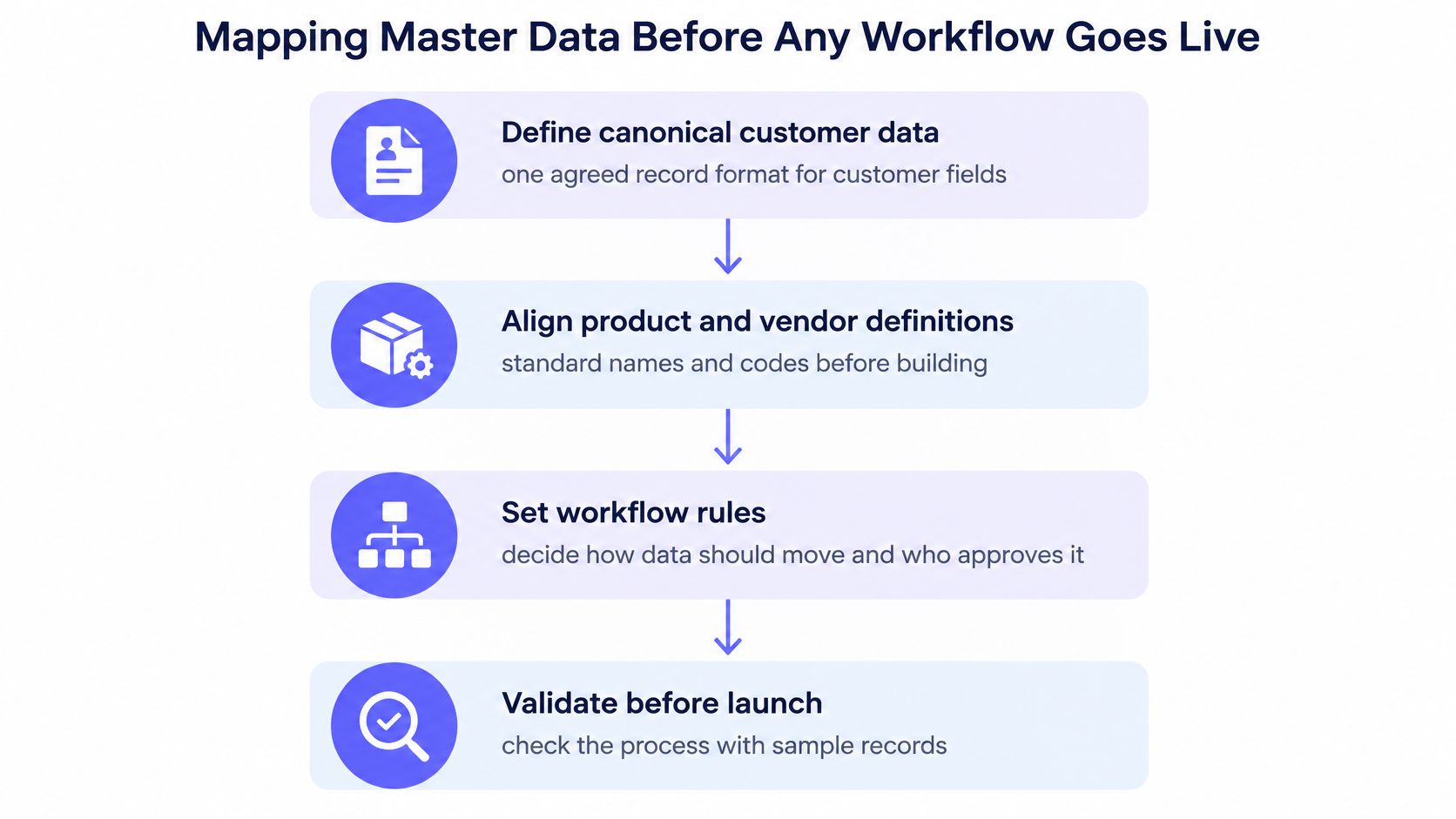
An integration can pass every connectivity test and still post the wrong numbers. Map the business entities and agree their owners and rules before building workflow calls. Poor data quality, weak process alignment, inadequate training, insufficient change management, and unclear requirements are recurring ERP implementation failure factors, according to a review of ERP research in Issues in Information Systems.
| Entity | Canonical owner | Validation rule | What breaks if undefined |
|---|---|---|---|
| Customer | Sales operations or RevOps | Unique ID across CRM and billing with a duplicate match rule | Duplicate invoices and split credit |
| Supplier | Accounts payable | Tax ID and bank details checked before first payment | Duplicate vendors and payment fraud exposure |
| Legal entity | Controller | Entity code mapped to the ERP subsidiary with effective dates | Postings land in the wrong ledger |
| Chart-of-accounts segment | Controller or GL lead | Only active segments accepted, mapping version recorded | Invalid dimensions and broken reporting |
| Tax code | Tax team | Rate and jurisdiction validated against the transaction date | Misstated tax on invoices |
| Currency | Treasury | ISO code and rate source stored with a timestamp | Revaluation and FX variance errors |
| Transaction status | Finance operations | Allowed state transitions defined and enforced | Duplicate postings after retries |
The Six-Step Mapping Sequence
Give every mapping an owner, validation rules, effective dates, and an exception queue. Then work through the sequence:
- Define entities: Agree on definitions for customer, supplier, legal entity, chart-of-accounts segment, tax code, currency, and transaction status.
- Assign owners: Name the team accountable for each definition and any changes.
- Map fields: Record the source field, target field, transformation, and mapping version.
- Set validation rules: Reject invalid values before writing to the ERP.
- Route exceptions: Send failures to a queue with a named owner and an aging limit.
- Test with reconciliation: Compare record counts, monetary totals, tax treatments, and status transitions.
Consider a supplier record without a tax ID match rule. The ERP may create a second vendor, splitting payments across two records and leaving bank-detail checks attached to the wrong one. The sync can report success while the records and controls are wrong.
Idempotency keys help prevent duplicate writes on retry. Give each write a unique key so a retried request returns the original result instead of creating another invoice, journal entry, payment, or revenue event. Replayable event handling also lets the team rerun work safely after an outage. HTTP success rates alone do not show whether financial records are correct.
Controls and Permissions That Survive Connected Systems
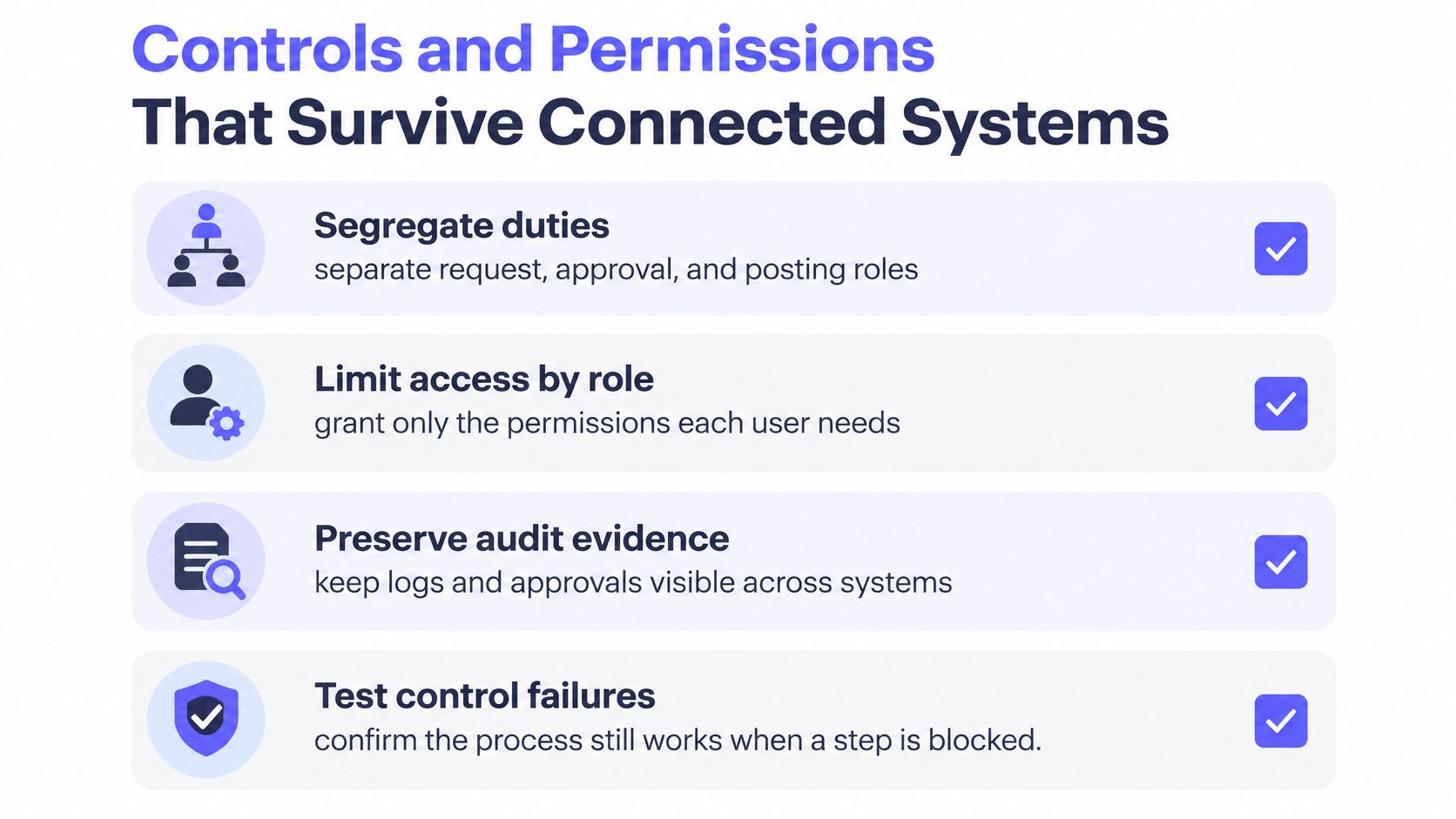
ERP controls survive connected systems only when permissions, approvals, and logs are designed across every system in the flow. An ERP doesn’t design segregation of duties for your team. The ERP reproduces the control environment your team already has, good or bad.
Your auditors want the integration to hold up under control testing, not just to run. That means predefined logging, not spreadsheet evidence assembled afterward. NIST Special Publication 800-53 requires organizations to identify which system events are capable of being logged and coordinate event selection with entities that need audit information. NIST lists examples such as password changes, failed logons or access attempts, security-attribute changes, administrative-privilege use, and data actions.
Controls to Build Before Release
Four controls carry most of the audit weight in enterprise resource planning integration.
- Permissions per system: Grant each identity only the access its step requires, in every connected tool.
- Approval gates before writes: Hold postings until a named approver with the right role releases them.
- Change history: Version every mapping and workflow definition, with approver and effective date.
- Exception ownership: Assign each exception type to a named owner with an aging limit.
A documented audit trail process ties those controls into one reviewable record. Without that record, control testing becomes reconstruction. Reconstruction from email threads rarely ends well.
| Evidence field | What the auditor sees |
|---|---|
| Actor | Named user or service identity that performed the write |
| Timestamp | UTC time of the write and of any approval |
| Transformation version | Mapping or workflow version that ran |
| Approval | Approver, role and approval record ID |
| Correlation ID | Immutable ID linking source record, payload and ERP posting |
| Result | Posted, rejected or retried, with the ERP document reference |
Deterministic Execution and the Limits of AI
Deterministic, programmatic workflows make evidence predictable. The same input and version produce the same steps, in the same order. Auditors can re-perform the logic. Nobody has to guess why a step ran.
Generic automation tools record that something happened. A governed workflow records who or what acted, when, which transformation version ran, which approval applied, the correlation ID, and the result. AI belongs in interpretation tasks only, such as document parsing. Confidence thresholds and human fallback keep low-confidence reads out of your ledger. Interpretation is advisory. Posting is not.
Measuring Integration Value After Go-Live
A passing interface test proves that systems can exchange data. It does not prove the right data reached the ledger, that exceptions were resolved, or that the connection is worth operating. Measure value against a baseline, with named owners and review triggers.
Many integration projects finish late or deliver fewer benefits than expected. Set measures for your own workflow rather than relying on broad project averages.
| Metric | What it measures | Review trigger |
|---|---|---|
| Straight-through processing rate | Share of records posted with no manual touch | Drop below the agreed baseline |
| Exception rate by root cause | Exceptions grouped by source system and reason | Any new root cause or sustained rise |
| Reconciliation breaks | Source, payload and ERP totals that disagree | Any break unexplained at close |
| Duplicate rate | Records or postings created more than once | Any duplicate reaching the ledger |
| Processing latency | Time from source event to ERP posting | Latency beyond the agreed window |
| Retry rate | Writes that needed a retry to succeed | Rise after a system or configuration change |
| Exception aging | Days an exception waits for an owner | Items older than the agreed limit |
| Evidence completeness | Writes with full execution evidence | Any write without evidence |
| Cost per transaction | Total run cost divided by transactions processed | Rise without matching volume growth |
Setting Control Gates and Review Triggers
Set control gates before deployment. Define thresholds for mapping coverage, automated validation, duplicate rates, reconciliation variance, latency, retries, exception aging, and evidence completeness. Assign an owner to each threshold and specify what action follows when it is breached.
Release approval should depend on parallel-run results across representative entities, currencies, tax regimes, and fiscal periods. A clean result for one entity is not enough. Reconcile source records, integration payloads, and ERP postings, then use correlation IDs to trace results to the originating transaction and transformation version.
Record a baseline before integration starts. Review the measures after ERP configuration, policy, or upstream system changes. Compare processing improvements with operating cost and unresolved exceptions. More connections do not automatically create more value. Poorly controlled integrations can move incorrect data faster and make it harder to explain how it reached the ledger.
A Month-End Close Example From Start to Evidence
A controlled month-end close integration moves each invoice from document to ERP posting with one evidence trail. The following composite example is illustrative, not a named client. A mid-market controller runs accounts payable across an ERP, a document system, and a supplier portal with no API.
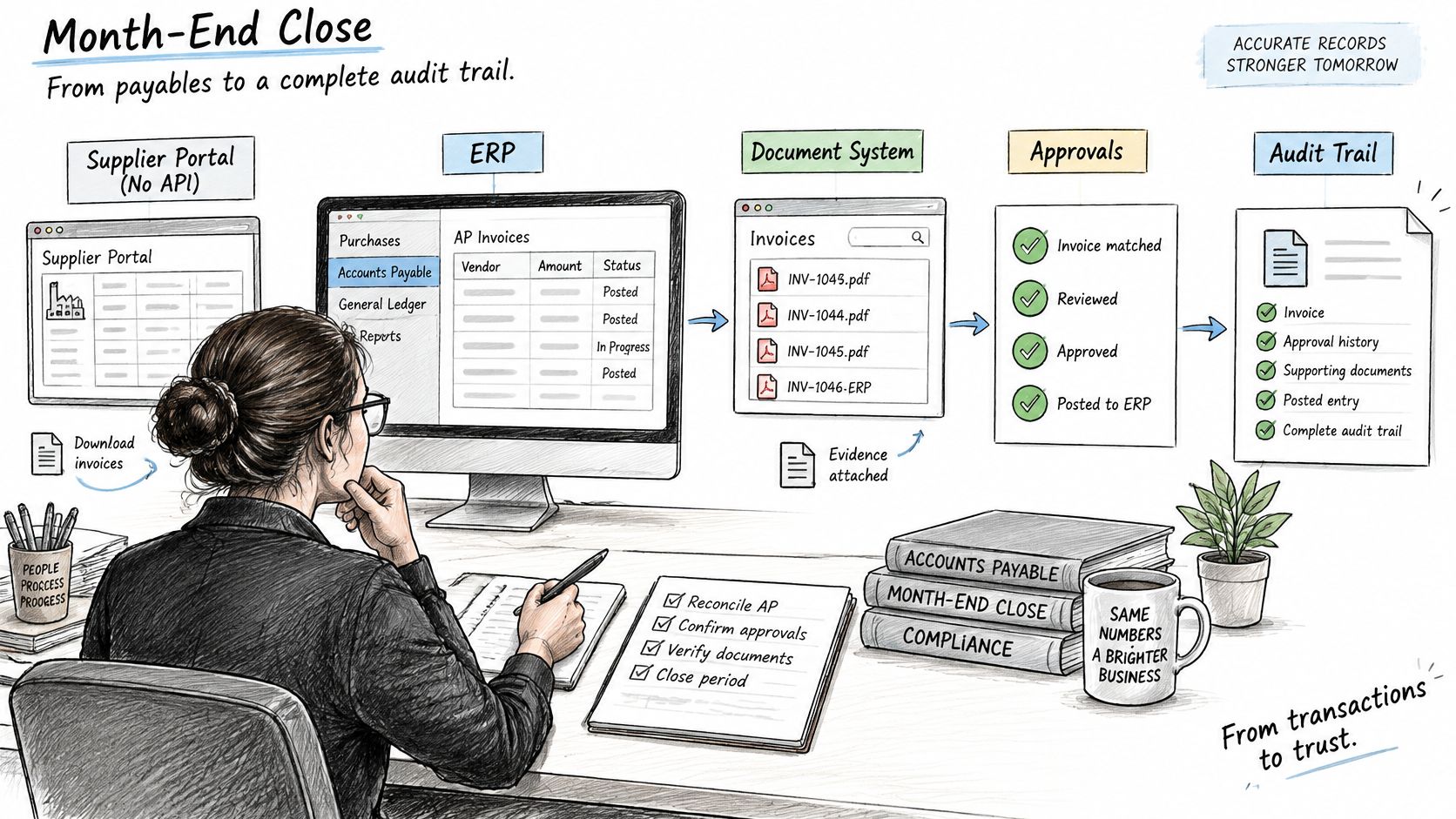
Invoices arrive in a shared document folder. Document parsing extracts supplier, amount, tax, and due date against a confidence threshold. Low-confidence items route to a human reviewer in Slack. The reviewer corrects or rejects the record before anything posts.
Approved invoices post to the ERP through a browser automation session on the supplier portal and ERP screens. Permissions are set per role. The session identity can create bills but can’t approve payments. That separation mirrors the manual control your auditors already test.
The Failure Case and the Evidence
A network timeout during posting triggers an automatic retry. The idempotency key stops that retry from creating a second payment record. The ERP returns the original posting reference instead. Finance sees one bill, one approval, and one retry event in the log.
The walkthrough below shows how an execution record connects source document, approval, and posting result.
At close, the controller reconciles invoice totals against ERP postings inside the month-end close process. Each invoice carries an execution tree, approval record, transformation version, and posting result. During the audit walkthrough, the controller opens one trail per invoice. There’s no reconstruction from email threads.
Later, the supplier portal updates its screens. One browser step fails and routes to the exception queue. Version history and change control limit the damage to that single workflow. Other integrations keep running on their pinned versions. The fix ships as a reviewed new version, not a quiet edit.
Frequently Asked Questions About ERP Integration
Is an API Required for Enterprise Resource Planning Integration
An API is often the preferred connection method, but it is not the only option. Native connectors suit supported pairs such as NetSuite and Salesforce. Controlled browser automation can connect legacy systems without APIs, while staged files suit low-frequency batch loads. The right method must support permissions, logs, validation, and exception routing.
How Long Does ERP Integration Take
ERP integration timelines depend on scope. Broad launches often take longer than planned, so start with one workflow, such as accounts payable between a document system and NetSuite or Sage Intacct. Confirm that its mapping, controls, and reconciliation work before expanding. A narrow launch limits the number of failure points finance must investigate.
Do Auditors Accept Automated ERP Integrations
Automated integration is easier to audit when each write retains its actor, timestamp, transformation version, approval, correlation ID, and result. Permissions across systems must preserve the intended segregation of duties. Deterministic steps also make it possible to re-perform the logic against retained evidence.
Which Integration Method Is Safest for Finance
No method is safest in every finance workflow. Native connectors provide vendor-maintained authentication for supported APIs. Middleware centralizes shared logic, but that logic can be harder to inspect. Browser automation reaches systems without APIs, though screen changes can break it. Choose based on the control model, API availability, change frequency, and evidence requirements.
How Is Integration Success Measured After Go-Live
Set a baseline before launch, then track straight-through processing, exceptions by root cause, reconciliation breaks, duplicates, retries, exception aging, and evidence completeness. Assign an owner to each measure and define what change requires investigation. Review results after ERP configuration, policy, or upstream system changes. A successful connection that posts incorrect amounts is still a control failure.
Does Browser Automation on a Supplier Portal Break Vendor Terms or Security Policy
Check the portal’s terms and your security policy before running browser automation. Use named permissions, logged sessions, and a documented owner. Confirm the design with auditors before release. If the terms prohibit automated access, use staged files or a vendor-supported connection instead.
Confirm Your Integration Plan Before the Next Release
Your integration plan is ready when entities, methods, control gates, and evidence are confirmed before release. Use this sequence.
- Confirm canonical entities and owners for every workflow that crosses systems.
- Choose the integration method per workflow using API availability, control model, change frequency, and evidence requirements.
- Define control gates and baseline metrics before go-live, with thresholds and named owners.
- Run in parallel across representative entities, currencies, tax regimes, and fiscal periods, then review reconciliation variance.
- Verify the evidence record for each write against the required fields.
- Schedule the post-go-live review against metric triggers, not calendar habit.
Start with a single workflow. Prove the controls hold under retries, exceptions, and screen changes. Then expand to the next workflow. Integration earns trust one auditable posting at a time.
If your workflows already span ERP, CRM, billing, and document systems, one of them can be implemented as versioned, auditable code with evidence kept for every action. Visit Loopfour to discuss starting with a single workflow, proving the controls, and expanding from evidence rather than promises.