
A connected integration can still leave finance with an unreconciled ledger. A HubSpot NetSuite integration synchronizes commercial and financial records between the CRM and ERP, but synchronization status alone doesn’t establish accounting validity. The control question isn’t whether a record moved. It’s whether the right record moved, under an approved rule, with evidence that survives close.
Table of Contents
- What a HubSpot NetSuite Integration Actually Syncs
- Native Connectors Versus iPaaS and Custom Automation
- How to Map Accounts Contacts Deals and Orders
- How to Implement the Integration Without Breaking the Ledger
- How to Reconcile Errors and Throttle API Limits
- Choose a Governed Rollout and Start in Sandbox
- Questions Finance Teams Ask Before Go-Live
What a HubSpot NetSuite Integration Actually Syncs
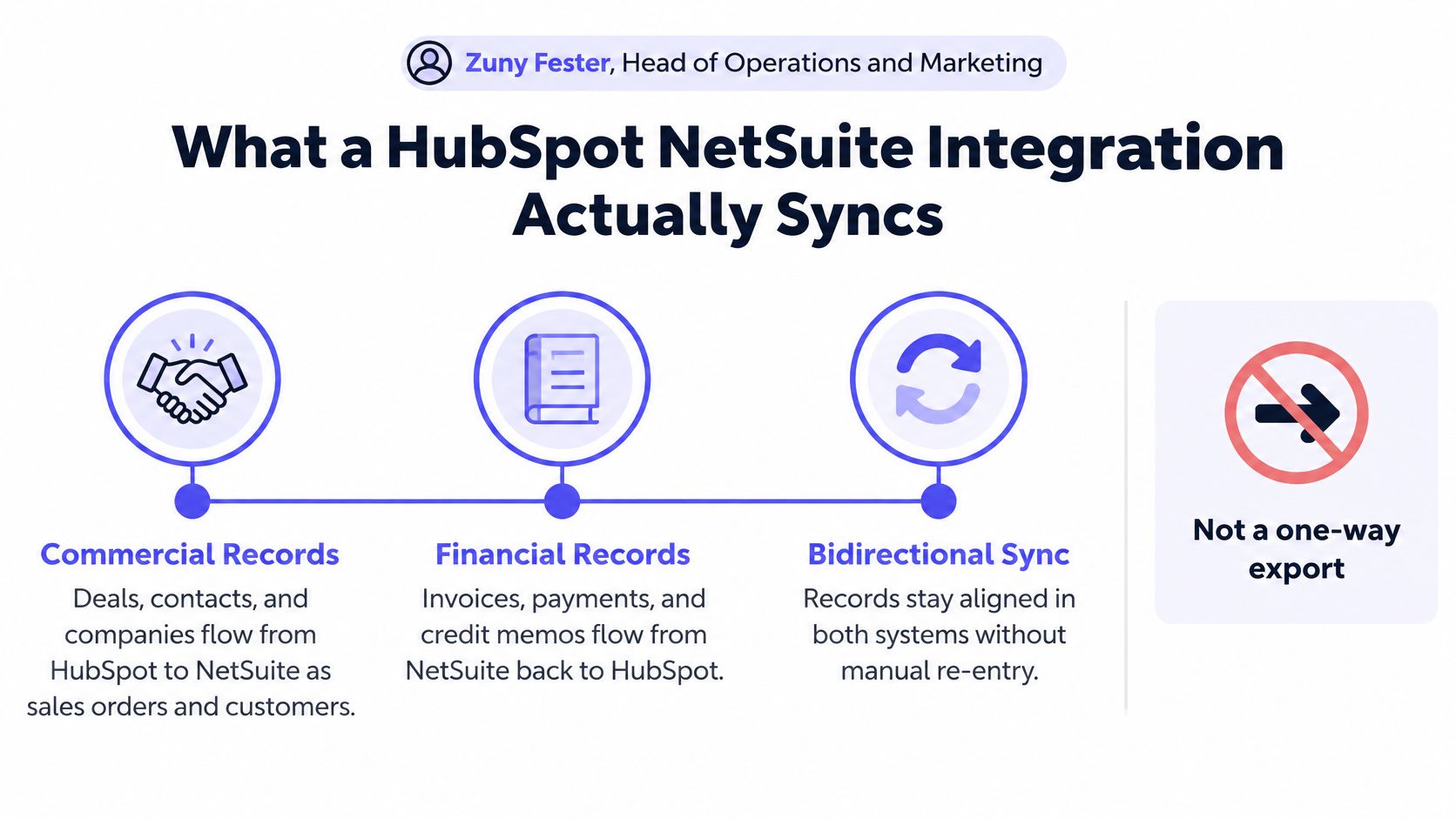
A HubSpot NetSuite integration is bidirectional record movement with rules, not a one-time contact export. HubSpot holds sales activity and customer context. NetSuite holds the financial transactions and accounting classifications that you have to own before anything posts.
That split shows up the moment a deal becomes an order. A company name can match in both systems while the subsidiary, currency, or billing relationship does not. Copying the fields you can see will not fix the mismatch. Field ownership has to say which system is allowed to write each value, the way a receiving dock checks the purchase order before it stamps a pallet received.
From record synchronization to transaction initiation
HubSpot’s integration grew past basic record movement. The documented milestones add useful visibility. Each one still needs an operating control before you treat the handoff as finished.
- Native synchronization: By April 21, 2021, HubSpot’s native NetSuite integration documentation described synchronization for contacts, companies, deals, invoices, and sales orders, covering existing and newly created records.
- Embedded context and sync visibility: HubSpot’s integration knowledge base documents embedded CRM activity in NetSuite layouts by March 2, 2023, a record-level sync card by May 5, 2023, and deal-driven sales-order creation on January 30, 2024.
The embedded view can show timeline activity, workflow enrollment, record properties, and a route back to HubSpot. The sync card names the matching NetSuite record, whether synchronization is active, its status, and its last update. That card is an inspectable execution record of what the connector last did. It is not a sign-off that the accounting fields were right.
Sales-order creation is a different job. A user can start a NetSuite sales order from a HubSpot deal, or a deal-based workflow can start it automatically. HubSpot also creates an associated order record. Pre-write validation is the gate before that write: subsidiary, currency, tax code, and posting period have to pass your rule, or the order should stop for a person.
The diagram shows the commercial and financial relationship. Its broader transaction categories are not a promise that every connector supports every object.
Visibility isn’t financial validation
A green sync status confirms an integration condition. It does not prove that the subsidiary, currency, tax code, or posting period fit the transaction.
Take a HubSpot deal tied to a customer that sells through several legal entities. The connector can create an order against a valid customer ID and still pick the wrong subsidiary or currency. You still have to confirm that the selected subsidiary can transact with that customer in the currency you intend. The connector did its job. Your ledger may not agree.
Control boundary: Record visibility helps operators investigate. Pre-write validation decides whether a financial action should happen.
A controlled ERP-CRM integration needs field ownership, a check before the write, and a record of what ran. Object coverage alone leaves sales with a completed handoff and accounting with an order that still has to be corrected.
Native Connectors Versus iPaaS and Custom Automation
A HubSpot NetSuite connection should be selected by what finance must prove at close, not by installation speed. The right option must support the required mappings, transaction volume, exception handling, and evidence.
HubSpot to NetSuite connection options
| Option | Best fit | Price reference | Control gap |
|---|---|---|---|
| Native HubSpot connector | Standard contacts, companies, deals, invoices, sales orders | Included with HubSpot | Reported sync-log and custom-field, dropdown, and line-item mapping limitations |
| Marketplace standard plan | Partner-run sync | $250 per month advertised in the HubSpot Marketplace listing | Not a universal price; taxes, incentives, and other adjustments excluded |
| Integration Fox Enterprise | Heavier NetSuite connector | $499 per month plus $3,000 setup, a 2025 Integration Fox listing reference | Confirm implementation scope and customization terms |
| Integrate starter | Bounded record synchronization | $2,400 per year for up to 5,000 record synchronizations per month, a 2025 Integrate listing reference | Volume cap; confirm current terms |
| iPaaS or custom scripts plus API capacity | High-volume processing or unusual mappings | Capacity-pack pricing shown below; implementation is separate | Drift, last-write-wins behavior, and thin audit evidence unless explicitly controlled |
| Deterministic finance workflow | Audited, multi-entity writes into NetSuite | Implementation on the existing stack; ERP stays | Requires predefined rules, approval gates, and exception owners |
Price the operating scope, not just the connector
Native synchronization suits straightforward record visibility. However, HubSpot Marketplace feedback identifies limitations involving custom fields, dropdown lists, detailed line-item mapping, and sync-log visibility. Those are evaluation questions, not grounds to assume every configuration will fail.
Marketplace connectors provide another bounded option. Finance should confirm current prices, supported objects, synchronization allowances, and support responsibilities before purchase. A subscription fee doesn’t establish who repairs a rejected tax mapping during close.
Custom integrations and iPaaS offer more engineering flexibility. They also require explicit decisions about versioning, retries, ownership, and reconciliation. Rite NRG’s discussion of common system integration pitfalls provides useful context for assessing those responsibilities beyond the connection itself.
Size API traffic around the complete event
HubSpot’s technical-limits catalog lists $500 per month per API capacity pack, adding 1 million daily calls and a 250-requests-per-10-seconds rate before account-specific tier adjustments; its base daily limits are 250,000 for Free and Starter, 650,000 for Professional, and 1,000,000 for Enterprise.
A deal-to-order event can require a customer lookup, item lookups, validation reads, transaction creation, and a confirmation read. Capacity planning must count that complete path, including retries and reconciliation. Comparing API integration platforms only by connector count misses the workload.
Two-way field copy can reproduce duplicate customers. Loopfour, the deterministic finance workflow automation platform, runs predefined, versioned steps and writes results back while the ledger stays in NetSuite instead.
The practical selection rule is narrow. Native fits light CRM hygiene. Marketplace fits bounded partner-managed synchronization. Custom engineering fits unusual or high-volume requirements. Governed workflows fit financial writes whose authorization and execution must be auditable.
How to Map Accounts Contacts Deals and Orders
A HubSpot NetSuite integration needs a named system of record for each object and financially meaningful field before bidirectional updates begin. Ownership must specify who can create, amend, approve, and retire a value.
The following ownership model is a starting design, not a universal connector default. Finance and RevOps should approve the exceptions explicitly.
Object ownership for HubSpot and NetSuite
| Object | System of record | Sync direction | Key to store |
|---|---|---|---|
| Company or customer | Split ownership: HubSpot for prospects, NetSuite once financial | One-way until matching rules pass | HubSpot record ID and NetSuite internal ID |
| Contact | Named owner, usually HubSpot until the customer exists | One-way, then controlled updates | Both external IDs |
| Deal or opportunity | HubSpot | HubSpot to NetSuite | HubSpot deal ID on the NetSuite transaction |
| Product or item | NetSuite | NetSuite to HubSpot | NetSuite item internal ID |
| Sales order | NetSuite after creation from the deal | HubSpot initiates; NetSuite owns the transaction | Both order identifiers |
| Invoice, payment, credit | NetSuite | NetSuite to HubSpot for status only | NetSuite transaction internal ID |
| Subsidiary, currency, tax, class, location, period | NetSuite | Reference only, never invented in HubSpot | NetSuite list internal IDs |
Match immutable identifiers before descriptive fields
HubSpot record IDs and NetSuite internal IDs should be stored in their counterpart systems. Names and email addresses can help investigate a match, but they shouldn’t replace durable cross-system identifiers.
A company rename must not create another customer. Likewise, a retried order event must not create another sales order. Idempotency means that processing the same intended action again doesn’t duplicate its business effect.
Use the external ID together with a source version or last-modified timestamp. Before writing, check whether that version has already been applied. If an older event arrives after a newer one, route the conflict for review rather than overwriting the newer state.
A durable queue or outbox should preserve pending changes. Historical backfill belongs on a separate processing path so imported records don’t compete indiscriminately with live orders.
Normalize source values before enabling updates
HubSpot properties need consistent treatment for missing values, duplicates, and multi-value selections. A blank property must have a defined meaning: leave unchanged, clear the destination, or reject the event.
- Master products in NetSuite: HubSpot line items should reference approved item identifiers rather than redefine accounting items.
- Constrain financial classifications: Reject invalid subsidiary, currency, and tax combinations before any ERP write.
- Start one-way: Establish trusted master data and matching rules before permitting controlled updates in both directions.
- Separate ownership from visibility: Sales may need to see financial status without having permission to determine it.
HubSpot’s developer usage guidelines give privately distributed apps burst limits of 100 requests per 10 seconds on Free and Starter and 190 on Professional and Enterprise, with developer-document daily ceilings of 250,000, 625,000, and 1,000,000, respectively; failed requests should remain below 5% of daily requests.
These are the developer-document figures, not the commercial catalog figures. Engineering should resolve the applicable account and application limits before sizing workers, rather than blending different published allowances into one assumed entitlement.
How to Implement the Integration Without Breaking the Ledger
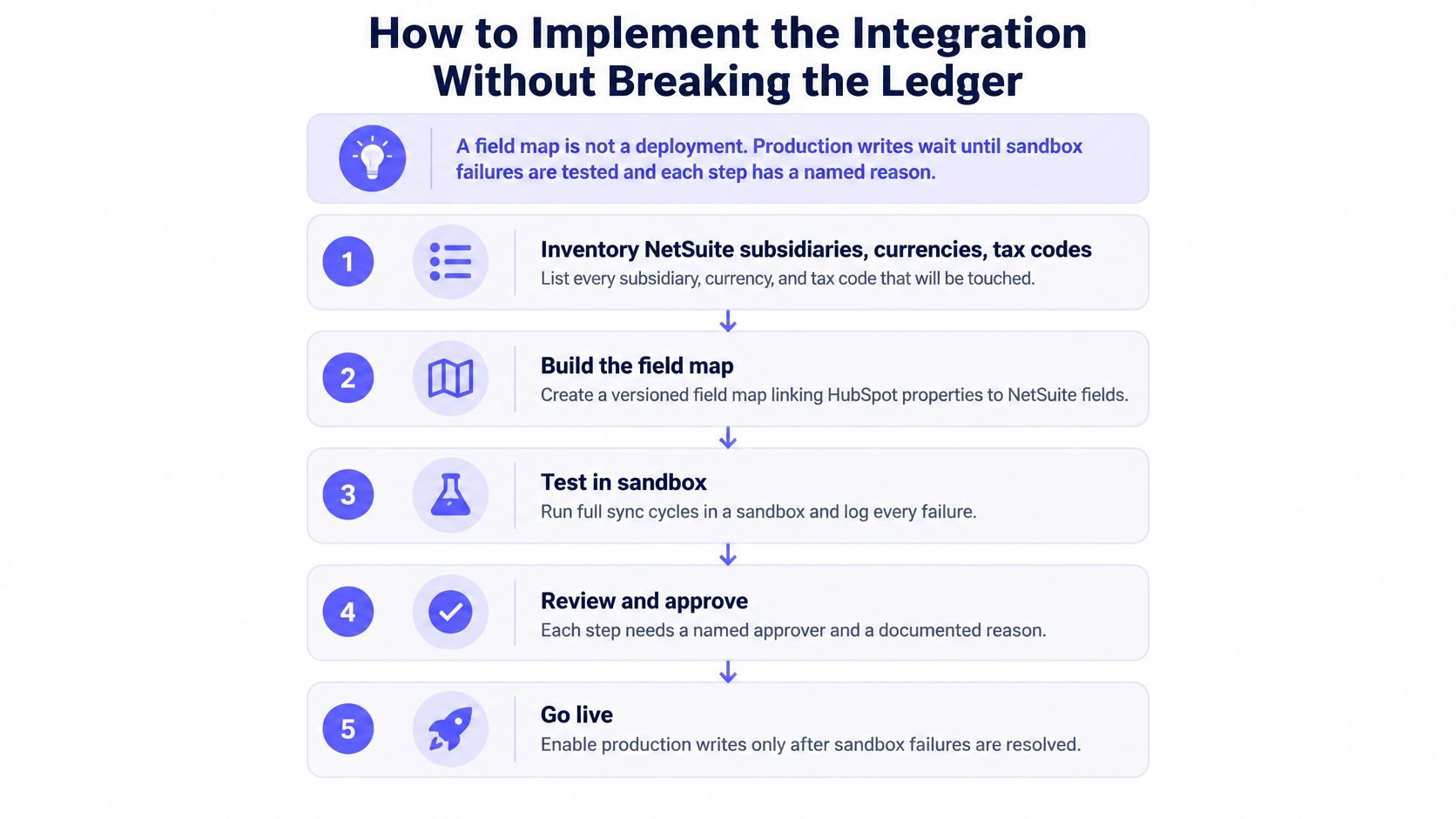
Production writes wait until sandbox failures are named and finance signs the release. A connection test can still post the wrong subsidiary, the wrong period, or a second invoice. Treat the rollout as a controlled finance process: someone owns each field, validation runs before the write, and every run leaves a record you can inspect.
The figure is the control sequence. Data preparation, testing, backfill, reconciliation, and approval stay separate gates. Done means documented acceptance, not an installer finishing a wizard.
Use a controlled release sequence
Each gate needs a reason you can explain to a controller.
- Inventory the NetSuite environment. List subsidiaries, currencies, tax codes, classes, locations, statuses, and open posting periods. The workflow may reference only values that already exist.
- Profile HubSpot properties. Mark nulls, duplicate companies, inconsistent formats, and multi-value fields. Write the handling for each condition before any record moves.
- Assign field ownership and version the rules. Name who may change a classification and who may only read it. Approve allowed combinations, and reject a bad subsidiary, currency, or tax relationship before the request leaves your side. Store that rule version with the run.
- Test sandbox behavior. Exercise create, update, delete or archive, retry, timeout, duplicate-event, and partial-failure paths. Confirm both stored identifiers still resolve to the records you intended.
- Run bounded backfill. Use checkpoints and an explicit restart position. Keep historical processing off the live event path.
- Reconcile in parallel. Compare integration results with source reports. A difference needs an explanation and an owner before that scope is released.
- Gate production writes. Invoices, credit memos, refunds, and revenue-affecting changes need approval. The controller can withhold release.
Put one deliberate rejection in the sandbox. An invalid tax combination should stop before NetSuite receives a transaction request. A timeout drill should show, in the run log, whether the order exists before anyone approves a retry.
Verify accounting state after transport success
Read the NetSuite record back after the call returns. Confirm the transaction exists with the classifications and totals you intended. A successful response only means the service accepted the request. It works like a signed delivery slip: the package reached the dock, not that accounting accepted the contents.
Oracle’s REST Web Services documentation notes that record instances load in edit mode even for GET requests. Keep the integration role least privilege, limited to the records and operations the workflow needs.
HubSpot polling does not fire the moment a property changes. It runs on the interval published for that API mechanism, so confirm the interval during design instead of assuming near-real-time updates. Event-driven handling, plus a scheduled reconciliation, keeps the ledger check independent of how often you poll.
A sandbox exit is a finance decision. Counts, totals, rejected cases, and rejection owners must all be named.
A NetSuite integration rollout should keep that release boundary after launch. A mapping change that touches invoices gets the same review as the original implementation. Production access does not let a later requirement skip the controller.
How to Reconcile Errors and Throttle API Limits
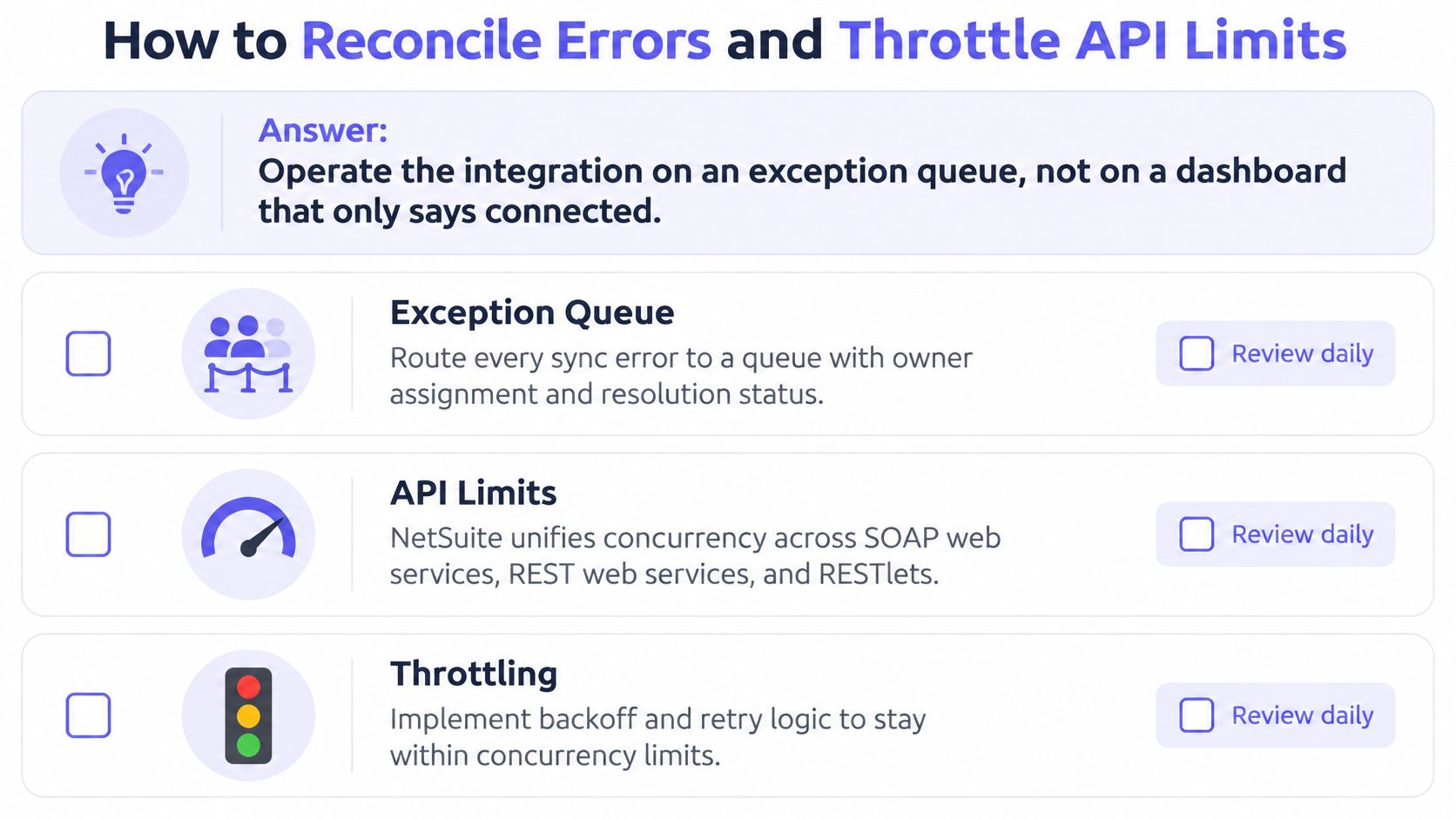
A HubSpot NetSuite integration should operate through an owned exception queue, not a dashboard that merely says connected. Operators need to distinguish temporary transport failures from invalid business instructions.
Oracle’s NetSuite concurrency documentation states that SOAP web services, REST web services, and RESTlets share the account’s concurrent-request limit. HubSpot traffic therefore competes with other integrations using those channels.
Queue work and control parallelism against the shared allowance. Schedule heavy backfill outside close, and reserve capacity for operational transactions.
Retry transport failures, not invalid accounting
Temporary throttling and service failures need controlled retries. Invalid classifications need correction.
- HTTP 429 and transient 5xx responses: Use exponential backoff with jitter. Increasing delays and randomized retry timing reduce synchronized retry bursts.
- Validation failures: Park the event in a dead-letter queue with a named owner. Repeatedly submitting an invalid tax code won’t make it valid.
- Ambiguous timeouts: Look up the intended transaction before replaying the write. A lost response doesn’t establish that creation failed.
- Unresolved conflicts: Preserve both source values and the applicable mapping version. Don’t choose whichever update arrived last.
The operating checklist keeps exception handling separate from throughput management.
Reconcile the business result
After each batch, compare record counts and financial totals by subsidiary, currency, transaction type, and accounting period. A balanced aggregate can conceal an order assigned to the wrong entity, so reconciliation must retain those dimensions.
Attach a correlation ID from the HubSpot event through the NetSuite transaction. Preserve the request, response, mapping version, and approval as the common evidence bundle.
| Symptom | Accountable owner | Attempt to establish | Additional evidence |
|---|---|---|---|
| Duplicate customers after a two-way first pass | RevOps and customer master-data owner | Whether both systems independently created the customer | Matching decision and both record IDs |
| Sales order in the wrong subsidiary | Finance operations | Which rule selected the legal entity | Source subsidiary and validation result |
| Deal marked synced but invoice never posted | AR or billing owner | Whether synchronization stopped before posting | Transaction state and approval outcome |
| Timeout with a partial line set | Integration engineer and billing owner | Which lines committed before interruption | Line-level readback and replay decision |
The evidence bundle must establish what was attempted, not merely the eventual corrected value. Auditors need the sequence to hold up: source event, rule, approval, write, exception, and resolution.
A sync card’s last-updated time is a useful clue. It isn’t the execution record of the financial write. Operators should also monitor failed-call rates against the applicable HubSpot threshold rather than treating persistent retries as normal throughput.
Choose a Governed Rollout and Start in Sandbox
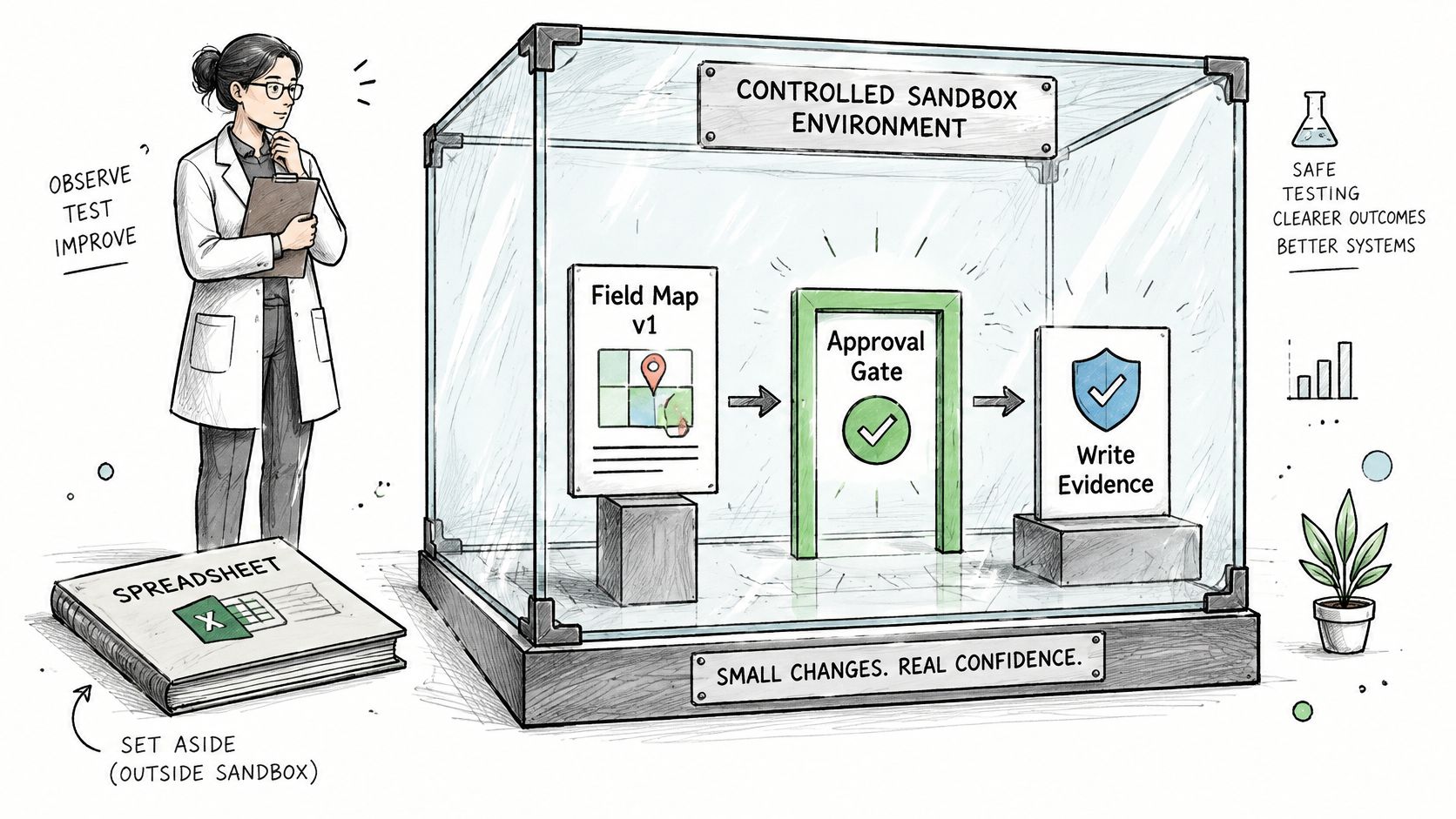
A HubSpot NetSuite integration should go live only when the mapping version, approver, and write evidence sit inside the workflow. A spreadsheet beside the workflow isn’t an adequate substitute for enforced release controls.
The sandbox is the place to establish that boundary before invoices are exposed to production writes.
Make the release rule testable
A governed rollout keeps a change history and requires approval before revenue-affecting rules change. Exceptions should reach a named owner through Slack, Microsoft Teams, or email, with timestamped decisions.
AI should remain scoped to interpretation, such as reading a document or classifying a field. Confidence thresholds and human fallback must constrain that work. An agent shouldn’t decide the NetSuite write.
Testing should examine the financial outcome as well as the application response. Faberwork LLC’s discussion of automated testing for expense tracking offers an adjacent perspective on designing repeatable tests around financial processes.
Loopfour’s implementation evidence shows distinct applications of deterministic controls:
- Deployment scope: One Salesforce-to-ERP billing customer went from decision to production in 6 weeks.
- Reconciliation: A healthcare technology company replaced a 4,000-row manual spreadsheet with a deterministic four-way match across pricing, orders, GL, and invoices.
- Cash application: A cybersecurity software company matches 97% of partner payments automatically at 95%+ confidence.
Those outcomes describe their respective implementations. They aren’t a HubSpot deployment forecast or a substitute for acceptance testing.
The accompanying video provides additional context for the workflow approach.
Go-live rule: No financial write without an approved mapping, a responsible owner, and inspectable execution evidence.
Native synchronization remains reasonable for simple record visibility. Marketplace synchronization should remain inside its contracted scope and allowance. Invoice, credit, and revenue writes need stronger governance when auditors will ask who changed what.
The concrete starting point is a sandbox inventory of subsidiaries and duplicate companies. Finance can then approve a single deal-to-order path before permitting any production invoice write.
Questions Finance Teams Ask Before Go-Live
HubSpot NetSuite go-live approval should resolve operational questions, not just installation questions. Each answer needs a concrete test or ownership decision.
What does the HubSpot sync card prove?
The HubSpot sync card shows whether a record is syncing, its matching NetSuite record, synchronization status, and last update. The card doesn’t establish whether subsidiary, currency, tax code, or posting period was appropriate. Finance must inspect validation and transaction evidence separately.
How often can HubSpot poll?
Applicable HubSpot API usage has a minimum polling interval rather than unrestricted continuous polling. The engineering owner should confirm the mechanism’s documented interval and prefer webhooks with reconciliation where supported. Faster polling isn’t a substitute for detecting missed events and incomplete writes.
Do SOAP, REST, and RESTlets have separate NetSuite limits?
NetSuite applies shared account concurrency governance across those integration channels. Separate workers can therefore exhaust the same allowance. The integration owner should coordinate workload scheduling and queue limits across HubSpot synchronization and other account integrations.
Why can a NetSuite GET still be risky?
NetSuite REST Web Services load record instances in edit mode even for GET operations. Read-oriented integration behavior therefore doesn’t justify broad permissions. The NetSuite administrator should restrict the integration role and verify its effective access during sandbox testing.
When is the native connector enough?
The native HubSpot connector can suit standard record visibility when required mappings and operational controls are satisfied. Missing custom-field coverage or execution evidence may justify another approach. For broader CRM procurement comparisons, the DataLunix Freshsales pricing overview is separate context, not evidence of NetSuite connector capability.
What must be true before the first production invoice?
HubSpot and NetSuite sandbox tests must cover create, update, archive, timeout, and partial failure. Both external identifiers must be stored and verified. A named finance owner must approve the write, and the workflow must preserve the applicable mapping, approval, and resulting transaction evidence.
Loopfour implements deterministic, auditable finance workflows across existing HubSpot and NetSuite records while keeping the ledger in NetSuite. Visit Loopfour to discuss a sandbox-first deal-to-order workflow with predefined validation, approval gates, and inspectable write evidence.