
A deal closes in Salesforce on a Friday. Finance raises the invoice in QuickBooks on Monday. By Wednesday that invoice sits twice in the ledger, and the reconciliation queue has a line nobody wants to own.
A Salesforce to QuickBooks integration is the pipeline that moves accounts, contacts, products, opportunities, invoices, payments, tax and currency data between the CRM where revenue originates and the ledger where it is posted. It replaces re-keying with synchronized records that sales and finance can both trust, if those records stay accurate and auditable after go-live.
The scale on each side explains why this boundary is crossed so often. Salesforce reported fiscal-year 2025 revenue of $37.9 billion in its annual report. QuickBooks leads the small-business accounting category. Nearly every company selling through Salesforce and keeping books in QuickBooks hits the same handoff: pipeline on one side, posted revenue on the other.
The difficulty is normal, not a sign of a bad vendor. In 2025, 95% of surveyed IT leaders reported difficulty integrating data across systems, according to Salesforce Connectivity Benchmark figures cited by Breadwinner. What holds a sync together is the mapping, the retry design and the approvals behind it. Those controls are what stop a duplicate invoice or a partial write from surviving into the close.
Table of Contents
- Pick the Right Integration Pattern for Your Stack
- Map Objects, Owners and IDs Before You Connect
- API Limits and Batch Sizes That Set Your Capacity
- How to Build the Sync in Eight Stages
- Partial Writes, Retries and Duplicate Invoices
- Decide Who Approves Each Batch Before Go-Live
- Salesforce to QuickBooks Integration Questions Answered
Pick the Right Integration Pattern for Your Stack
An opportunity hits Closed-Won, Flow writes one invoice, and the second QuickBooks company never receives it. That miss is a pattern limit, not a field typo. Start from the documented options and keep the smallest one that still owns failed writes, partial posts, and a log a reviewer can open months later.
Salesforce’s QuickBooks integration guidance names three paths: prebuilt AppExchange applications, MuleSoft Composer, and custom integrations. The same page states that QuickBooks and Salesforce can exchange customer information, sales orders, expenses and invoicing data, and that the integration isn’t currently available for Salesforce Essentials.
Confirm the edition before anyone scopes fields. An Essentials org can’t run this design. After that, fit rests on three inputs: how many QuickBooks companies you run, how many records move in a day, and how many exceptions you expect per week.
A fourth path sits inside Salesforce. The QuickBooks Online connector for Flow can treat QuickBooks as a trigger source or an action target, authenticates through OAuth 2.0 in the browser, and reuses an established connection across flows. One trigger is a fair use, such as Closed-Won creating an invoice. Multi-entity posting with approval gates is outside what that connector carries.
| Pattern | Best for | Setup effort | Control you keep |
|---|---|---|---|
| AppExchange app | Single QuickBooks company with standard objects | Low to medium | Limited to the app’s mapping and retry rules |
| Salesforce Flow connector | One trigger with simple logic, such as Closed-Won to invoice | Low | Flow logic you can inspect inside Salesforce |
| MuleSoft Composer | Teams already running MuleSoft-based automation | Medium | Guided connectors with inspectable flow logic |
| Custom integration | Multi-entity, high-volume or exception-heavy operations | High | Full control of IDs, retries, logs and reconciliation |
Packaged apps bring a price and a ceiling. One AppExchange listing for QuickBooks Connect advertises real-time, two-way sync of customers, invoices, products, journal ledgers and payments from $300 per company per month (Salesforce AppExchange listing), so a two-entity business budgets that licence twice before comparing it to a build.
Selection rule: if nobody is named to fix a failed write at 2 a.m., the pattern is wrong regardless of its price.
Shortlist two patterns: the one finance can operate without the integrator in the room, and the one that owns retry and log behaviour where exceptions happen. A software stack for CNC shops is a separate buying comparison, not a model for CRM-to-ledger posting. The pattern you keep still needs the discipline of enterprise application integration so IDs, retries and evidence do not collapse into a one-way script nobody can audit.
Map Objects, Owners and IDs Before You Connect
Every synced field needs exactly one system of record and one immutable match key, decided before anyone authenticates a connection. Teams that skip this step get a working demo and a duplicate customer list.
Ownership splits along a predictable line. Sales owns the commercial facts: account name, billing address, opportunity amount, close date, order reference. Finance owns the accounting facts: item master, tax codes, currency settings, revenue classification and posting status. When both sides claim the same field, the last writer wins and nobody can explain the variance at close.
The match keys are the part auditors care about, because they’re what makes a record traceable six months later. Store the Salesforce Account ID on the QuickBooks customer as an external reference. Match contacts on contact ID plus email, products on SKU, orders on the order ID written onto the invoice, and payments on payment ID plus the invoice they settle. Drop the invoice’s order ID into your exception report and a reviewer can jump from a ledger line back to the deal in one step.
Country-specific fields break first on multi-entity setups. A 2026 technographic estimate of QuickBooks adoption attributed 146,531 QuickBooks customer organizations to the United States, 11,160 to Canada and 6,161 to the United Kingdom, or 84.87%, 6.46% and 3.57% of the listed base. If your Salesforce org carries customers across those markets, tax treatment, currency, date format, billing address and legal entity each need an explicit mapping instead of a copied total.
| Source object or field | QuickBooks object | System of record | Match key |
|---|---|---|---|
| Account | Customer | Salesforce for name and billing address; QuickBooks for customer ID | Salesforce Account ID stored as external reference |
| Contact | Customer contact fields | Salesforce | Contact ID plus email address |
| Product | Item (product or service) | Finance for item master; Salesforce for list price | SKU or product code |
| Opportunity or order | Invoice | Salesforce for amounts and dates; QuickBooks for posting | Order ID stored on the invoice |
| Payment | Payment applied to invoice | QuickBooks | Payment ID plus invoice ID |
| Tax code and currency | Tax and currency settings | QuickBooks | Country and currency code |
Matching rule: match on IDs and tax registration numbers. A customer name is a label, not a key.
The mapping sheet doubles as a handover document. Anyone doing Salesforce integration work should be able to open it and know which system wins a conflict without asking a person who may have left.
API Limits and Batch Sizes That Set Your Capacity
Plan capacity in API calls per source record, and read the limits before choosing a batch size. Batch endpoints exist because one-record-per-call designs burn quota on overhead, and the quota is shared whether the sync is the only consumer or not.
| Limit | Value | What the integration should do |
|---|---|---|
| Synchronous API batch | Up to 50 objects per call | Batch small writes instead of one record per call |
| Asynchronous API batch | Up to 32,000 objects | Use for large backfills and nightly loads |
| Enterprise Edition API requests | 100,000 per rolling 24 hours, plus license-based allocation | Poll the limits resource and reserve capacity for other processes |
| Access-token requests | One per 20 minutes per client machine | Reuse the token until it expires |
| Excess requests | HTTP 403 with REQUEST_LIMIT_EXCEEDED after continued overuse | Throttle, then back off with exponential backoff and jitter |
| Immediate retries | Add load during the same limit window | Retry only after checking the idempotency key |
Those figures come from Salesforce’s guidance on API limits and monitoring, which also notes that consumption is counted at the org level rather than per user. That single detail changes how you budget. A dashboard refresh or an unrelated marketing tool eats the same allowance as your invoice sync, so reserve a share for everyone else.
Capacity pressure is the rule, not the exception, because the average org runs far more applications than it connects. Accounting Seed’s analysis of Salesforce integration cites a 2025 MuleSoft figure that the average enterprise managed 897 applications, only 29% of them integrated. Every one of those integrations that touches Salesforce is a competitor for the same limit.
Run a load test that proves retries are safe
- Replay the largest expected daily delta, then multiply it by a peak-period factor taken from your own month-end and quarter-end volumes.
- Inject failures at a known rate, including 429 and 403 responses and network timeouts, so the retry path executes under observation.
- Verify no duplication, checking that injected failures produce zero extra invoices or payments in QuickBooks.
- Calculate p95 latency and exception rate per object type, measuring extraction calls, transformation calls, destination writes, retries and reconciliation queries separately.
A pass on all four earns the right to schedule the production run. Anything less means the first month-end becomes the load test, with your controllers watching.
If you’re still choosing the transport layer, this comparison of API integration platforms covers where the limits and retry behaviour sit in each architecture.
How to Build the Sync in Eight Stages
Go-live is eight stages, and the sequence is what keeps invoices accurate after the first production write. Each stage exists so the next one can be proven. Skip the read-only reconcile and the first month is spent matching balances in a live ledger.
The stages follow a common staged, idempotent build pattern. Nothing posts until the prior stage has a check a reviewer can rerun.
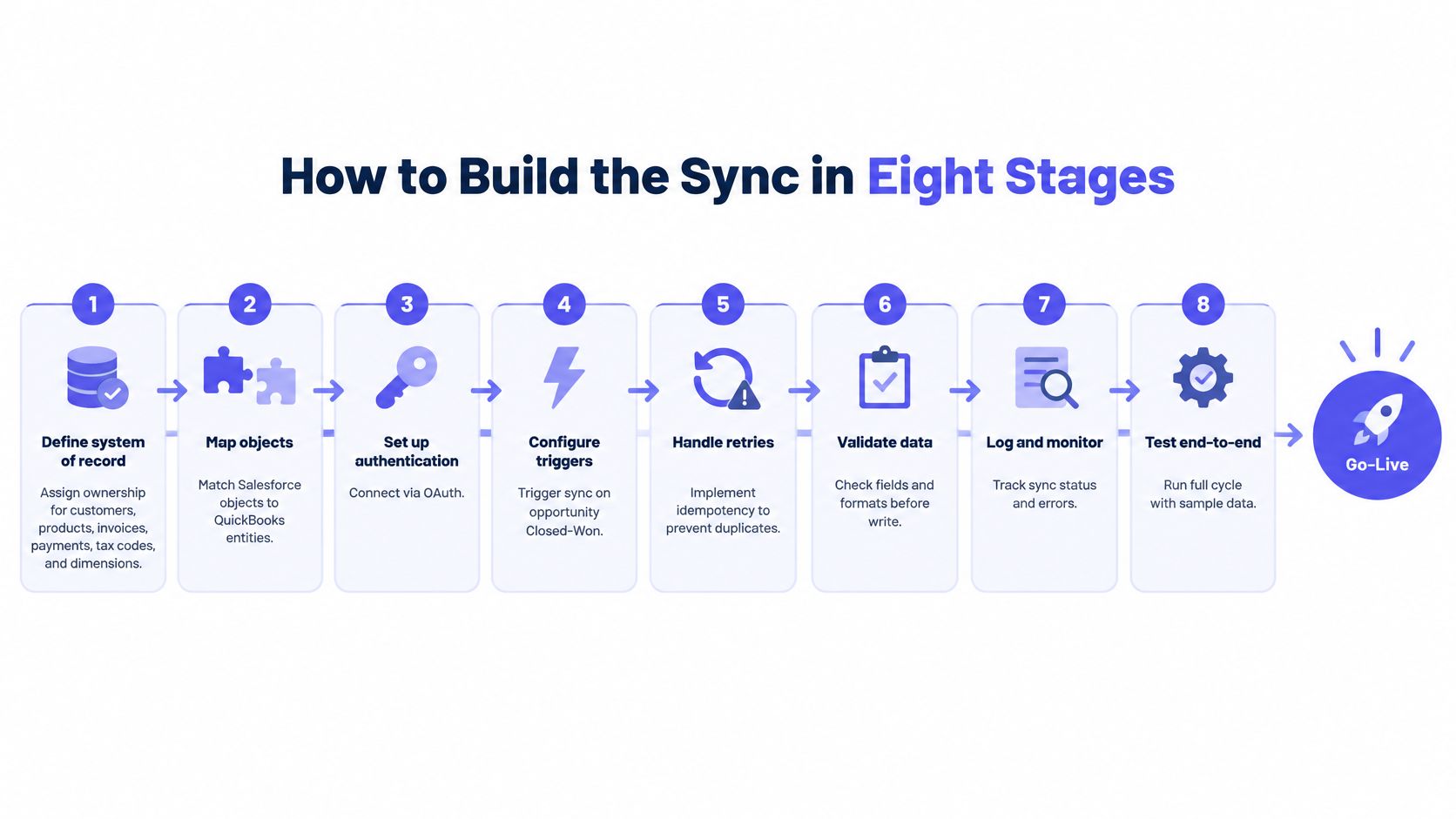
- Define the system of record for customers, products, invoices, payments, tax codes and accounting dimensions, so every field has exactly one owner.
- Create a cross-reference table holding immutable Salesforce IDs next to QuickBooks entity IDs. A later write looks up that pair before it creates anything, which is how a retry finds a record it already created.
- Normalize currencies, dates, tax treatment and revenue classifications before any write leaves Salesforce. A payload that still carries Salesforce formatting will post, then fail a control total for a reason nobody can see in QuickBooks.
- Run an initial read-only extract and reconcile it against QuickBooks totals. That comparison is the starting balance. Do not turn on live writes until the unexplained difference is zero.
- Load master data first. Customers and items must exist before any transaction references them. A transaction that arrives first creates an orphan or a second customer with a slightly different name.
- Post transactions in dependency order: parent before lines, invoice before payment. A payment with no invoice, or lines with no header, is a partial record an auditor will sample.
- Persist request IDs, payload hashes, response IDs, timestamps and retry state for every write. That set is what an auditor asks for. Reconstructing it after the fact is close to impossible.
- Run control reports for record counts, monetary totals, duplicates and exceptions. Counts and totals should agree on both sides. Duplicates and exceptions should have a named disposition, not a spreadsheet note.
Acceptance rules to agree before the first live write
Three conditions make go-live a decision rather than a hope: zero unexplained balance variance, zero duplicate external IDs, and full traceability from each Salesforce source record to its QuickBooks transaction or its recorded exception disposition.
Then rehearse. Run stages four through eight end to end in a sandbox company at least once, with real volumes, before switching on production writes. A sandbox run that takes a morning is cheaper than a week of cleaning duplicates out of a live ledger.
Partial Writes, Retries and Duplicate Invoices
A retry is the most common way a sync creates a second invoice. The first write reached QuickBooks, the response timed out on the way back, the queue retried, and now two invoices with different QuickBooks IDs describe one economic event.
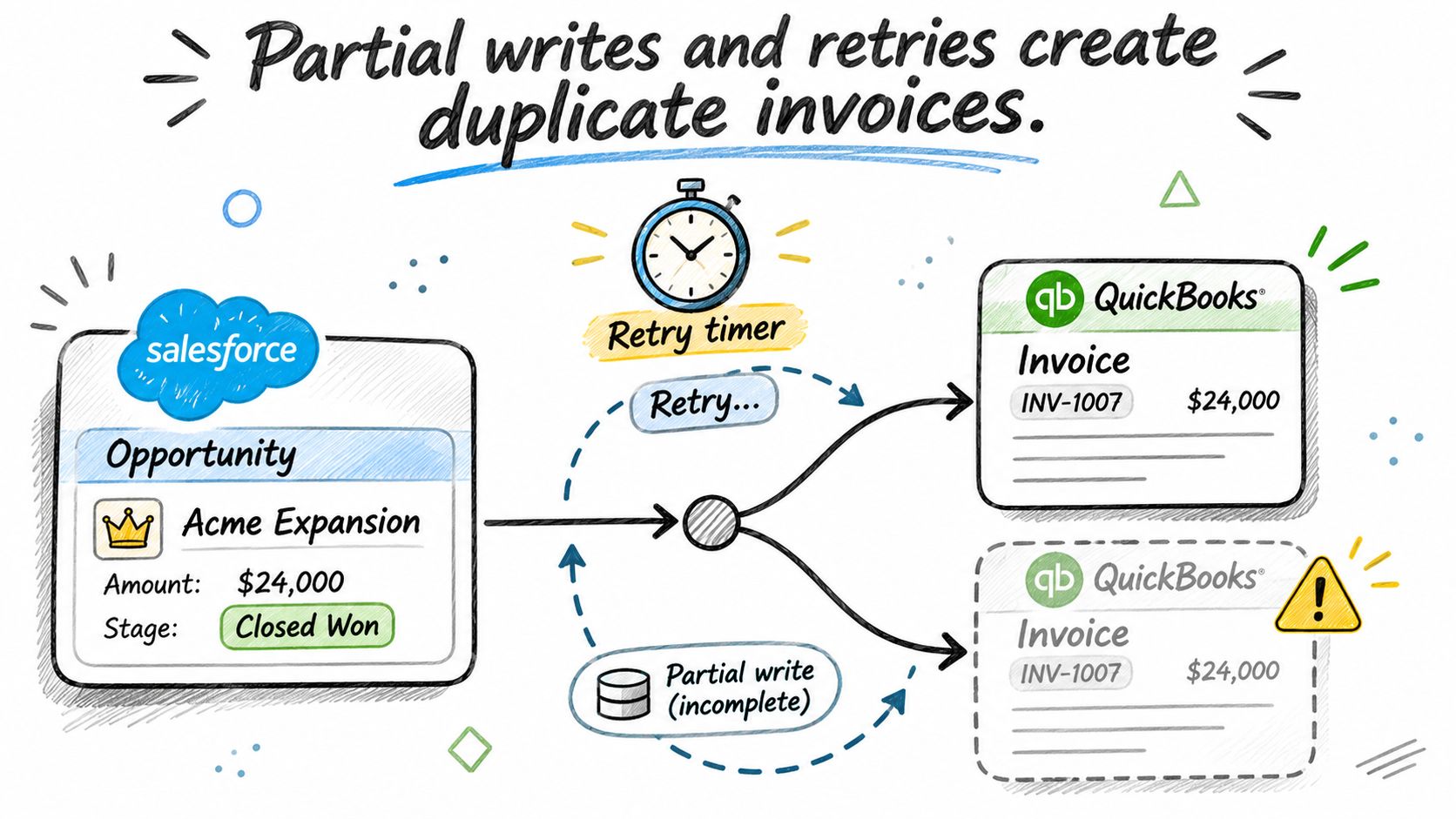
Most setup guides stop at OAuth, object mapping and an invoice created when an opportunity hits Closed-Won. The damage happens past that point, in three partial-success shapes: a request times out after QuickBooks accepts the write, only the invoice lines fail while the header posts, and a retry carries a payload that changed since the first attempt. All three leave duplicate invoices or orphaned line items, and all three stay invisible until reconciliation or an audit sample.
The cost is measurable. Reconciliation research cited in an analysis of common Salesforce to QuickBooks sync failures attributed 44% of reported mistakes to manual intervention and poor system integration, and 56% to inadequate software, limited real-time access or inconsistent data formats. Read both halves together and the conclusion is uncomfortable: removing the human doesn’t remove the error if the automation ignores accounting transaction boundaries.
The walkthrough below covers how to reason about those boundaries when a sync is already live.
| Failure | What it looks like | Control to add |
|---|---|---|
| Timeout after QuickBooks accepts the write | Retry creates a second invoice | Query by idempotency key or external reference before any retry |
| Only invoice lines fail | Invoice header exists with missing or partial lines | Mark the parent record partial and replay the lines only |
| Retry with a changed payload | Same opportunity posts twice under different hashes | Compare payload hash and response ID before posting |
| Customer matched by name | Duplicate customers across entities | Match on immutable Salesforce ID and tax ID, never on name |
| Retry limit exceeded | Records sit unposted with no owner | Route to a dead-letter queue with a named owner and deadline |
What a daily control report must compare
One report, run daily, comparing Salesforce opportunity value against QuickBooks invoice totals, then tax, currency, payment status and posting state. Report the count of records in each state, not just totals, because two offsetting errors can leave a total clean while the underlying records are wrong.
Practical rule: every accepted write carries a destination ID, and every rejected write carries an owner and a retry count. Anything else is a hope.
Retry design only helps if the downstream entry is clean. Teams replacing manual invoice data entry with a scheduled job learn the same lesson: the exception queue, not the happy path, decides whether the automation holds through a quarter close.
Decide Who Approves Each Batch Before Go-Live
Name one approver for every exception type and define the evidence each write must keep. Do that before the first production run, not after the first audit finding.
Approval gates should follow risk rather than volume. Invoices above an agreed threshold, credit notes and any record that fails matching wait for a named person. Fully matched routine batches post once the control report passes, with no one signing off manually. Route exceptions to the owner in Slack, Microsoft Teams or email with the Salesforce source record attached, so the decision never requires logging into two systems.
A connector and a control layer part company at this point. A connector can tell you a call returned successfully. It rarely tells you who approved the economic event. Loopfour, the deterministic finance workflow automation platform, runs each step as predefined code and keeps execution evidence for every action, approval, exception and system write.
At Everyset, customer, invoice and journal entry records are written by the workflow into QuickBooks Online, and people review the flagged exceptions and approve each daily batch before it posts. Everyset, a film and TV background casting and payroll company, processes 100+ invoices a day across two QuickBooks entities with no manual data entry.
The evidence set a reviewer asks for
- Approver identity and decision time, recorded against the batch rather than the individual invoice.
- Destination ID for every accepted write, so a ledger line can be traced back without a screenshot.
- The control report the batch passed, including record counts and monetary totals by entity and currency.
- The source record link, giving a reviewer a path from Salesforce to QuickBooks and back in one hop.
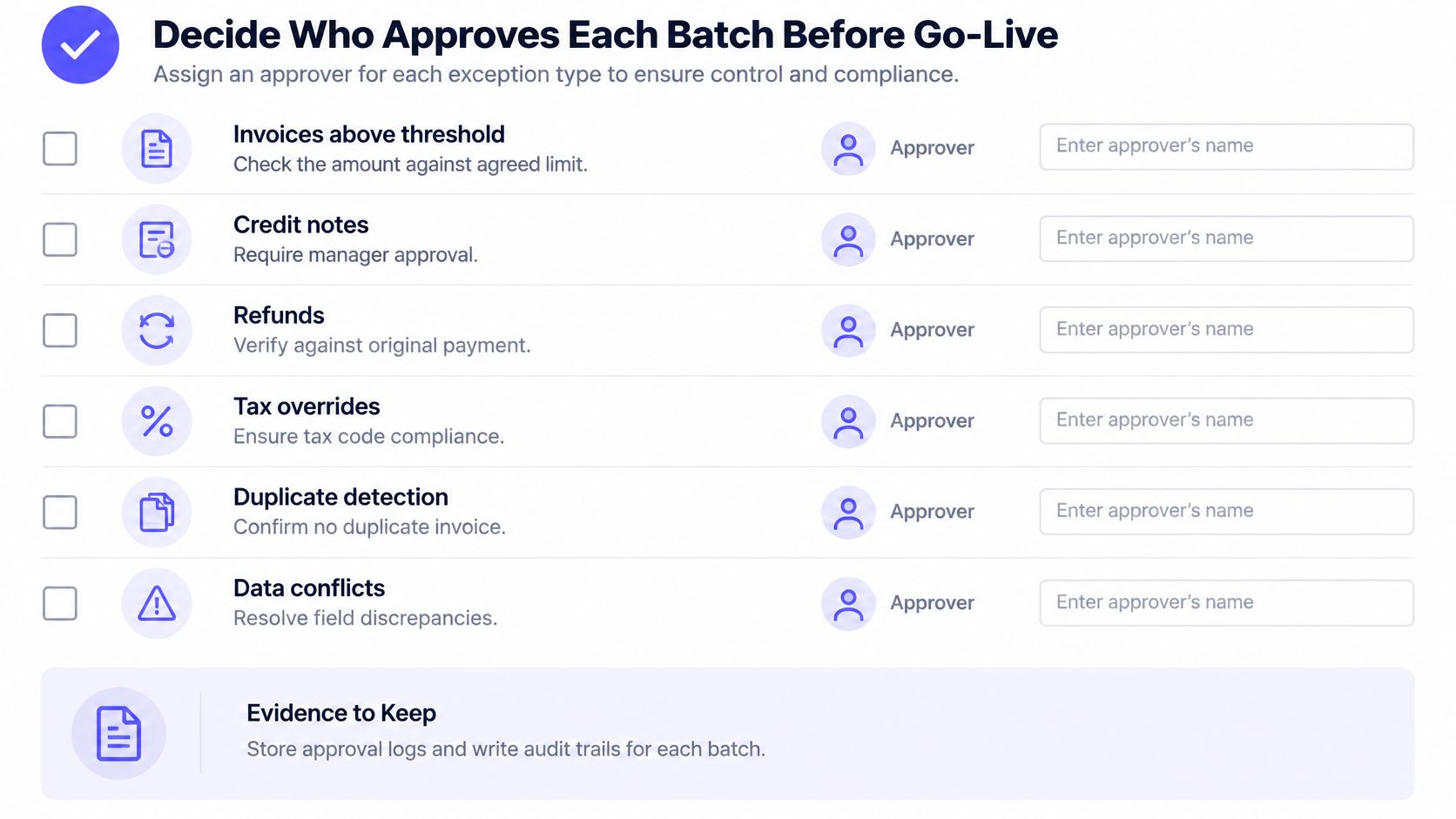
Test the trail before go-live with a reviewer who didn’t build the sync. Ask them to trace one invoice from its Salesforce opportunity to the QuickBooks transaction and back to the approval that released it. If that takes more than a few minutes with no help, the evidence exists but isn’t usable.
Accounts where every movement must be attributable use the same discipline. A trust accounting walkthrough for QuickBooks shows the client-by-client separation an approver needs to see before releasing a batch.
Salesforce to QuickBooks Integration Questions Answered
Can I connect Salesforce to QuickBooks without custom code?
Yes. A packaged app from the AppExchange installs through a guided setup with prebuilt field mappings, and Salesforce Flow can use a QuickBooks Online account as either a trigger or an action target, so customer sync and invoice creation need no Apex. Custom code enters only when the mapping, entity count or retry rules exceed what a package exposes.
Does Salesforce Essentials support the QuickBooks integration?
No. Salesforce’s own QuickBooks guidance rules that edition out, so an Essentials org can’t run this design as documented. Upgrade the edition before scoping the mapping, because the edition decision changes what the connector can reach.
What does a QuickBooks connector cost?
Budget per QuickBooks company rather than per user, since packaged listings price that way and a two-entity business pays twice. A custom build swaps the licence fee for engineering time, retry logic and log storage, so compare the two over a three-year horizon instead of a monthly invoice.
How long does setup take?
It depends on mapping complexity, entity count and how many exception types need a named approver. Set the go-live date only after stages four through eight have run end to end in a sandbox company; one Salesforce-to-ERP billing build went from decision to production in six weeks on a single defined scope.
Is a successful API response enough to trust the sync?
No. A 200 response confirms receipt, not accuracy, and a 403 with REQUEST_LIMIT_EXCEEDED confirms only that you ran out of allowance. Trust comes from the daily control report that compares invoice totals, tax, currency and posting state against the Salesforce source records.
Loopfour runs Salesforce to QuickBooks billing as a deterministic workflow: opportunity to invoice, customer sync, journal entries and payment posting, with every write carrying an execution record and every exception routed to a named approver. If your team is still reconciling by hand after go-live, Loopfour can show you what the control report should contain before the next close.