
An AP invoice approval process is the controlled sequence that validates a supplier invoice, confirms the spend, records authorization, and permits payment. Popular advice starts with automating the approval click. A stronger design starts with exception ownership and evidence, because a faster approval doesn’t resolve a missing receipt or explain an unauthorized override.
For controllers, the test is straightforward: can another person reconstruct why the invoice was paid? A defensible process connects the original document, applicable rules, accountable owners, approval decisions, and ledger entries. Software should preserve that chain, not merely move invoices between inboxes.
Table of Contents
- Eight Stages Every AP Invoice Passes Through
- How to Run Each Stage From Capture to Payment Release
- Which Matching Rules Apply to Each Invoice Type
- Who Owns an Exception and How Fast It Must Clear
- Benchmarks to Measure Your Approval Speed and Accuracy
- Frequently Asked Questions About AP Approval
- What is the difference between two-way and three-way matching?
- What is a touchless invoice rate in accounts payable?
- Can the person who entered an AP invoice also approve it?
- What evidence should be ready for an auditor sampling an approved AP invoice?
- Does AP automation remove the need for human invoice approvers?
- Decide Which Approval Steps to Automate First
Eight Stages Every AP Invoice Passes Through
An AP invoice approval process moves an invoice through eight controlled stages, from receipt to payment release. Each stage needs an accountable owner, a timestamp, and evidence that permits the next action.
AP invoice approval stages at a glance
| Stage | Owner | Evidence to keep | Common stall point |
|---|---|---|---|
| Receipt and capture | AP clerk or intake system | Receipt timestamp and source file | Invoice sits unopened in a shared inbox |
| Data validation | AP team | Supplier ID, invoice number, totals and tax checked | Duplicate invoice or wrong legal entity |
| Matching | AP team or system | PO and goods-receipt references | Missing PO or missing receipt |
| Coding | AP or budget owner | GL account and cost center | Unclear cost center on the invoice |
| Exception handling | Buyer, budget owner or controller | Reason code, owner and resolution note | No single owner assigned |
| Approval | Budget owner per approval matrix | Approver identity, decision and timestamp | Approver absent with no delegate |
| ERP posting | AP system | Posted entry linked to the invoice | Posting fails without an alert |
| Payment scheduling and release | AP team or treasury | Payment run reference and release approval | Payment run missed |
Start the clock at receipt. APQC defines invoice-to-payment cycle time as calendar days from invoice receipt until payment transmission, including weekends and waiting time.
That definition exposes a common reporting weakness. An invoice can spend longer waiting for someone to open it than being actively processed. Measuring data-entry time alone hides that delay.
Make every handoff observable
An invoice status should identify its current owner and the condition preventing progress. A generic pending status isn’t enough to distinguish missing documentation from an approval queue.
Record stage entry and completion separately. For payment scheduling and release, retain distinct scheduling and transmission timestamps, even when both sit within the same operational stage.
Practical test: Sample the last ten invoices and check whether every applicable stage has an owner and timestamp. Record skipped stages as explicit policy decisions, not empty fields.
A missing event doesn’t necessarily mean the control failed. It means the team needs supporting evidence before treating the control as demonstrated.
How to Run Each Stage From Capture to Payment Release
Run the AP invoice approval process through explicit control gates, and retain evidence before allowing the next action. Clean invoices should progress without unnecessary handling; unresolved exceptions should stop the affected invoice.
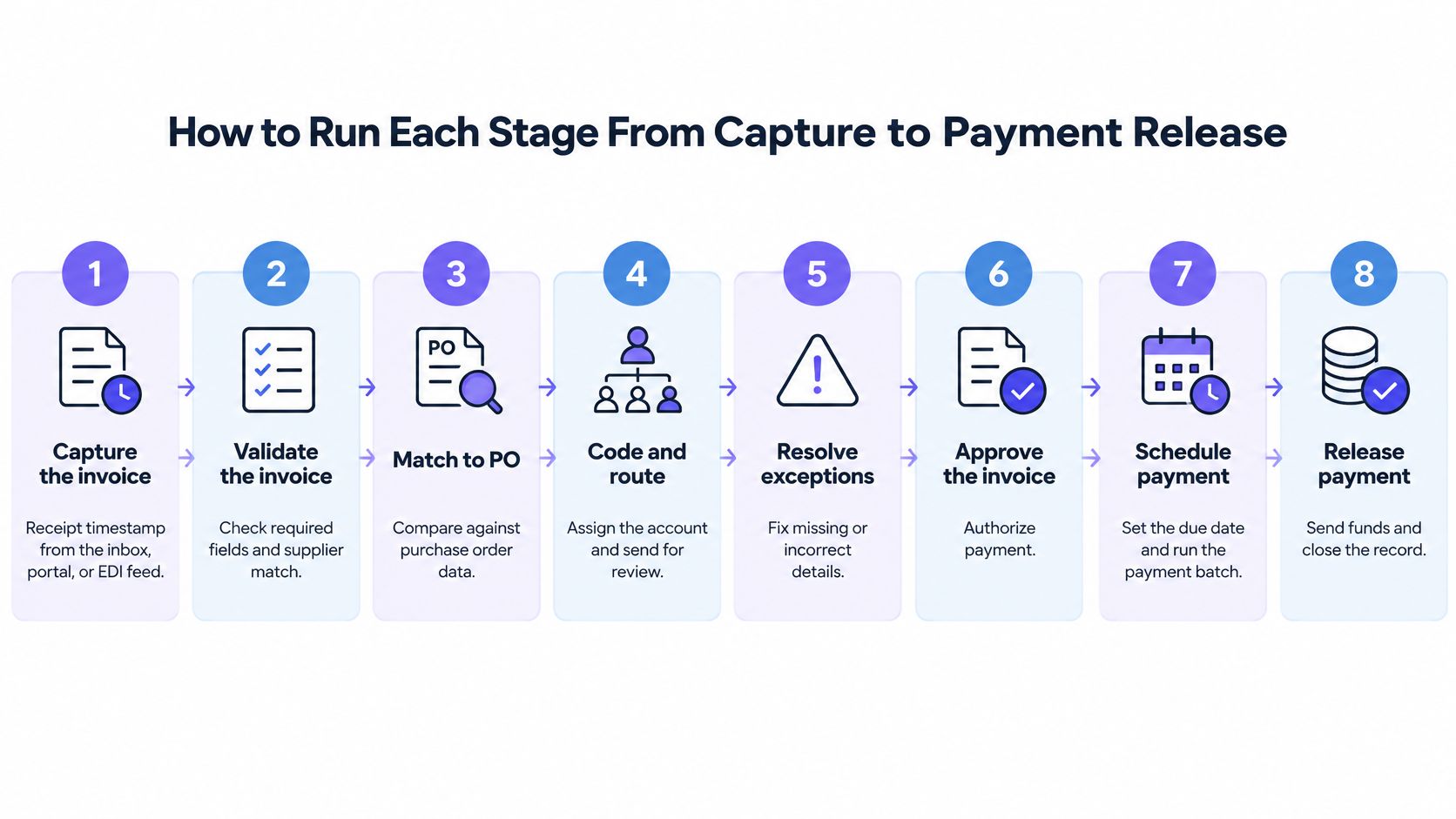
The workflow illustration summarizes the handoffs. The operational record must preserve posting confirmation separately from scheduling and release.
Establish the invoice record before routing
Invoice capture, validation, matching, and coding should establish what the company owes and who owns the spend. Routing an incomplete record transfers investigation work to the approver.
-
Capture the invoice at receipt. Preserve the source file and receipt timestamp from the inbox, supplier portal, or EDI feed. Don’t substitute the date someone eventually enters the invoice into the ERP.
-
Validate the invoice against controlled records. Check supplier identity, legal entity, invoice number, date, currency, tax, totals, and payment terms. Compare the supplier, invoice number, and amount for potential duplicates. A new invoice must not authorize a vendor-master change.
-
Apply the required match. Use the invoice-type rule to identify the purchasing and receipt evidence required. Attach the references to the invoice record rather than leaving the approver to search another system.
-
Code the invoice and evaluate tolerances. Assign the GL account, cost center, project, and entity before selecting the approval route. Apply predefined price, quantity, and tax tolerances. Route the affected invoice or line for review when the policy permits line-level handling.
Docsumo’s AP control guidance distinguishes intake, validation, matching, coding, authorization, and payment release. That separation matters operationally: passing a match doesn’t establish approval authority, and approval doesn’t confirm that posting succeeded.
Require confirmed outcomes before money moves
Exception resolution and approval should produce machine-readable outcomes, not ambiguous email threads. Posting and payment release then consume those outcomes as prerequisites.
-
Resolve exceptions with a named owner. Send the variance, supporting documents, reason code, and deadline together. A request to review an invoice is incomplete unless the recipient knows which decision is required.
-
Authorize against the approval matrix. Check the approver’s entity, amount authority, and cost-center responsibility. Enforce separation between invoice entry and approval. Preserve the matrix version used for the decision.
-
Post and confirm the ERP result. Store the ERP document identifier, posting status, and related evidence. A successful API request isn’t sufficient if the ERP subsequently rejects the transaction. Failed writes need alerts and controlled retries that prevent duplicate entries.
-
Schedule and release payment. Confirm posting before including the invoice in the scheduled run. Verify the payment file against purchasing records and the vendor master, then retain release authorization and transmission confirmation.
The clean end state is an invoice record connected to its authorization, ERP entry, and payment evidence. A paid status without those connections is an accounting result, not a complete control record.
Which Matching Rules Apply to Each Invoice Type
The required invoice match depends on what was purchased and how the purchase was authorized. One matching rule shouldn’t govern every invoice, particularly when services, recurring charges, and local tax requirements require different evidence.
Matching requirements by invoice type
| Invoice type | Required match | Who confirms | Evidence before approval |
|---|---|---|---|
| PO-backed goods | Three-way match: PO, goods receipt and invoice | Receiving team and buyer | PO and receipt references attached |
| PO-backed services | PO and service acceptance | Requesting budget owner | Signed service acceptance |
| Non-PO invoice | Documented policy check, no PO match | Budget owner | Written policy exception approval |
| Recurring vendor, including utilities and subscriptions | Standing PO or contract match | AP team with budget owner | Contract reference on file |
| Cross-border or e-invoice | Identifier and tax validation before approval | Tax team | Validation or clearance record |
Two-way matching compares the supplier invoice with the purchase order. Three-way matching adds the goods-receipt record, establishing whether the invoiced goods were received.
Services need equivalent acceptance evidence rather than a fictional warehouse receipt. A milestone sign-off or signed service acceptance should identify the deliverable and authorized recipient.
For recurring vendors, a contract reference alone shouldn’t permit unrestricted payment. Check the billing period, contracted rate, renewal terms, and whether the service remains authorized. Non-PO approval should document the policy exception, not pretend a purchase order existed.
Set tolerances without weakening acceptance
Tolerance rules permit predefined differences, but they shouldn’t conceal missing evidence. A small price variance and an absent receipt are different control conditions.
Define whether the tolerance applies per line or invoice, which currency governs it, and whether both monetary and percentage limits must pass. A breach should hold the affected invoice rather than block unrelated invoices in the batch.
Keep matching distinct from accounts payable reconciliation. Approval evaluates the obligation before payment; reconciliation checks whether accounting records and subsequent activity agree.
Treat tax acceptance as a separate state
Commercial acceptance doesn’t necessarily establish tax validity. A Billtrust global e-invoicing compliance guide reports that a 2025 global compliance survey found 41% of countries required invoices to be sent or reported digitally, and summarizes KPMG’s analysis of the associated customer-data and process changes.
Where local rules require validation or government clearance, retain that result separately from budget-owner approval. A commercially accepted invoice may still need correction before compliant posting.
Before approval, the controller should be able to name the evidence required for that invoice type and identify any unmet condition.
Who Owns an Exception and How Fast It Must Clear
A missing PO sits with the buyer who created it. It does not sit in a shared AP queue where everyone assumes someone else will chase it. Every exception needs that same clarity: one accountable owner, a fixed deadline, and a defined condition that releases it for payment.
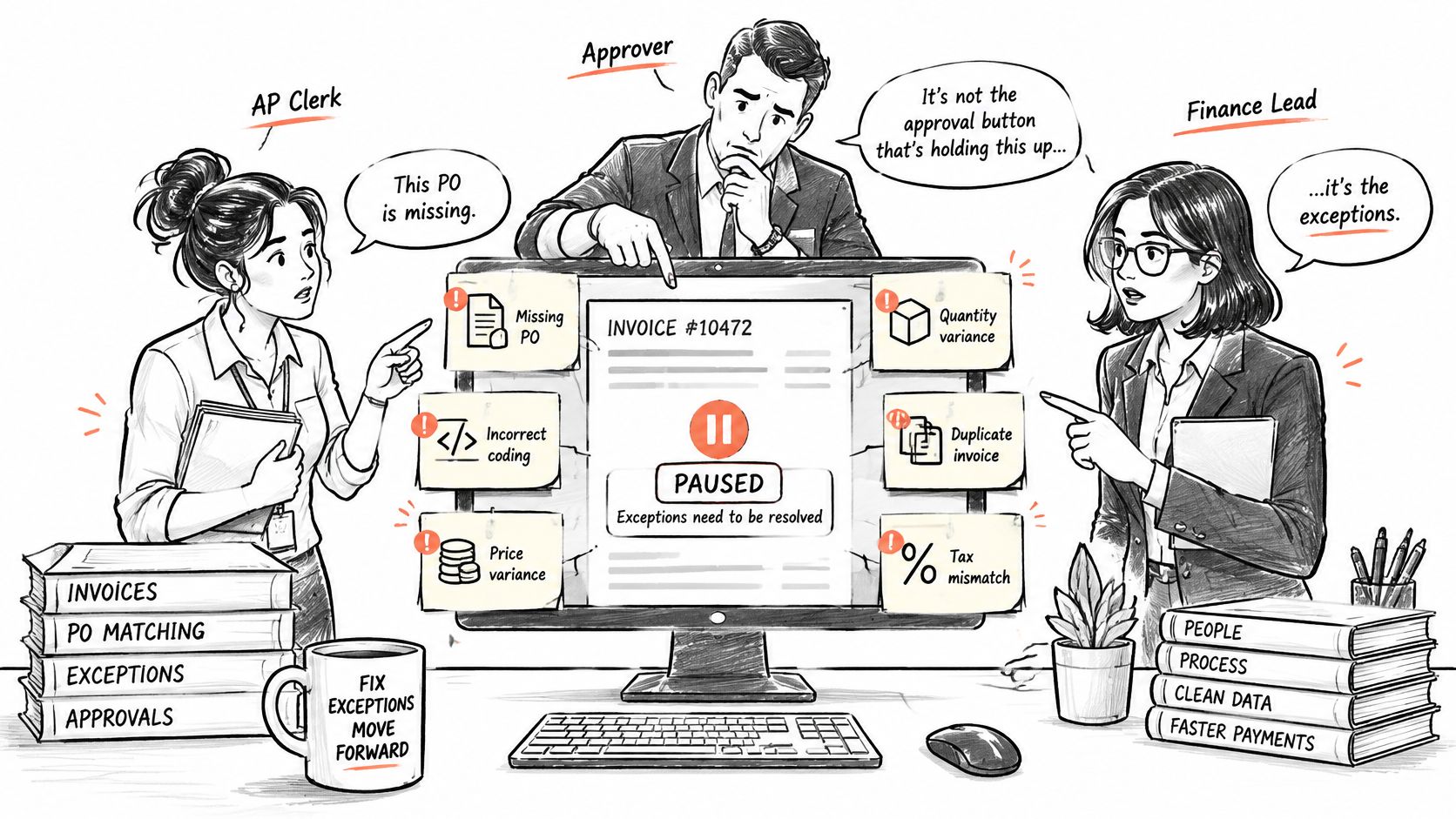
In Ardent Partners’ AP Metrics That Matter in 2025, 53% of respondents identified invoice exceptions as a leading AP challenge. That result points to design work. Exception handling needs assigned owners and due dates, with evidence attached to each decision.
Exception types and accountable owners
Adapt the example internal policy below to your organization, and tighten the deadlines for high volume suppliers or payment runs with limited review time.
| Exception type | Accountable owner | Example escalation |
|---|---|---|
| Missing PO | Buyer | Reminder after 2 business days, controller after 5 |
| Incorrect coding | Budget owner | Reminder after 2 business days, controller after 5 |
| Price variance | Buyer | Reminder after 2 business days, controller after 5 |
| Quantity variance | Receiving team | Reminder after 2 business days, controller after 5 |
| Duplicate invoice | Controller | Reminder after 2 business days, controller after 5 |
| Tax discrepancy | Controller | Reminder after 2 business days, controller after 5 |
| Unavailable approver | Named delegate with time limit | Delegation expires on a fixed date |
Resolve combined exceptions without shared ambiguity
Combined exceptions stall when two teams each wait for the other. Assign specialist decisions plus one case owner who holds the invoice until all outcomes are recorded.
Procurement approves a PO at one price, the supplier invoices a higher price, and receiving records a different quantity. The buyer decides the price variance. Receiving confirms the quantity. The case owner keeps the invoice on hold until both results are logged. No partial clearance.
The related discussion can support a team review of the exception handoff.
Delegation needs a named substitute, defined authority, and an expiry date. An override needs an authorized role, reason, amount, timestamp, and explicit identification of the unresolved condition. An auditable exception trail should retain those decisions and resulting system changes.
Speed without that record creates risk. Straight-through approval looks efficient while undocumented overrides, duplicate payments, and manual edits accumulate outside the control.
For Everyset, the workflow writes customer, invoice, and journal entry records into QuickBooks Online. People review flagged exceptions and approve each daily batch before it posts. That is an example of governed human review, not evidence of an AP-specific outcome.
For every exception category, the operating question remains: who owns it, and how long can it wait before someone must act?
Benchmarks to Measure Your Approval Speed and Accuracy
Speed means little if the invoice cannot survive an audit. Track receipt to approval, receipt to payment transmission, and cost per invoice together, then read each result against who owned the exceptions and what evidence stayed with the invoice.
AP approval metrics and reference values
| Metric | Definition | Reference value |
|---|---|---|
| Cost per invoice | Total AP processing cost divided by invoices processed | Manual or bottom performers about $10–$15; top performers about $2.82, in Amazon Business’s APQC-based comparison |
| Receipt to approval | Days from receipt until approved | Average 8.2 days, top performers under two days, according to AppZen’s benchmark discussion |
| Receipt to payment transmission | Calendar days from receipt until payment is transmitted | Median 15 days, 12 at the 25th percentile and 24 at the 75th percentile, in APQC’s cross-industry benchmark |
Compare endpoints before comparing performance
An approval benchmark is not a payment benchmark. Approval stops when the owner signs and the invoice is scheduled. Payment stops when funds leave. Mixing the two makes a slow treasury run look like slow approvers, or the reverse.
Measure the gap for each invoice. That gap shows where payment runs, holds, and cash timing add days after the approval record is complete. Controllers who skip this split tend to pressure approvers while the actual delay sits in a weekly payment batch.
The visual summarizes the measurement categories; the table above preserves the exact benchmark scope.
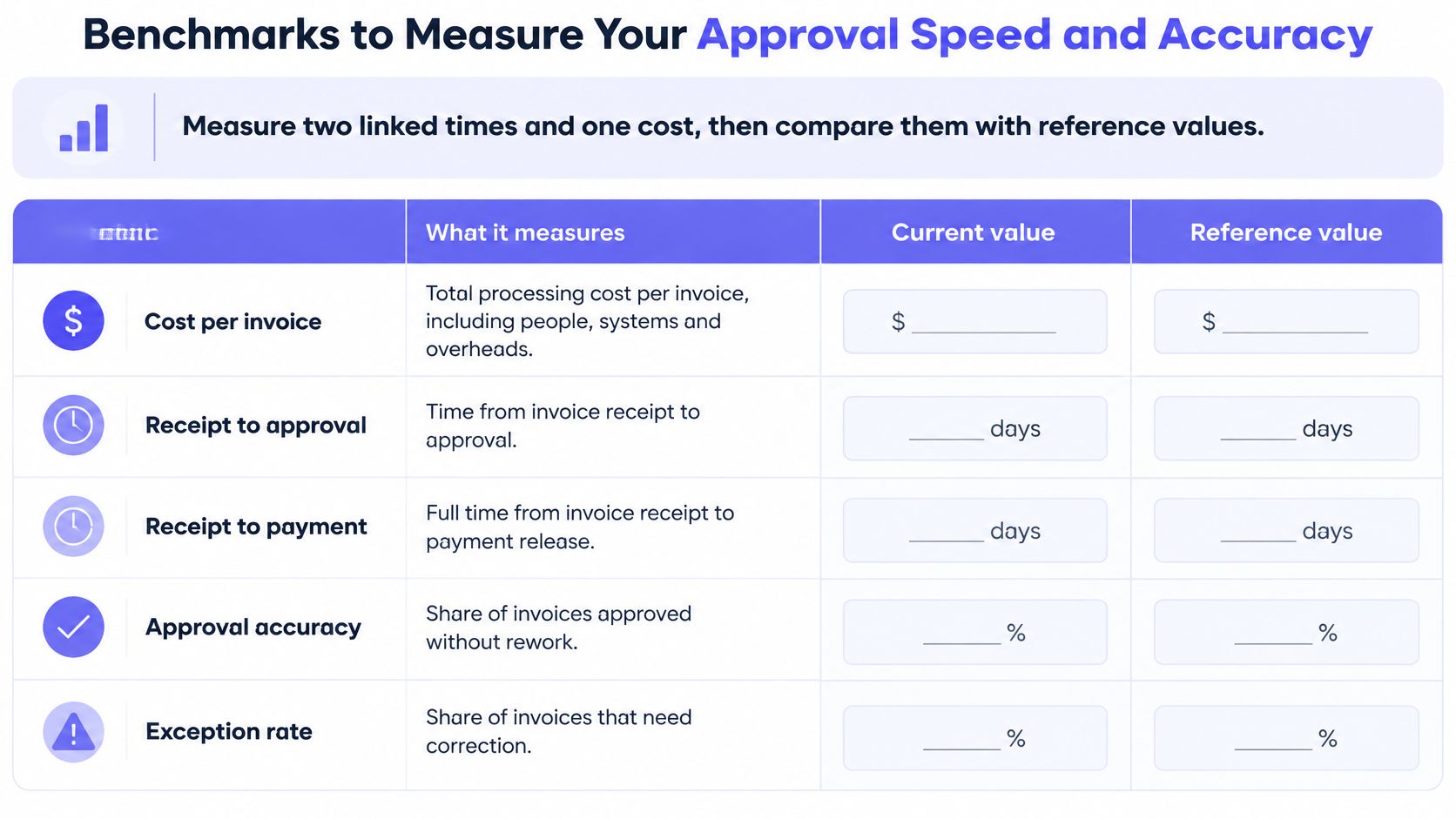
Cost needs the same discipline. Include the same labor, systems, and support categories each period. I recommend separating PO-backed goods, services, non-PO invoices, and compliance-heavy transactions. A blended cost hides the categories that consume the review time.
Review the queue tail and recurring causes
Averages hide stalled invoices. A useful dashboard shows the tail.
Track median and 90th percentile approval latency, open exceptions grouped by accountable owner, and exception reasons that separate missing evidence from disputed amounts. Add suspected duplicates versus confirmed duplicate payments, plus touchless rate for eligible invoices completed without manual intervention.
A review of accounts payable automation benefits should connect reduced handling to stable or improved accuracy. Monthly reviews should fix recurring causes, such as missing receipts from one purchasing workflow, before adding approvers.
Frequently Asked Questions About AP Approval
AP approval questions usually concern matching, authority, evidence, and the boundary between automation and human decisions. The following answers describe a controlled operating model rather than universal legal requirements.
What is the difference between two-way and three-way matching?
Two-way matching compares a supplier invoice with the purchase order, while three-way matching also checks the goods-receipt record. For services, the AP process should retain equivalent evidence that the authorized recipient accepted the work.
What is a touchless invoice rate in accounts payable?
The touchless invoice rate is the share of AP invoices that move from receipt to posting without manual data entry or exception handling. The AP team should define eligibility consistently and review the measure alongside exception rates and payment accuracy.
Can the person who entered an AP invoice also approve it?
No, the controlled AP model described here separates invoice capture or coding from invoice approval. The approval matrix should enforce that separation in the system, including when a delegate acts for an absent approver.
What evidence should be ready for an auditor sampling an approved AP invoice?
An AP invoice evidence package should include approver identity, approval timestamp, applicable purchasing and acceptance references, and the ERP posting reference. The controller should also retain any exception resolution or delegated authority needed to explain why that particular approval was valid.
Does AP automation remove the need for human invoice approvers?
No, AP automation doesn’t remove named human decisions where the organization’s policy requires them. Rule-based capture, matching, and routing can execute automatically, while amount-based approvals, budget judgments, and overrides remain subject to the prescribed authority.
Decide Which Approval Steps to Automate First
Automate rule-based work first and preserve human approval wherever policy requires judgment or authorization. Capture, validation, matching, routing, and posting are suitable candidates when their inputs, conditions, and failure paths are explicit.
The APQC retail and wholesale AP benchmark framework includes cost per invoice, first-time-error-free disbursements, payment-file verification, and invoice-data auditing. Those control points should survive an automation implementation.
Require evidence before accepting the automation claim
An automation demonstration should show a failed match, an unavailable approver, and a rejected ERP write. A clean invoice alone doesn’t demonstrate an auditable process.
The retained package should include:
- Source evidence: Invoice record, PO, receipt, and vendor-master validation.
- Decision evidence: Approval outcome, authority, exception history, and delegation.
- Execution evidence: Workflow version, system writes, posting confirmation, and payment-file verification.
BankStatementWizard’s guide to key features for automated accounting workflows provides a broader software-evaluation checklist. For AP, each proposed feature should be tested against the evidence package rather than accepted as a substitute for it.
An unexplained automated decision isn’t a stronger control than an unexplained manual decision.
Keep deterministic execution separate from interpretation
Loopfour, the deterministic finance workflow automation platform, runs predefined, versioned steps on existing ERP, billing, and document tools. Its accounts payable automation captures the invoice, matches it against the PO and receipt, routes approval to the person who owns the spend, and attaches evidence to the payment.
Black-box decisioning can obscure why an invoice moved. Loopfour executes matching and routing as predefined steps instead, with retained execution evidence. Document interpretation can use confidence thresholds and human fallback without giving an interpretation model unrestricted posting authority.
No workflow goes live without the approvals the customer’s controls require. Exceptions wait for the right owner before anything posts. That boundary matters more than a promise of universal straight-through processing.
Loopfour offers governed invoice workflows that connect matching, exception ownership, approval, and payment evidence on the existing finance stack. Visit Loopfour to book a 45-minute workflow review covering AP, billing, cash application, reconciliation, or another selected process, and leave with a scoped plan for running it on that stack.