
Your team has invoice capture running in Workday, yet month end still brings a long exception queue, approvers asking for context that should already be attached, and auditors asking who approved an override. Workday accounts payable automation is the governed movement of invoices from intake through matching, approval, exception resolution, and posting in Workday, with evidence retained for every decision. Capture gets an invoice into the system. Exception control determines whether that invoice can be paid safely.
Author: Elena Torres, a senior finance operations lead specializing in audited AP controls.
Table of Contents
- Measure Your AP Baseline Before You Automate
- Choose an Integration Approach for Workday AP
- How to Run a Seven-Step Invoice Match in Workday
- Route Approvals to the Owner of the Spend
- Exception Routing That Shows Root Causes
- Capture Audit Evidence for Every Posting
- Start With One Pilot Entity and One Workflow
- Frequently Asked Questions About Workday Accounts Payable Automation
- Does Workday Accounts Payable Automation Include Invoice Capture
- What Exception Rate Should a Workday AP Team Expect
- Which Workday Invoices Should Never Be Posted Touchless
- Who Should Approve a Workday Supplier Invoice
- How Long Should a Workday AP Automation Pilot Run
- What Evidence Do Auditors Need for Each Workday AP Posting
Measure Your AP Baseline Before You Automate
Before changing a Workday rule, measure cycle time, straight-through rate, exception rate, cost, exception aging, and discount capture. Break the results down by entity and exception class, so an overall improvement cannot hide a growing queue in one part of the process. Without a baseline, later claims about automation are difficult to assess.
The Workday guide to automating accounts payable reports that the average AP organization takes 9.2 days to process a single invoice, while fewer than one-third of invoices move straight through without human intervention. It also reports that nearly 40% of potential AI productivity gains can be lost to rework when AI is added to workflows that have not been redesigned.
An AppZen analysis of Ardent Partners’ 2025 benchmark reports an average invoice-processing cost of $9.84, an 8.2-day cycle time, and an 18.4% exception rate among organizations that already had invoice capture and workflow software. Use these figures as comparison points, not as proof that a particular deployment is succeeding or failing.
Segment Every Baseline Metric
An average is useful for comparison, but segmentation helps locate control failures. Break each metric down by invoice source, entity, supplier, PO status, and exception reason. For example, portal invoices may need more coding corrections than supplier email invoices, or one entity may account for most aged exceptions. Track the same categories before and after a rule change.
| Metric | What it measures | Reference point | How to calculate |
|---|---|---|---|
| Invoice cycle time | Days from receipt to payment posting | 9.2 days average | Median days from receipt to posting, by entity |
| Straight-through rate | Invoices posted with no human touch | Fewer than one-third | Touchless posts divided by all invoices |
| Exception rate | Invoices needing exception treatment | 18.4% average | Exceptions divided by invoices received |
| Cost per invoice | Total AP processing cost per invoice | $9.84 average | Total AP cost divided by invoices processed |
| Exception aging | Median days an exception stays open | Establish a baseline by exception class | Median open days by exception class |
| Early-payment discount capture | Eligible discounts actually taken | Track the share of available discounts captured | Discounts taken divided by discounts available |
Measure end-to-end posting success, not OCR extraction accuracy alone. An invoice can be captured correctly and still fail matching, coding, or approval. Count it as touchless only when it completes the intended process without human intervention.
Two choices can make a baseline misleading. Broad tolerances may raise the straight-through rate by passing differences that policy should stop. Rework can also shift effort from manual entry to exception handling, recoding, and supplier follow-up rather than eliminating it.
Teams considering external options can compare accounts payable automation tools against these same metrics. Record a value for each measure and identify which results must come from Workday reports.
Choose an Integration Approach for Workday AP
Workday accounts payable automation should start with Workday’s native path when purchase order, receipt, and invoice data already live in Workday. Connector or browser automation becomes necessary only when required evidence or actions sit in another system. The best approach is the one that preserves a complete record for every posting.
The Workday supplier invoice work area documentation explains that uploading an invoice for OCR scanning creates a draft supplier invoice and attaches the original file. Users can edit or submit that draft for approval. When OCR doesn’t identify related PO lines or a supplier contract, the Link PO Lines task supports PO-line matching, line copying, and overrides on one screen.
That native path is strong for standard Workday invoices. It becomes weaker when evidence sits in outside document, billing, or ERP tools. A workaround that copies values without preserving source context solves throughput today and creates an evidence gap later.
Match the Approach to the System Boundary
Business process configuration controls what happens inside Workday after submission. Connectors move governed data between systems with APIs. Secure browser automation handles legacy or homegrown tools that expose no API, but it carries maintenance risk when screens change.
| Approach | Best fit | Control point | Main limit |
|---|---|---|---|
| Native supplier-invoice work area | Teams using OCR capture on Workday invoices | Draft invoice, Link PO Lines task and approval before submit | Manual linking when OCR misses PO lines or contracts |
| Business process configuration | Companies needing entity-specific routing and tax defaults | Supplier Invoice Event steps for matching, budget check and approval | Outcomes depend on configuration quality and security policy |
| Platform connector to Workday | Teams running Workday alongside ERP, billing or document tools | API-based reads and writes with run logs | Field mappings need governed change control |
| Secure browser automation | Legacy or homegrown systems without APIs | Controlled browser sessions with every action logged | Breaks when screens change, so it needs maintenance |
A generic connector writes data and leaves your team to reconstruct why. Loopfour, the deterministic finance workflow automation platform, covers the connector and secure browser rows while keeping a log of every action. That distinction matters when an auditor asks which system value authorized a Workday write.
Before selection, confirm field ownership, retry behavior, duplicate prevention, and error ownership for each interface. A failed write should create a named task with context, not a silent retry or a spreadsheet side queue. The Loopfour guide to Workday integration outlines the integration choices finance teams should settle before build work starts.
Selection test: Can every touchless posting be traced to a PO, a receipt, and a policy version?
If the answer is no, the integration is moving data faster than it is preserving control. Fix lineage first, then expand automation.
How to Run a Seven-Step Invoice Match in Workday
A Workday invoice match should run as a fixed seven-step sequence that normalizes intake, confirms purchasing context, matches, checks tolerances, routes exceptions, approves overrides, and retains evidence. The fixed order makes each posting explainable. Your team should never let an operator skip directly from capture to posting.
The diagram below shows the sequence in operating order.
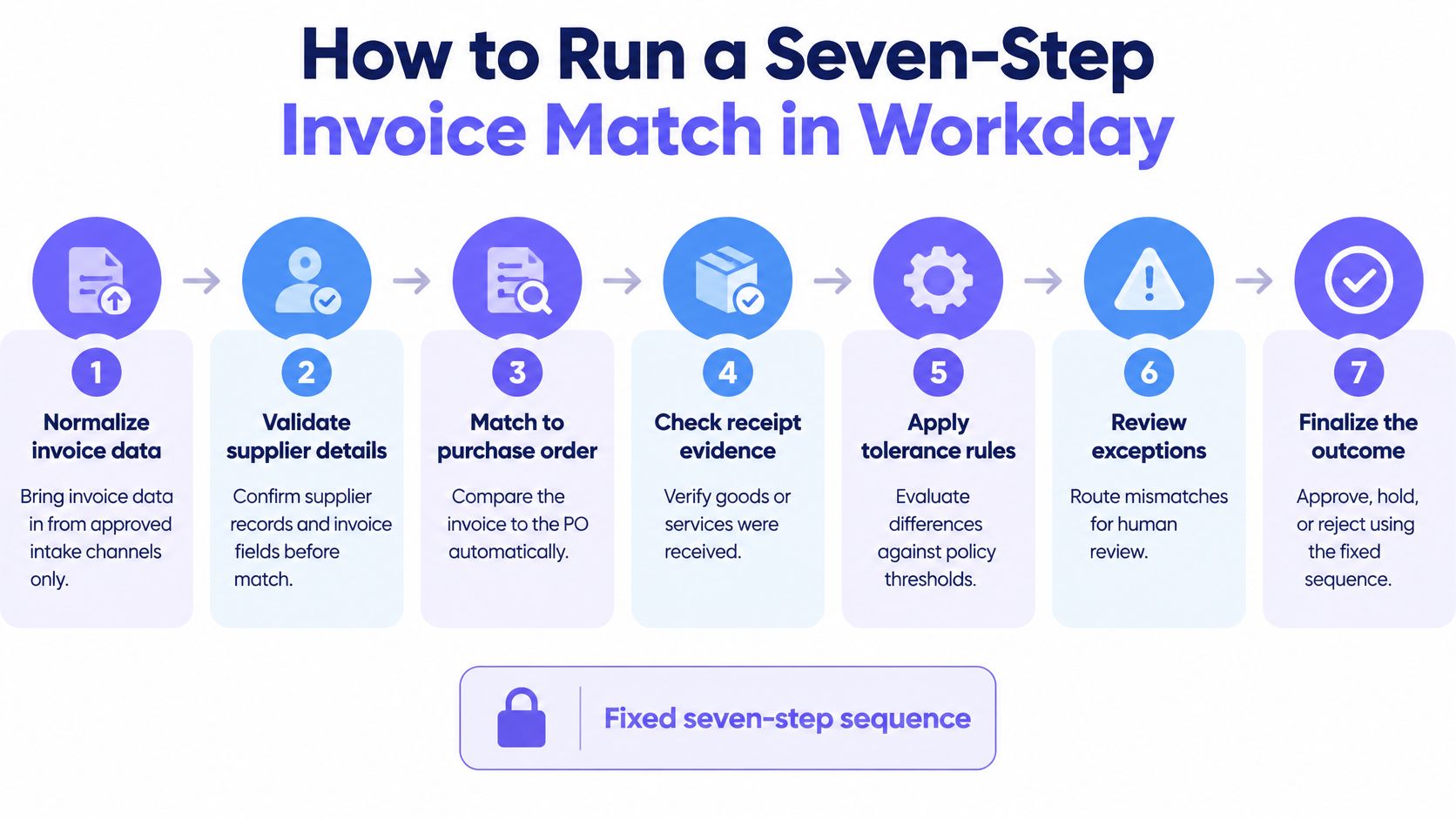
The Workday procure-to-pay matching course material describes three-way matching as a comparison among the purchase order or contract, receipt, and invoice. Workday configuration also supports match-rule sets, tolerance percentages or amounts, exception reasons, routing, and approved overrides.
- Normalize invoice data. Accept invoices only through approved channels such as supplier email, portal upload, or OCR capture. One controlled path prevents unapproved invoices from entering the queue.
- Identify supplier and purchasing context. Confirm entity, supplier record, PO, or contract before comparison begins. Correct context prevents matching against the wrong PO.
- Apply the required match. Use two-way matching where policy permits it and three-way matching where receipt evidence is required. Receipt confirmation prevents payment for goods never received.
- Evaluate price, quantity, receipt, and tolerances. Apply the policy version active on the posting date. Versioned evaluation prevents silent drift between policy and posting.
- Route unmatched items by explicit reason. Send each item to the owner for that failure class. Explicit reasons prevent root causes from hiding in a generic queue.
- Require approval for overrides. Record the approver and stated reason before release. Named approval prevents unreviewed price or quantity changes.
- Retain match and approval evidence. Keep the evidence with the payment record. Retention prevents postings that nobody can reconstruct.
Test the Cases That Break Matching
Testing should include partial receipts, over-receipts, invoices just below and just above tolerance, non-PO invoices, credit memos, duplicate invoice numbers, and supplier or currency mismatches. Happy-path invoices prove very little. Edge cases reveal whether tolerances, routing, and duplicate blocks behave as configured.
A healthcare technology company replaced a 4,000-row manual reconciliation spreadsheet with a deterministic four-way match across pricing, orders, GL, and invoices. That example shows the practical goal clearly. Deterministic matching replaces fragile manual comparison with repeatable checks.
No touchless posting is valid unless the PO, receipt, tolerance, and policy version can be traced.
Route Approvals to the Owner of the Spend
Every Workday supplier invoice approval should go to the person who owns the spend, using predefined criteria rather than personal availability. Owner-based routing puts budget accountability at the decision point. It also gives auditors a named approver whose authority matches the cost being approved.
The flow below shows approval as a controlled path, not an inbox exercise.
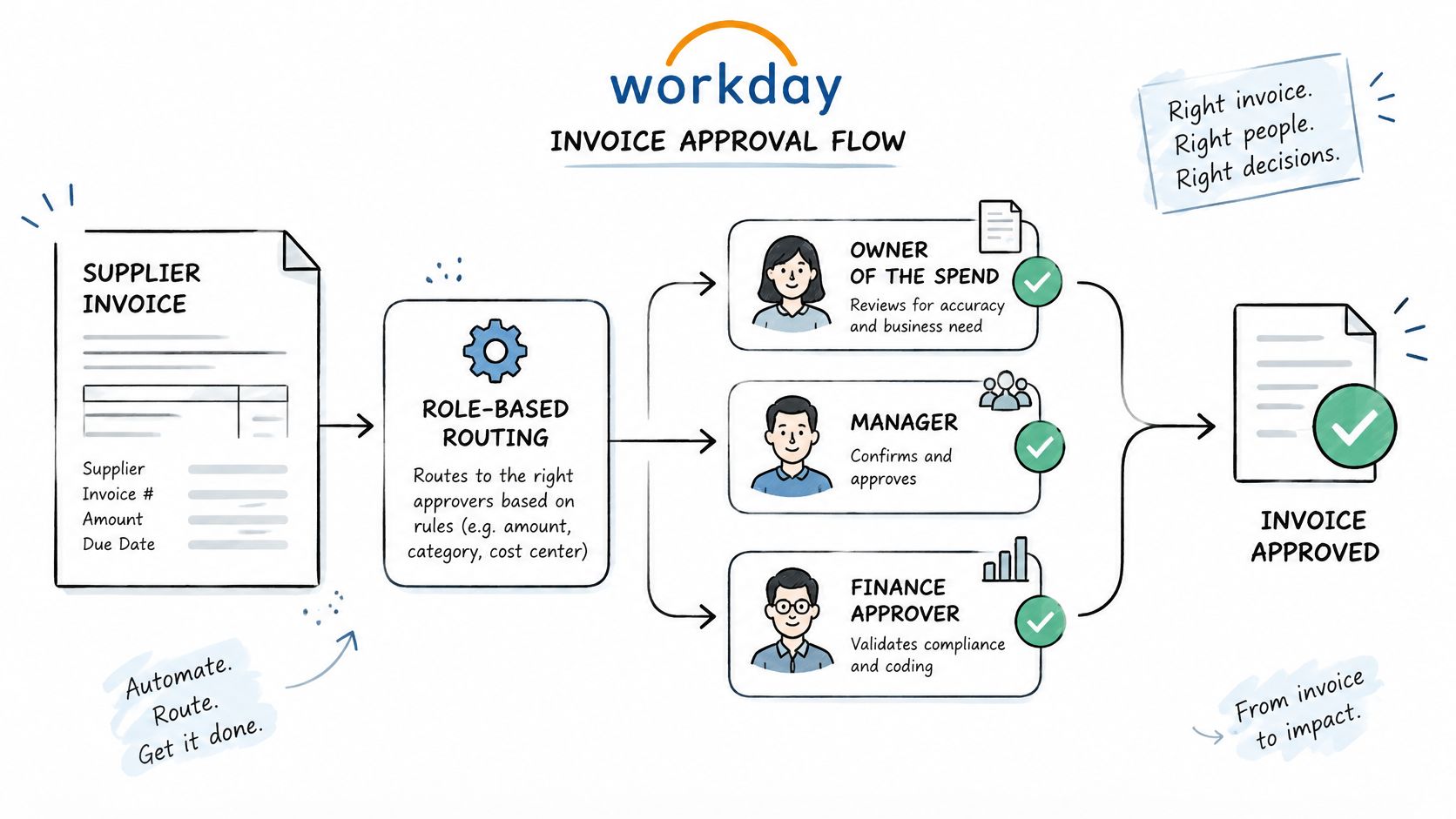
The Workday supplier invoice approval documentation states that Workday can route supplier invoices through predefined approval logic using role-based security. Routing criteria can include company, cost center, spend category, supplier, and other worktags. After submission, the invoice enters the Supplier Invoice Event business process, where review, matching, budget-check, and approval steps determine the next action.
Use Supervisory Routing Without Losing Accountability
Workday also supports routing through the management chain of a supervisory organization. That option avoids creating a separate approval role for every invoice path. It doesn’t remove the need to confirm that each manager owns the relevant budget.
- Route by spend ownership: Use cost center, spend category, supplier, and company to identify the accountable owner.
- Separate entry from override approval: The person entering an invoice shouldn’t approve its price or quantity override.
- Require override reasons: Every override approval needs a named approver, timestamp, and stated business reason.
- Avoid one copied chain: A single approval chain across entities hides local cost-center owners.
The video below is useful for checking how a configured approval path presents decisions to reviewers.
Your team can compare its routing design with the Loopfour walkthrough of the AP invoice approval process before changing Workday roles. List each approval path with its criteria and named owner. Any path without a person behind it is unfinished configuration.
Exception Routing That Shows Root Causes
Workday AP exceptions should route by failure class to a named owner, with trigger, context, aging, and resolution evidence attached. A generic queue hides whether the problem is pricing, receiving, supplier data, coding, or approval. Deterministic routing makes the remaining exception auditable.
| Exception class | Typical trigger | Routed to | Resolution record |
|---|---|---|---|
| Price variance | Invoice price above PO or contract tolerance | Buyer on the PO | Approved override with a stated reason |
| Quantity or receipt mismatch | Over-receipt, partial receipt or missing receipt | Receiving manager | Corrected receipt or approved variance |
| Duplicate invoice | Same supplier and invoice number seen before | AP analyst | Blocked posting linked to the original invoice |
| Non-PO invoice | Invoice with no PO reference | Budget owner | Approved non-PO justification |
| Supplier or currency mismatch | Supplier master or currency differs from the PO | Supplier master team | Updated master record with change log |
| Coding error | Spend category or cost center wrong | Cost center owner | Recoded line with reason |
The FintekCafe summary of a 2025 Ardent Partners survey reports that slow approvals affected 49% of AP teams and high exception volumes affected 48%. It also reports an 18.4% average exception rate, compared with 11.1% among top performers, while only 4% had fully automated exception management.
Manage Aging by Class, Not by Queue Total
Set a resolution target for each exception class. Track median aging against that target and escalate breaches to the owner’s manager. Record reassignment, hold, approval, rejection, and write-back decisions with reasons.
Your goal isn’t the highest possible touchless rate at any cost. Wider tolerances can produce that number while weakening control. Your goal is fewer avoidable exceptions and a defensible record for each legitimate one.
Review the top three exception classes every month. A rising price-variance class may point to stale contract pricing. Repeated receipt failures may point to warehouse practice rather than AP skill. Fix the source, then watch whether that class falls in the next cycle.
Root-cause rule: If an exception class keeps rising, the defect sits upstream from the person clearing the queue.
Capture Audit Evidence for Every Posting
An invoice can pass matching and still leave an audit gap if the record does not show which rules applied or who resolved an exception. Preserve evidence that lets an auditor trace the posting back to its source and reconstruct each decision without relying on staff interviews or screenshots. Keep it attached to the posting, where it remains useful even after roles change.
The checklist below sets out the evidence to retain for each posting.
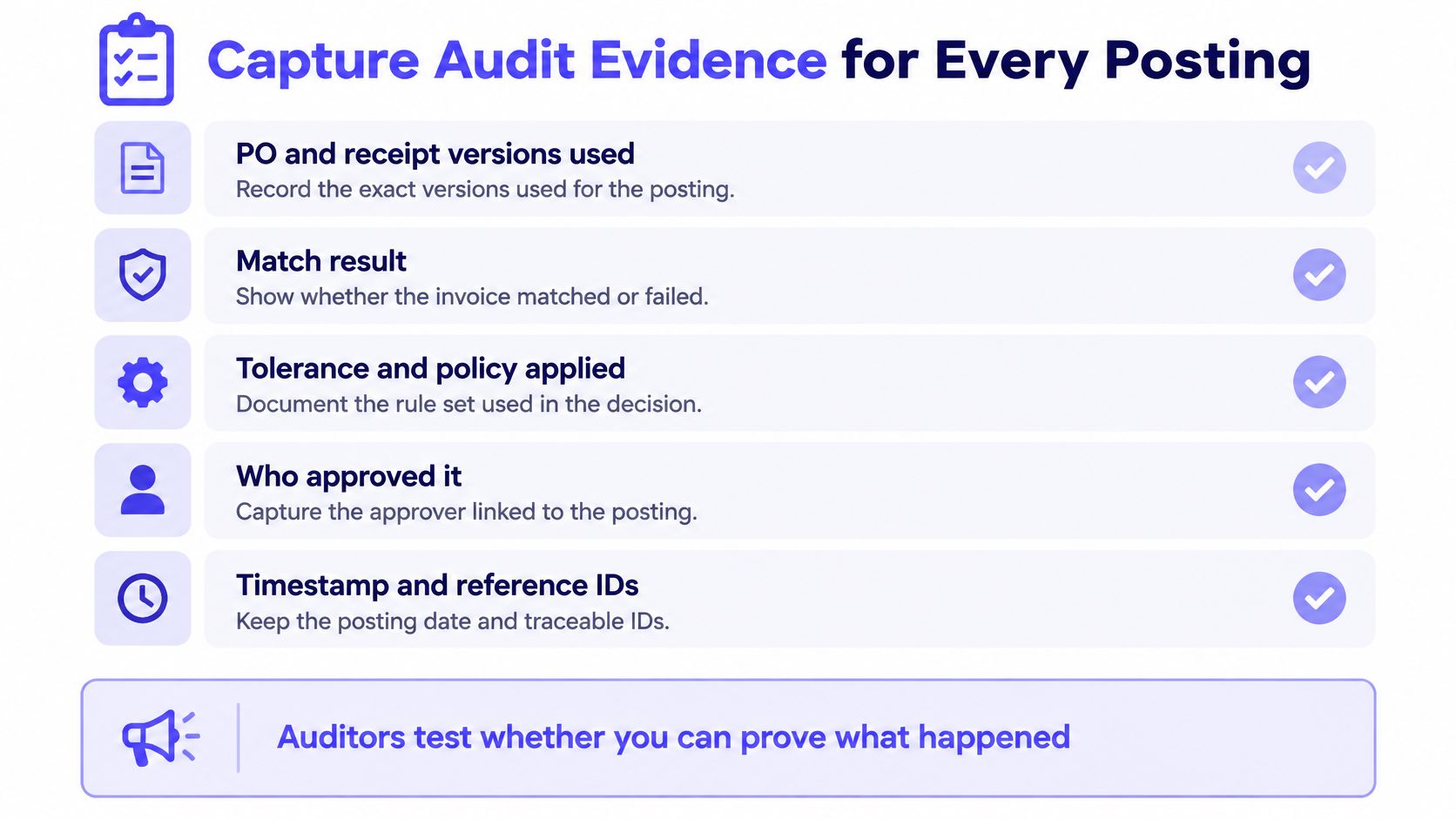
The Workday supplier invoice request documentation describes configurable business processes, security policies, ship-to data, and tax-defaulting rules. Record which configuration applied to each posting. A match result alone does not show whether an exception was routed correctly or which policy governed its release.
| Evidence item | What to retain | Question an auditor asks |
|---|---|---|
| PO and receipt versions | Versions used at match time | Which PO terms and receipt quantity applied? |
| Match result | Pass or exception reason with tolerance applied | Why was this invoice released without review? |
| Policy version | Rule set and tolerance version active on posting date | Which rule governed this posting? |
| Approvals and overrides | Approver, timestamp, and stated reason | Who approved this override, and did they also enter the invoice? |
| Source document | Original invoice or e-invoice file | Does the file match the amount and tax posted? |
| Posted entry | Entry ID and payment link | Can you trace payment back to the source file? |
Version Rules and Preserve the Source Artifact
Keep rule versions distinct. If a tolerance changes, the record for an earlier posting must still show the rule that was active when it was made. Retain the invoice creator and override approver separately, so approval segregation can be reviewed from the evidence.
Attach the original invoice or e-invoice artifact to the Workday record, then reconcile its amount, tax, supplier, and currency to the posting. For retained files, teams can save PDFs without unwanted blank pages, keeping the archived packet readable without changing the underlying evidence.
A public company on Workday runs Loopfour with SOC 1 evidence captured on every workflow run. The record should cover execution as it happens, not only the final approved PDF. That distinction matters when an auditor needs to see how an exception was handled, which approval followed, and what was ultimately written to the system.
The Loopfour explanation of an audit trail process offers a model for organizing that record. Trace one posted invoice backward from payment to its source file. If the evidence does not show the rule, owner, decision, and resulting posting, the exception trail is incomplete.
Start With One Pilot Entity and One Workflow
A Workday accounts payable automation pilot should cover one entity and one invoice source through at least one full month-end cycle. A narrow pilot lets your team verify results by hand and isolate configuration defects. Expansion should wait until postings, exceptions, and evidence hold steady.
Loopfour’s accounts payable automation captures the invoice, matches it against the PO and receipt, routes approvals to the person who owns the spend, and attaches the evidence to the payment. A good first Loopfour workflow for a finance team is usually one that is easy to verify manually. That principle protects the pilot from becoming a broad transformation program before controls are proven.
Stabilize Data Before Activating Rules
Start with supplier email or one PO-backed spend category. Clean duplicate supplier records, obsolete bank details, missing tax defaults, and inconsistent PO references first. Matching rules can’t compensate for unreliable master data.
- Stabilize intake: Use one approved channel and one naming convention for source files.
- Clean supplier master data: Remove duplicates and verify payment and tax fields.
- Activate matching and approvals: Turn on policies only for the pilot entity.
- Compare against baseline: Track cycle time, touchless rate, exception aging, and cost per invoice.
The Workday customer story for OneSource Virtual reports that the Workday customer since 2011 cut AP close time from 5 days to 2 days and reduced vendor inquiries by 97% after optical character recognition and unified financial data took hold. Those figures come from a Workday-published customer account, so they are a reported case outcome rather than an independent industry average.
That result points to synchronized capture, coding, accrual visibility, and reconciliation. Scanning alone doesn’t explain fewer vendor inquiries. Better status visibility and fewer unresolved exceptions do.
Loopfour connects to Workday, NetSuite, Sage Intacct, QuickBooks, Rillet, Salesforce, HubSpot, Stripe, Slack, Microsoft Teams, Box, Dropbox, DocuSign, Ironclad, Google Sheets, and Excel. Keep integrations in the pilot limited to systems needed for that one workflow so failures stay attributable.
Expand only when the pilot holds its numbers and every posting shows complete evidence. Confirm the pilot entity and record the baseline before vendor discussions begin.
Frequently Asked Questions About Workday Accounts Payable Automation
Does Workday Accounts Payable Automation Include Invoice Capture
Yes, Workday accounts payable automation includes invoice capture through the supplier-invoice work area. OCR creates a draft supplier invoice with the original file attached. Your team can edit that draft or submit it for approval.
What Exception Rate Should a Workday AP Team Expect
A Workday AP team should set expectations from its own segmented baseline, not from a vendor target. Ardent Partners’ 2025 benchmark reports an 18.4% average exception rate among organizations with invoice capture and workflow software. Segment the rate by invoice source, entity, supplier, PO status, and exception reason.
Which Workday Invoices Should Never Be Posted Touchless
An invoice should never post touchless when its match can’t be traced to a PO, receipt, tolerance, and policy version. Duplicate invoices must be blocked and linked to the original. Non-PO invoices need an approved justification from the budget owner.
Who Should Approve a Workday Supplier Invoice
The owner of the spend should approve a Workday supplier invoice. Workday routing can use company, cost center, spend category, supplier, and other worktags under predefined approval logic. Override approvers should be separate from invoice entry staff.
How Long Should a Workday AP Automation Pilot Run
A Workday AP automation pilot should run for at least one full month-end cycle. Compare cycle time, touchless rate, exception aging, and cost per invoice against the recorded baseline. Expand only after evidence remains complete for every pilot posting.
What Evidence Do Auditors Need for Each Workday AP Posting
Auditors need the PO and receipt versions, match result, tolerance and policy version, approvals and overrides, source invoice or e-invoice file, and posted entry ID. The payment should trace back to the source file without manual reconstruction. Missing policy version data is a control gap, even when the amount is correct.
Bring one Workday entity, one invoice source, and a recorded baseline to Loopfour, and turn that pilot into a deterministic workflow with owner-routed exceptions and evidence on every run. Your team keeps Workday as the system of record while Loopfour makes each match, approval, override, and write-back auditable.