
Your AP inbox holds 340 unread messages, one supplier has sent the same statement three times, and the controller wants to know why a $4,300 invoice was paid twice last quarter. Somebody on your team is about to open a PDF, retype the vendor name into the ERP, and email a budget owner who is on holiday.
Accounts payable invoice processing software replaces that loop with a governed pipeline. It captures the supplier invoice, applies your predefined rules, matches it to a purchase order and receipt, routes the approval to the person who owns the spend, posts the bill to the ledger, and keeps the evidence for every step. The buying decision isn’t really about how well the tool reads a PDF. It’s about what the tool does after capture: how it handles exceptions, who it asks for approval, what it writes to your ERP, and what your auditors can see six months later.
Table of Contents
- What Accounts Payable Invoice Processing Software Does
- What Manual Invoice Processing Costs Your Team
- Core Features That Separate Real Automation From OCR
- A Worked Example
- Invoice Rules and Audit Controls to Encode
- Choose Software by Testing It Against Your Own Invoices
- Integration Patterns and Rollout for Mid-Market and Enterprise Teams
- Frequently Asked Questions About AP Invoice Processing Software
What Accounts Payable Invoice Processing Software Does
Accounts payable invoice processing software captures supplier invoices, checks them against your rules, matches them to purchase orders and receipts, routes approvals, posts the bill to your ERP, and keeps evidence for each step. That definition describes seven jobs, not one, and most purchase mistakes come from buying only the first two.
Think of it as a security checkpoint. Every invoice walks the same lane in the same order. Nothing skips a screen. Anything flagged goes to a named officer instead of a shared mailbox, and every scan is logged against the document that produced it.
- Receive. Invoices arrive by email attachment, supplier portal upload, EDI feed or an e-invoicing network. One intake point beats five.
- Capture. The system extracts header fields (vendor, invoice number, dates, totals, currency) and line-item fields.
- Validate. Required identifiers, tax fields and duplicate candidates get checked before anyone is asked to approve anything.
- Match. The invoice is matched to the purchase order and the goods receipt, inside tolerances you set.
- Route. Approval goes to the budget owner by amount, entity and cost center, with delegation rules written down.
- Post. The coded bill and journal entry are written to the ledger, and that write is logged.
- Release and archive. Payment is released under a separate role, and the source document is stored with the rule version that cleared it.
The four-stage view below compresses the same pipeline:
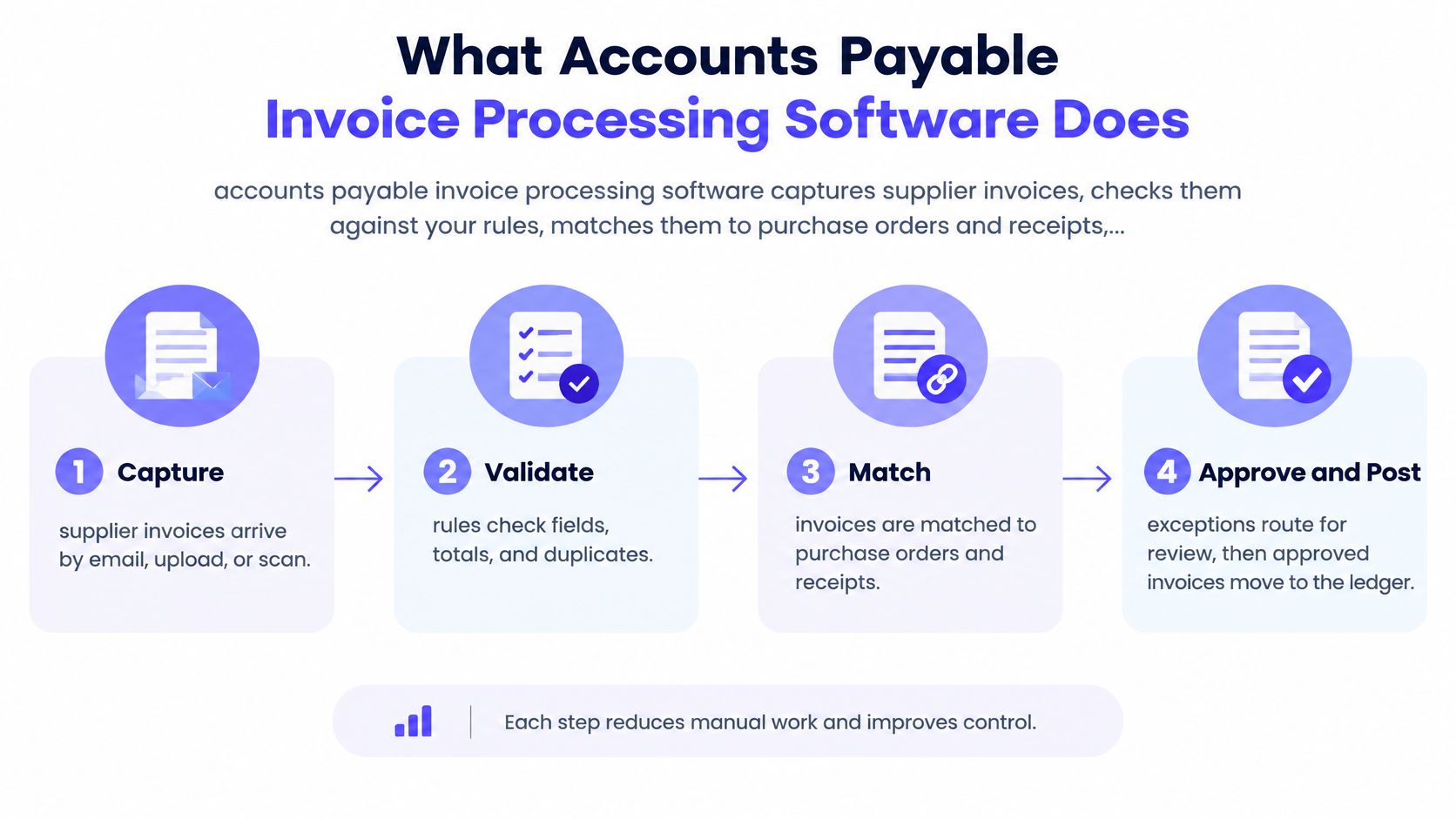
The distinction that decides most purchases is between a digitizing tool and a controlled workflow. A digitizing tool turns PDFs into a queue and hands the queue to a human. A controlled workflow decides, records and proves each decision, then sends only the exceptions to people.
Four groups use the output daily: AP clerks who clear exceptions, controllers who own the close, budget owners who approve spend, and CFOs who need the liability visible before month end. All four judge the software by what happens after capture. If you’re mapping the finance side first, a bill payment guide for small businesses from Book Tech LLC covers the payment half of the cycle that sits downstream of invoice processing, which helps you scope where the software’s job should end.
What Manual Invoice Processing Costs Your Team
Manual invoice processing runs about $9.40 per invoice on average. Best-in-class organizations run about $2.78. The spread is roughly $6.62 per invoice, a 70% gap, and it doesn’t come from software licences. It comes from touches.
Ardent Partners’ 2025 benchmark figures, set out in WEX’s breakdown of AP invoice benchmarks, put the two populations side by side.
| Metric | Overall average | Best-in-class |
|---|---|---|
| Cost per invoice | about $9.40 | about $2.78 |
| Processing cycle time | 9.2 days | 3.1 days |
| Invoices needing exception handling | about 14% | about 9% |
At 100,000 invoices a year, that cost difference is about $662,000 annually, before payment discounts, late-payment penalties, duplicate payments or the opportunity cost of staff time. Cycle time matters as much as cost, because a 9.2-day average is six days of supplier goodwill you don’t have.
The labor picture is just as blunt. SAP Concur’s 2025 AP automation trends report found that 52% of AP professionals spend fewer than 10 hours a week processing invoices, while 60% still manually enter invoices into an ERP or accounting system. Few people, doing it by hand, at volume.
Why does cost per invoice climb so fast? Every re-keyed field adds a touch. Every approval chased by email adds a day. Every exception resolved twice adds a correction further downstream. A $9.40 average is a blend, and a non-PO invoice from a new supplier with a missing tax identifier sits well above it.
Set your own baseline first: count invoices, hours and elapsed days from receipt to posting for one full month, and keep the spreadsheet. Vendor comparisons mean nothing without a starting point.
Benchmarks move with invoice complexity, labor markets, ERP configuration and the way each organization defines an exception, so treat them as a reference point rather than a target you can bank. The wider cash-flow and close-time case sits in these accounts payable automation benefits.
Core Features That Separate Real Automation From OCR
Most AP tools automate capture. Very few automate the controlled workflow behind it, which is why the phrase “we’re automated” so often means “we scan faster than we used to.”
Survey numbers make the gap concrete. In a 2026 survey reported by Datacentre Solutions, 31% of organizations described AP as fully automated, yet 66% said their automation was largely limited to OCR and invoice digitization, and only 6% reported end-to-end operations powered by agentic AI. The same reporting puts average touchless processing at 32.6%, the exception rate at 14%, and manual ERP entry at 60% of invoices.
Loopfour, the deterministic finance workflow automation platform, treats capture as the entry point rather than the product. Its accounts payable automation captures the invoice, matches it against the PO and receipt, routes approvals to the person who owns the spend, and attaches the evidence to the payment.
The question to ask in a demo: what percentage of invoices complete without human rework, and what happens to the ones that don’t?
Those seven capabilities are where the answer lives. Each one needs a verification check you can run on real invoices.
- Invoice capture. It reads PDFs, e-invoices and emailed attachments into structured fields. Verify field-level confidence scores and that low-confidence fields route somewhere, rather than being accepted without review.
- Validation. It checks required identifiers, tax fields and duplicates before routing. Verify the rule list is editable and versioned, so a rule change can’t alter last quarter’s outcomes.
- PO and receipt matching. It matches the invoice to the purchase order and goods receipt. Verify the tolerance thresholds are published and that unmatched lines have a defined path.
- Approval routing. It sends approvals to the budget owner by amount, entity or cost center. Verify approver identity, timestamps and delegation rules per step.
- ERP posting. It writes the bill, coding and journal entry to the ledger. Verify posting logs, failed-write retries, and reconciliation back to the ledger rather than to a dashboard.
- Payment release. It passes approved invoices to payment runs. Verify approve and pay are separate roles held by separate people.
- Evidence retention. It stores the source PDF, rule version and change history. Verify the retention period matches your policy and that auditors can export the record themselves.
A feature is real only when a reviewer can see what the software decided and why.
A Worked Example
A mid-size invoice with one clean variance usually needs three human touches. The other four steps run on predefined rules. Here’s how that looks end to end, with every number illustrative.
Say a packaging supplier sends an $18,400 invoice as a PDF by email.
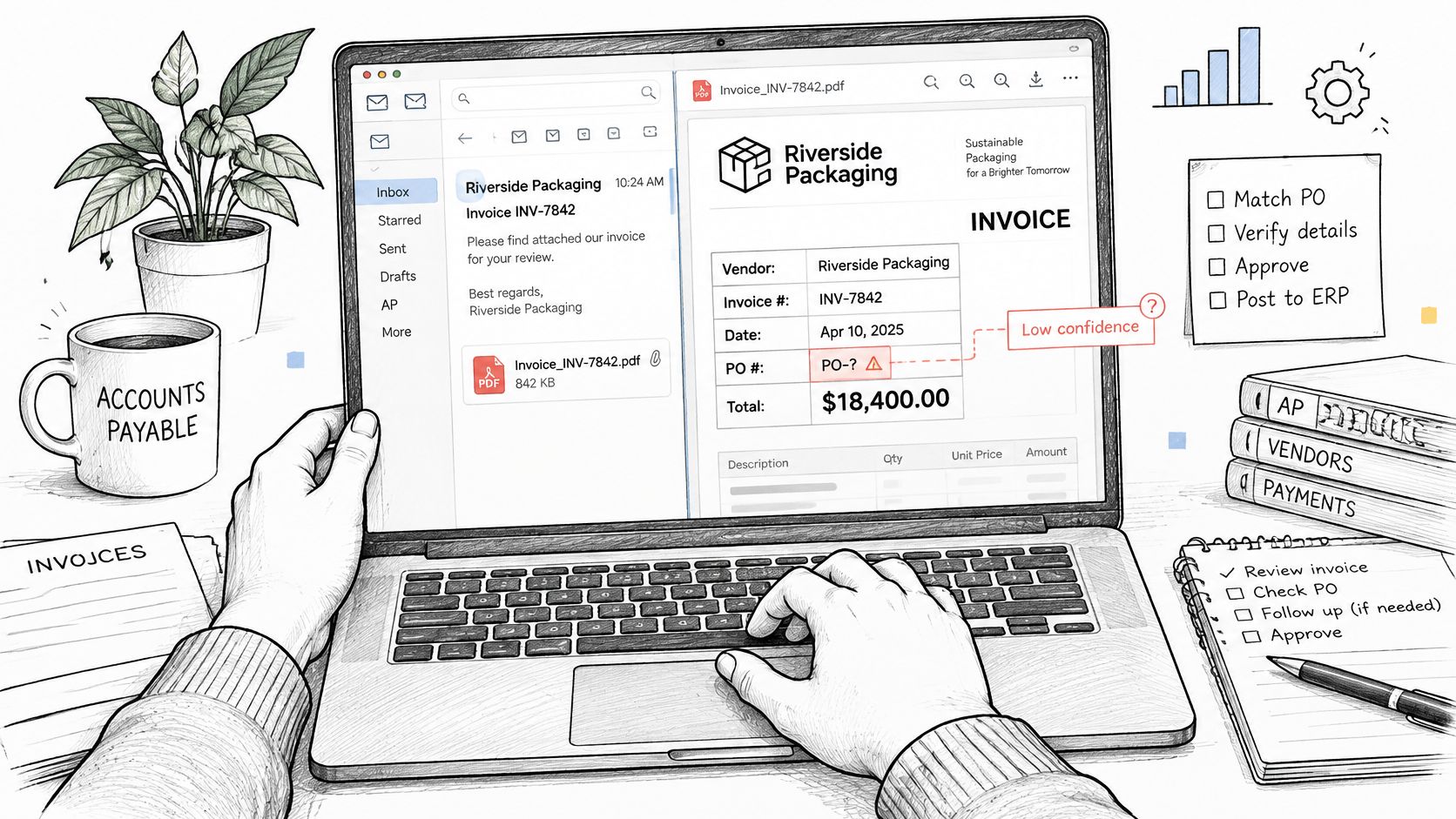
- Capture. Vendor, invoice number, date and total read cleanly. The PO number field scores low confidence, so it routes to an exception queue. Human touch one.
- Validation. The vendor master record is confirmed and no duplicate is found. No human touch.
- Matching. An $18,160 purchase order sits behind the invoice. The $240 difference is above the $200 tolerance, so a buyer reviews it. Human touch two.
- Approval. The budget owner approves the variance in writing, with a timestamp. Human touch three.
- Posting. The bill is coded to the cost center and the journal entry is written to the ERP. No human touch.
- Payment release. The payment run proceeds only after the system confirms approve and pay are different people. No human touch at the release itself.
- Evidence. The source PDF, rule version and every approval are stored against the record. No human touch.
Three of seven steps needed a person. Four ran on rules. That ratio is the whole argument for deterministic routing, and it holds at volume. For Everyset, a film and TV background casting and payroll company, Loopfour processes 100+ invoices a day across two QuickBooks entities with no manual data entry, while people review the flagged exceptions and approve each daily batch before it posts.
Run the same audit on your own work. Map your last ten invoices against these seven steps and count how many needed a person. If the answer is seven out of ten, the problem was never capture accuracy.
Invoice Rules and Audit Controls to Encode
Encode the rules before routing, not after an auditor finds the gap. Three control groups do the work: validation (required fields are present), segregation (the creator, approver and payer are different people) and evidence (each decision records the approver, rule version and timestamp).
The rules an invoice must pass
The U.S. Prompt Payment framework defines a proper invoice as payment documentation containing specific fields, including the vendor name, invoice date, government contract number or other delivery authorization, and the vendor invoice number or account number, per the Treasury’s Prompt Payment rule. Missing information can make an invoice improper and delay payment, so validate identifiers before routing. Under the Prompt Payment FAQs, agencies generally pay a proper invoice within 30 days after receipt unless the contract sets another due date or discount terms apply, which turns receipt timestamps and discount dates into workflow data rather than paperwork.
The Federal Acquisition Regulation on prompt payment adds two mechanics worth copying in any sector: a designated billing office must return a noncompliant invoice within seven days of receipt, with shorter deadlines for certain food-related contracts, and payment must be supported by a receiving report or other documentation authorizing it. For EU invoices, the European Commission’s VAT invoicing rules list the required content, including the issue date, unique sequential number, customer VAT identification number where applicable, VAT rate, VAT amount and VAT breakdown.
| Requirement | Source | What the Software Should Check |
|---|---|---|
| U.S. federal proper invoice | Prompt Payment rule, 5 CFR 1315 | Vendor name, invoice date, contract or delivery authorization number, invoice or account number |
| Noncompliant federal invoice | Federal Acquisition Regulation | Return within 7 days of receipt by the billing office |
| Federal payment timing | Prompt Payment FAQs | Pay within 30 days unless contract terms or discounts apply |
| Federal payment support | Federal Acquisition Regulation | Receiving report or equivalent documentation attached before release |
| EU VAT invoice content | EU VAT invoicing rules | Issue date, sequential invoice number, VAT rate, VAT amount and customer VAT ID when applicable |
| Separation of duties | Your internal control policy | Creator, approver and payer roles are different people |
| Vendor bank change | AFP 2025 Payments Fraud and Control Survey | Independent verification before payment details change |
Where error cost actually lands
A Qvalia analysis of 20,872,182 purchase invoices processed in 2020 by 100 large Nordic organizations found 21,569 invoices incorrectly handled or posted and passed undetected into accounting, equal to 0.10% of the total. After estimating that internally detected errors ran about five times the escaped number, the study put total erroneous invoices at 0.52%, with an estimated 22.5 working days each spent correcting them.
Fraud closes the loop. The 2025 AFP Payments Fraud and Control Survey found that 65% of organizations reported attempted or actual payment fraud, across 521 corporate practitioner responses. Vendor-master and bank-detail changes therefore belong inside the workflow from day one, with independent verification recorded.
If a control can’t be shown in the record, it doesn’t exist as far as the auditor is concerned.
The approval sequence itself is worth writing down before anyone configures anything. This walkthrough of the AP invoice approval process is a usable starting model for who signs at each threshold.
Choose Software by Testing It Against Your Own Invoices
A clean invoice can still stall after capture. Test software on whether it matches the PO and receipt, routes approval to the right owner, posts correctly to the ERP, and retains evidence for each decision. OCR accuracy matters, but it does not show how much work remains after extraction.
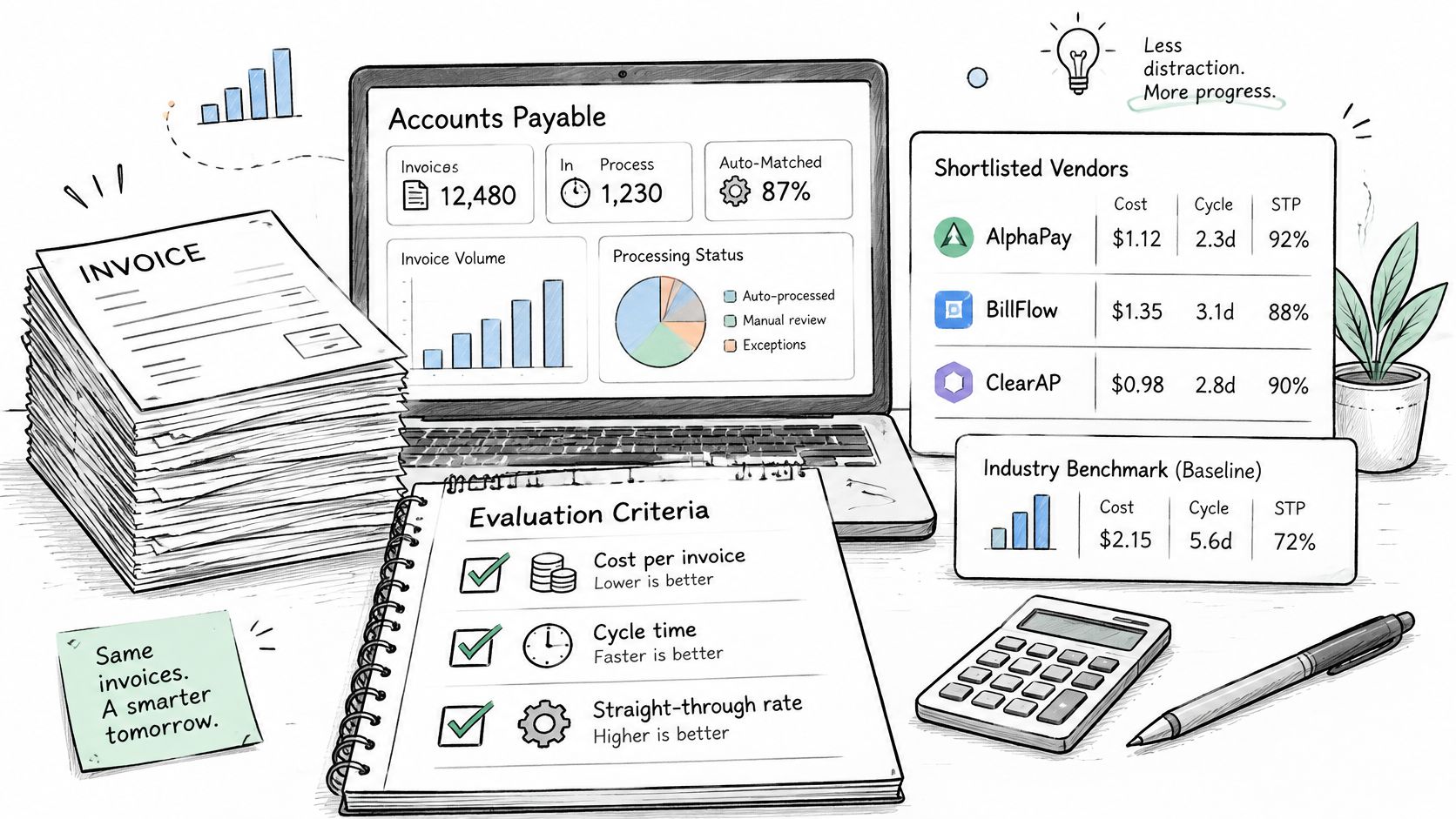
Ardent Partners’ benchmark work also finds that best-in-class teams enable 1.4 times more suppliers for electronic invoicing and process more than 1.8 times as many invoices straight through as peers, according to its State of ePayables AP benchmarks and best-in-class performance analysis.
Those results depend on the workflow around capture. Electronic invoices reduce scanning and keying; PO matching and approval routing reduce repetitive handling. People still need a clear queue for low-confidence extractions, unmatched orders, price variances, possible duplicates, and policy exceptions. Confirm that the system records what happened to each exception and who resolved it.
| Criterion | What to Require | Red Flag |
|---|---|---|
| Cost per invoice | Baseline and post-go-live cost measured per invoice | Pricing discussed only by seat count |
| Cycle time | Elapsed days from receipt to posting, with a before-and-after baseline | Speed claims with no starting point |
| Straight-through rate | Share of invoices passing without human touch, reported by supplier | One headline number for all invoices |
| Exception rate by cause | Exceptions classified by root cause and time to resolve | Exceptions counted but not classified |
| Pricing model | Cost basis stated per invoice, per entity or per volume tier | Fees that vary by unstated usage |
| ERP write verification | Posted entries reconciled back to the ledger | Manual re-keying after approval |
| Pilot on your invoices | Results on a sample of your own suppliers and entities | Demo data only |
Use the short video below to frame workflow questions before a vendor call. Focus on how exceptions, approvals, ERP writes, and audit evidence work in practice.
Run a controlled pilot:
- Pull a sample of 200 recent invoices from your three largest suppliers.
- Run every shortlisted vendor against the same sample.
- Score results against a baseline from a month of your own data.
- Confirm each automated action appears in the audit record, with approver identity and rule version.
- Proceed only if the pilot beats the baseline without weakening a control.
A faster process is not a better process if exceptions disappear from view. Check that approved invoices post as expected, and that auditors can trace the source invoice, approval, and decision behind each posting.
Integration Patterns and Rollout for Mid-Market and Enterprise Teams
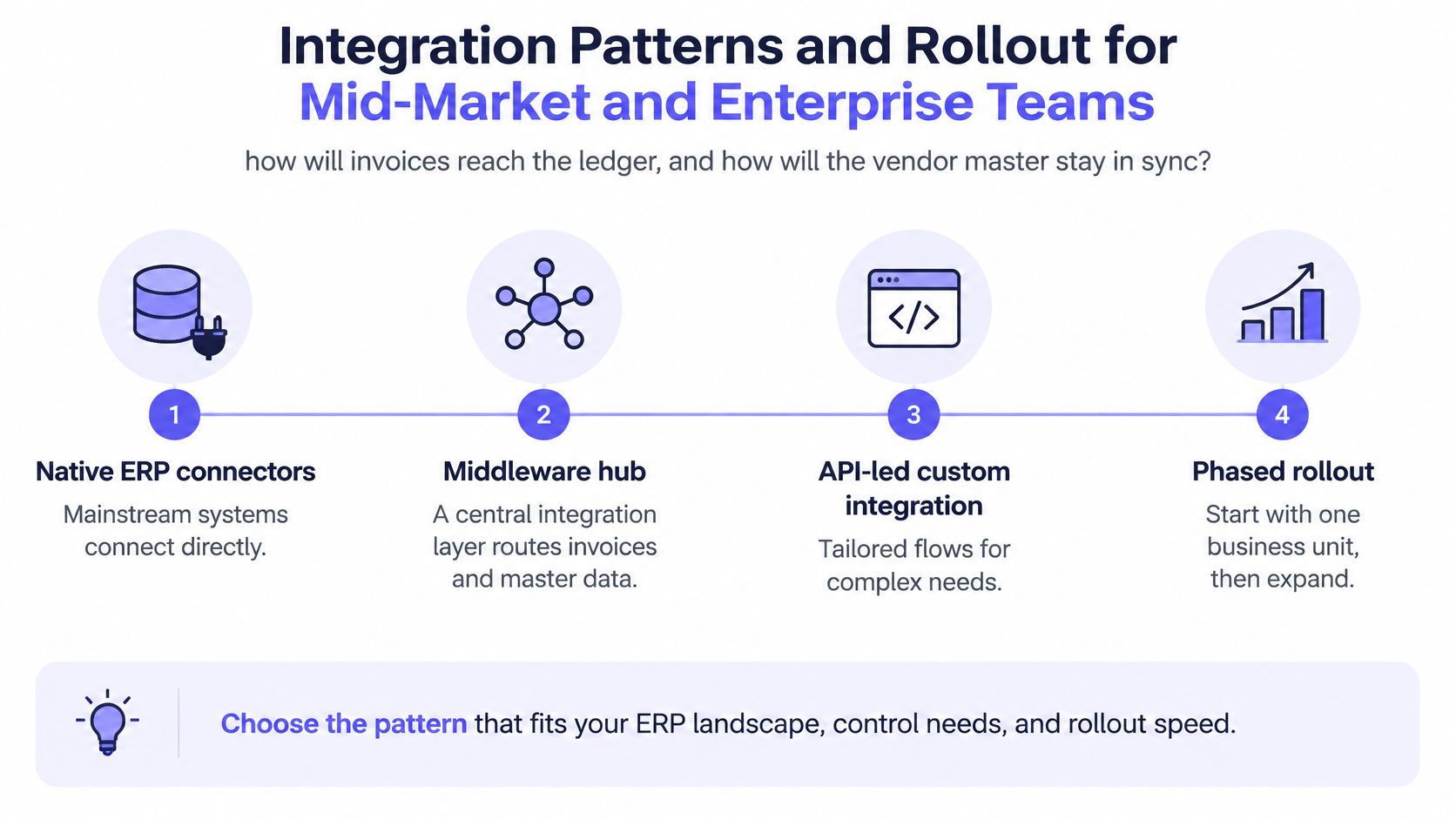
Two questions decide the architecture: how invoices reach the ledger, and how the vendor master stays in sync. Everything else is scheduling.
| Pattern | Best Fit | Main Trade-off |
|---|---|---|
| Native ERP connector | Mainstream ERPs such as NetSuite, Sage Intacct or QuickBooks | Fastest to deploy; limited to the connector’s scope |
| Custom API integration | Homegrown ERPs or unusual posting rules | More build effort; API key management needed |
| Secure browser automation | Legacy systems with no API | Keeps logs and permissions; depends on screen layout |
| Scheduled batch upload | Low-volume teams with tight budgets | Simple to run; delays posting and slows exception handling |
Pick by ERP environment first, control needs second, rollout speed third. A batch upload will run next week and frustrate everyone by the second month, while a custom API build takes longer and outlasts three process changes.
A three-phase rollout that doesn’t stall
Phase one sets the baseline and pilots a single clean supplier group with electronic invoices and clean purchase orders. The goal is a measurable straight-through rate, not coverage.
Phase two adds PO matching and approval routing for one legal entity. Tolerance thresholds and delegation rules get tested against real spend owners, and most rework rules get written.
Phase three extends to every entity and raises touchless thresholds only when false approvals stay under your control tolerance.
Security belongs in phase one, not phase three. Loopfour encrypts data at rest and in transit, and every API request requires an API key sent in the x-api-key header. Those are table stakes, not differentiators, so ask any vendor the same two questions before you discuss price.
Hold payment release until exception routing and ERP write verification work in production. Approvals that misfire are recoverable; payments that misfire are a recovery project.
If your team is still mapping systems, this explanation of enterprise application integration covers how invoice data, master records and posting rules move between platforms without a rebuild.
Frequently Asked Questions About AP Invoice Processing Software
What is accounts payable invoice processing software?
It’s the system that captures supplier invoices, checks them against predefined rules, matches them to purchase orders and receipts, routes approvals, posts the bill to the ERP and keeps evidence for each step. Its job ends at a posted, paid and auditable ledger entry, not at a searchable PDF archive.
Is OCR enough to automate accounts payable?
No. OCR digitizes invoices. Controlled workflow also covers validation, PO matching, exception ownership, payment authorization, ERP posting and audit evidence. A team that buys OCR alone still chases the same approvals, just with cleaner text.
What does manual invoice processing cost per invoice?
Ardent Partners’ 2025 figures put the average near $9.40 per invoice, against about $2.78 for best-in-class organizations. The gap is mostly labor: re-keying, approval chasing and exception resolution across finance and business teams.
Does the software stop bank-detail fraud?
It can, if it requires independent verification before vendor payment details change and keeps that check in the record. The 2025 AFP Payments Fraud and Control Survey found 65% of 521 corporate practitioners reported attempted or actual payment fraud, so the control needs to be configured, not assumed.
How long do U.S. federal agencies have to pay an invoice?
Generally 30 days after receiving a proper invoice, unless the contract sets another due date or discount terms apply. Invoice receipt timestamps and payment-term logic belong in the workflow so the clock is calculated, not estimated.
Should payment release be automated first?
No. Automate payment release only after exception routing and ERP write verification work in production. Capture and matching produce the visible savings; releasing payment is the step where a misconfigured rule becomes money out of the door.
Loopfour builds invoice processing as deterministic, auditable workflow code that runs on the ERP and accounting systems already in place, from capture through PO and receipt matching, approval routing to the spend owner, and a retained evidence trail behind every posting. When your pilot shows where the human touches cluster, that’s the workflow worth rebuilding first. Visit Loopfour to see how the workflow is defined, reviewed and handed to your auditors.