
Accounts payable is the workflow a business uses to verify what it owes suppliers, approve those amounts, make payments, and update its accounting records. The function remains high volume, with 60% of AP teams handling more than 1,000 invoices per month and 23% processing over 10,000, according to a 2026 AP statistics compilation.
At month-end, the familiar scene is rarely a clean queue of invoices waiting for payment. A supplier has emailed a revised invoice. A purchase order has the wrong quantity. A manager is away. Someone has changed bank details in a spreadsheet, but nobody can show who approved the change. The payment run is ready, yet the evidence is not.
That gap explains why the textbook answer to what is accounts payable process feels incomplete. The visible work is invoice capture and payment. The difficult work is controlling exceptions, proving authorization, and keeping supplier communication from becoming an undocumented parallel workflow.
By Daniel Mercer, Finance Operations Lead
Table of Contents
- What the Accounts Payable Process Is
- The Traditional Invoice-to-Payment Workflow
- Deterministic Workflows vs Probabilistic Automation
- The Hidden Cost of Manual Exception Handling
- Building Auditable Approval Gates and Controls
- Measuring Success with AP KPIs and SLAs
- Use a KPI set that explains causes
- Turn SLAs into operating rules
- What is the accounts payable process?
- Why does the accounts payable process fail in practice?
- What is a three-way match in accounts payable?
- Which accounts payable KPIs matter most?
- Should AI approve accounts payable invoices?
- How can AP teams improve supplier follow-up?
What the Accounts Payable Process Is
A payment run can be ready while a supplier dispute remains unresolved, a missing receipt blocks matching, or a bank-detail change waits in an email thread. These exceptions delay legitimate payments and create supplier friction. They also leave finance teams reconstructing who decided what, and why.
The textbook answer to what is accounts payable process stops at invoice capture and payment. The operating process is broader: it records and settles supplier obligations while controlling exceptions, authorization, evidence, and communication.
A practical AP process begins before an invoice arrives. Supplier records need controlled creation, review, and change permissions. The Sage accounts payable process guide identifies supplier master access as a key control, particularly when payment details change. That control should separate the person requesting a change from the person approving it and preserve the approval record.
The process then connects these decisions:
- Supplier setup: Validate the supplier and record approved payment information.
- Invoice receipt: Accept invoices through an approved channel and retain the receipt record.
- Validation and coding: Check required fields, duplicates, accounting codes, and supporting documents.
- Matching: Compare the invoice with purchasing and receiving evidence.
- Approval: Route the obligation to the correct budget owner and retain authorization.
- Payment scheduling: Apply agreed terms and select an approved payment method.
- Reconciliation: Post the payment, match it to the liability, and retain the supporting evidence.
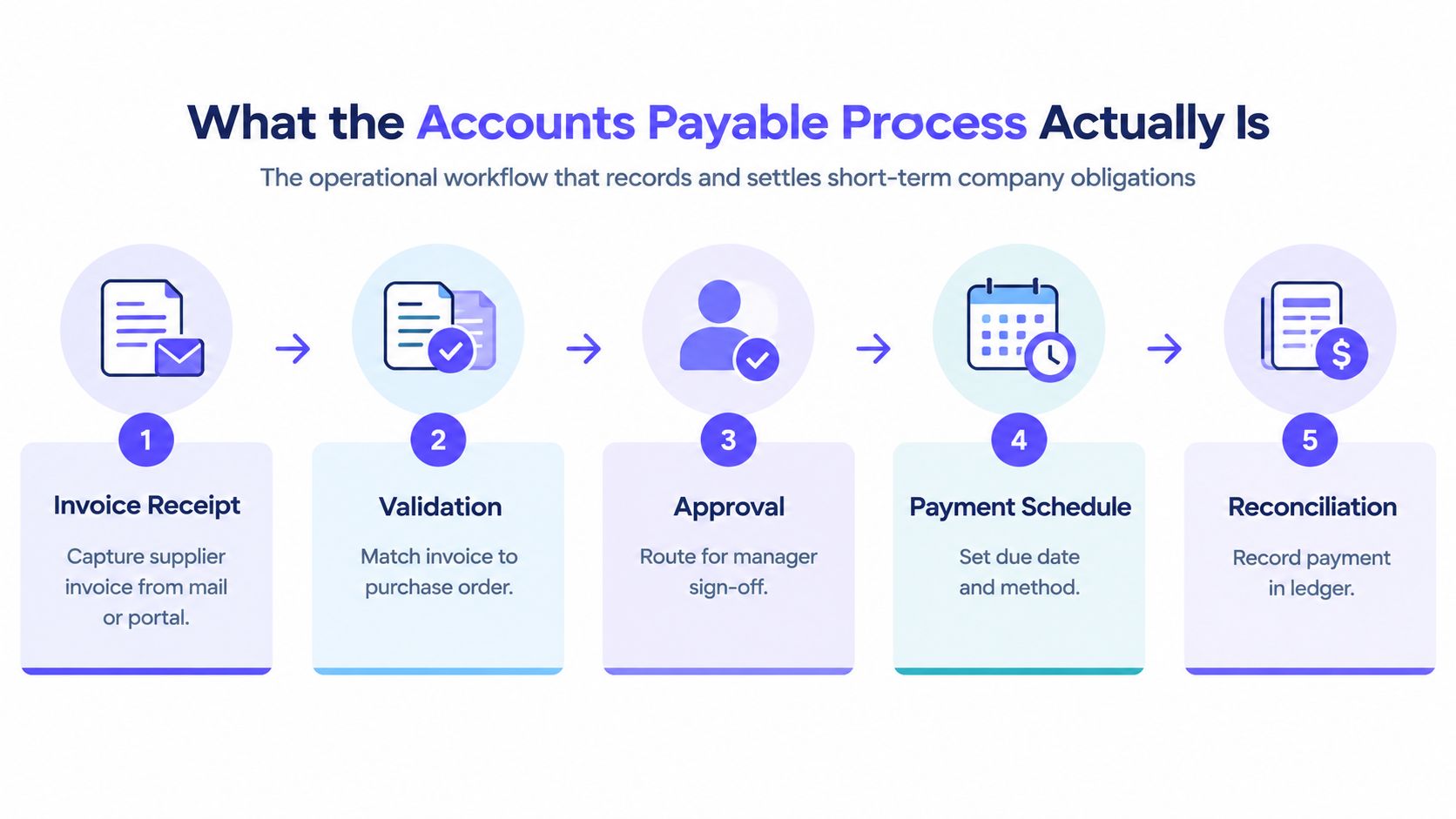
The accounts payable training manual from California State University San Marcos describes transaction-level records that preserve invoice and payment history, including dates, voids, changes, and payment status. An audit-ready balance therefore needs its supporting trail, not only the final ledger entry.
Practical rule: A payable is ready for payment when validity, authorization, matching, and payment evidence are connected.
Operating models change the control burden. A local business may use one ERP and a short approval chain. A shared-services organization may manage several entities, currencies, submission channels, and systems. Teams handling cross-border documentation need supplier bank-detail verification and multi-currency tolerance rules before payment release, as outlined in AP automation for South African exporters.
Manual workflows amplify supplier questions because each exception depends on someone finding the right email, attachment, or approver. What accounts payable automation means in practice explains how automation can route these cases while preserving the decision record. AP records an obligation. Controlled AP proves why it exists, who authorized it, and why payment was released.
The Traditional Invoice-to-Payment Workflow
A supplier sends a PDF to a shared inbox, follows it with a credit note through a portal, then submits a corrected invoice with the original reference. The invoice exists, but the process can still lose ownership, duplicate records, or delay payment. The traditional workflow moves through receipt, capture, matching, approval, payment, and reconciliation. Manual handoffs create the audit gaps and supplier friction that make this sequence difficult to control.
Each stage below names the control that must exist and the failure that appears when it does not.
| Stage | Required control | Common manual failure |
|---|---|---|
| Invoice receipt | Approved intake channel and timestamp | Invoices disappear in shared inboxes |
| Data capture | Supplier, amount, date, and coding validation | Re-keying introduces inconsistent records |
| Matching | Purchase order and receipt comparison | Exceptions sit without a clear owner |
| Approval | Policy-based routing and evidence | Approvers act through undocumented email |
| Payment execution | Authorized batch and bank controls | Payment status becomes difficult to trace |
| Reconciliation | Ledger and payment record alignment | Open items remain after settlement |
Systemized AP reporting should retain invoice history by vendor, invoice number, payment date, and status. That record is the operational spine of the process. Without it, finance teams reconstruct events from email threads, spreadsheets, and bank exports, leaving gaps between the accounting entry and the evidence supporting it.
Where the handoffs break
Receipt is the first pressure point. Different formats and channels force staff to identify whether a document is an invoice, credit note, or correction. A corrected invoice may carry the same reference as the original, and manual teams often resolve the difference by memory.
Matching creates a second fault line. A purchase order may show one quantity, the receiving record another, and the invoice a third. Someone must decide whether the variance is acceptable. If the decision is not recorded with an owner and reason, the exception can return during the next supplier query or audit.
Approval adds a separate control question. An invoice may be valid and correctly matched yet lack authorization from the person who owns the spend. A shared inbox provides visibility, but it does not establish ownership.
Payment execution adds timing pressure. Payment terms can include due upon receipt, fixed dates, net terms, proximate dates, split terms, discounts, and discount due dates, as described in Oracle’s payment terms documentation. A spreadsheet may calculate dates, but it does not reliably restrict changes or preserve the reason for one.
A governed invoice processing automation workflow treats each handoff as a controlled state change. The record should show its current stage, the next owner, the evidence supporting the decision, and the action required when an expected input is missing. That structure reduces repeated supplier questions and gives finance a traceable path from invoice receipt to settlement.
Deterministic Workflows vs Probabilistic Automation
Deterministic finance automation executes predefined rules in a repeatable sequence, while probabilistic automation interprets inputs and may produce variable outcomes. AP teams should use interpretation where judgment is needed, but payment controls should remain deterministic, auditable, and predefined.
The distinction matters most at the release-of-funds boundary. A system may use document interpretation to read an invoice. The next steps should still apply a known matching policy, route the exception to a named owner, require the correct approval, and preserve the execution evidence.

The control difference
A deterministic workflow answers the same questions every time:
- What input was received?
- Which rule was applied?
- Which person or system approved the next step?
- What changed in the accounting or payment system?
- What evidence was retained?
A probabilistic tool may be helpful when an invoice has an unusual layout or ambiguous description. It should not decide on its own that a discrepancy is immaterial. Your auditors want the decision to hold up. That requires a visible policy, a recorded tolerance, and an escalation path.
A three-way match compares the purchase order, goods receipt, and supplier invoice before payment release. The GEP guide to three-way matching notes that organizations can use exact reconciliation or a predefined tolerance, with leadership setting matching requirements, approval hierarchies, escalation rules, first-pass match rate, and exception aging.
A useful division of labor is simple. Let interpretation assist with messy documents. Let deterministic code govern money movement.
The trade-off is not between innovation and control. The trade-off is between flexible assistance at the front of the workflow and uncontrolled judgment at the end. Finance teams can use banking efficiency tips from Visbanking when evaluating broader automation opportunities, but AP still needs explicit payment gates.
Deterministic finance workflows make that boundary concrete. Loopfour, the deterministic finance workflow automation platform, runs predefined steps across existing finance systems, routes exceptions to owners, and retains execution evidence. Its AI Copilot can support interpretation, while the workflow itself remains governed by permissions, approval gates, version history, and change controls.
The skeptic’s question is valid: what happens when the rule is wrong? A deterministic workflow does not eliminate policy risk. It makes policy visible, testable, and changeable through an approved process. That is safer than allowing an opaque action to drift without a clear record.
The Hidden Cost of Manual Exception Handling
Invoice exceptions are the main bottleneck in AP. Clean invoices move through the happy path, while mismatches, missing receipts, supplier questions, and approval delays create the manual workload that determines cycle time and cost.
Benchmark data makes the pressure visible. Ardent-based reporting cited an average invoice exception rate of 19.9% in 2026, compared with 11.8% for best-in-class teams. The same benchmark reported an average processing cost of $9.90 per invoice, compared with $2.67 for best-in-class organizations in Corpay’s AP productivity benchmark coverage.
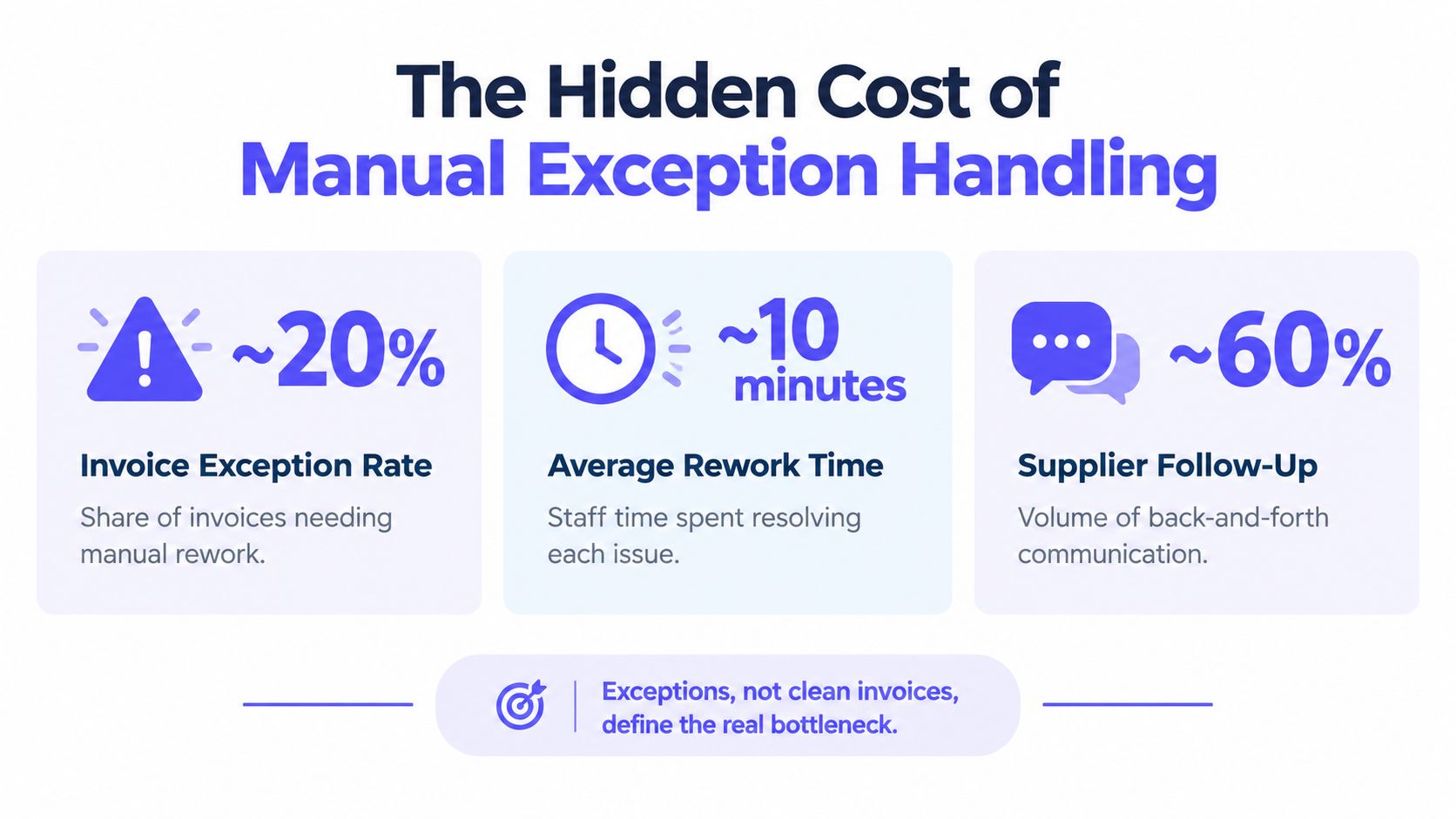
The numbers point to a process problem, not a staffing problem. Each exception creates several activities:
- Diagnosis: A finance specialist identifies whether the issue concerns price, quantity, receipt, coding, supplier identity, or approval.
- Follow-up: The specialist contacts procurement, receiving, the budget owner, or the supplier.
- Decision: Someone determines whether to correct the document, approve a tolerance, request a credit, or reject the invoice.
- Rework: The invoice is updated, resubmitted, rematched, and sometimes reapproved.
- Evidence capture: The final decision must remain attached to the transaction.
Why shared inboxes amplify friction
A shared inbox records that a message arrived. It does not establish an exception owner or enforce a response path. A spreadsheet may show that an invoice is pending. It does not reliably show whether the supplier has been contacted, whether a revised document is expected, or whether the payment date has changed under policy.
Supplier friction grows from that uncertainty. Suppliers ask for status because they can’t see whether an invoice is awaiting receipt confirmation, approval, correction, or payment scheduling. AP staff then spend time answering questions that a governed status history should answer.
Exception principle: An exception should leave the clean payment path immediately, carry its evidence with it, and return only after the defined condition is satisfied.
A deterministic exception workflow assigns the discrepancy to the correct owner with the invoice, purchase order, receipt, policy rule, and prior actions attached. It can pause payment without losing the transaction’s place in the queue. It can also distinguish a genuine data problem from a missing approval, which prevents every delay from becoming an informal investigation.
The embedded video below provides additional context on the accounts payable process and its operational challenges.
The practical objective isn’t to force every invoice through automation. It is to keep clean invoices moving and make difficult invoices structured, visible, and accountable.
Building Auditable Approval Gates and Controls
Auditable AP controls place a predefined decision gate before every material action. The strongest design limits access, validates evidence, routes approval by policy, and records every change without relying on one experienced employee’s memory.
A control framework should begin with the supplier master. Restrict who can create or edit supplier records. Require verification for sensitive payment-detail changes. Separate the person who maintains supplier data from the person who approves payment where the operating model allows it.
Define the gates before selecting the tool
A workable approval design answers five questions:
- Validity: Does the supplier and invoice represent a real obligation?
- Completeness: Are the purchase order, receipt, invoice, and coding records present?
- Matching: Do the required documents reconcile under the approved tolerance?
- Authorization: Has the correct spend owner approved the liability?
- Release: Is the payment batch authorized and recorded?
The gate should produce a clear outcome. “Pending review” is not enough. The system should state whether the invoice is awaiting a receipt, an approver, supplier correction, or a policy decision.
Recent survey data shows 66% of AP teams still manually enter invoice data, while 78% report stress from poor AP processes. The same survey found 44% plan full automation within a year, yet 21% say automation isn’t a priority, according to the Accounts Payable Automation Trends report. The contrast suggests that adoption alone won’t fix weak controls. Teams must redesign ownership and exception handling alongside technology.
Preserve the evidence chain
Versioned workflow definitions reduce key-person risk. A controller should be able to see which rule was active when an invoice was approved, who changed the rule, and whether that change passed the required review.
Legacy systems create a practical challenge because they may lack APIs. Secure browser automation can still execute a controlled step, provided the process preserves permissions, timestamps, screenshots or system evidence where appropriate, and the final write to the ERP or payment system.
Control design rule: A control that blocks an error but cannot explain its decision will create a different audit problem.
The right architecture doesn’t hide exceptions from finance staff. It removes repetitive investigation and presents the remaining judgment with context. Human approval stays where policy requires it. The system handles routing, evidence collection, status changes, and deterministic follow-through.
Measuring Success with AP KPIs and SLAs
AP performance should be measured through control outcomes, not automation activity. The useful measures are first-pass match rate, exception aging, processing cost, cycle time, approval latency, payment accuracy, and evidence completeness.
AP volume makes measurement essential. A 2026 AP industry compilation reported that 56% of AP teams spend more than 10 hours per week processing invoices and supplier payments. It also reported that only 41% had automated invoice approval workflows. A team cannot govern that workload through anecdotal status updates.
Use a KPI set that explains causes
| KPI | What it reveals | Control connection |
|---|---|---|
| First-pass match rate | How often invoices clear without rework | Match rules and supplier data quality |
| Exception aging | How long unresolved items remain open | Ownership and escalation gates |
| Processing cost per invoice | Manual effort and rework burden | Straight-through processing |
| Invoice cycle time | Time from receipt to authorization | Queue design and approval latency |
| Payment accuracy | Whether the intended amount reached the intended supplier | Supplier controls and payment validation |
| Evidence completeness | Whether each action can withstand review | Execution logs and retained records |
Benchmark research cited in the AP Performance Benchmark Report shows that top performers match purchase orders at least 90% of the time, while bottom performers are closer to 70%. The same report states that most organizations complete the bulk of invoice processing from capture through payment authorization in 7 days or less. These benchmarks are useful reference points, but each organization should define targets against its suppliers, systems, and approval model.
Turn SLAs into operating rules
An internal SLA should specify the expected response for each state. A receiving team may own receipt confirmation. A budget owner may own approval. AP may own validation and payment scheduling. Suppliers should receive clear instructions about accepted channels, required invoice data, and how exceptions are communicated.
The best SLA dashboard doesn’t merely show late invoices. It shows why invoices are late and who can act next. That distinction prevents finance leaders from pressuring AP to process unsupported invoices just to improve a headline metric.
Frequently asked questions
What is the accounts payable process?
The accounts payable process verifies supplier obligations, records approved liabilities, obtains authorization, schedules payment, and reconciles the resulting transaction. The process is controlled through matching, permissions, approval gates, payment rules, and retained evidence.
Why does the accounts payable process fail in practice?
The accounts payable process usually fails at exception resolution rather than invoice receipt. Missing receipts, inconsistent purchase orders, supplier corrections, unclear ownership, and undocumented approval decisions create manual rework and payment delays.
What is a three-way match in accounts payable?
A three-way match compares the purchase order, goods receipt or receiving report, and supplier invoice before payment is released. The organization may require exact reconciliation or apply a predefined tolerance.
Which accounts payable KPIs matter most?
First-pass match rate, exception aging, processing cost per invoice, cycle time, payment accuracy, and evidence completeness provide a balanced view. Together, these measures show both efficiency and control quality.
Should AI approve accounts payable invoices?
AI can assist with document interpretation and anomaly identification, but payment approval should follow deterministic rules, predefined tolerances, explicit authorization, and a retained audit trail. Human fallback is appropriate when evidence is incomplete or ambiguous.
How can AP teams improve supplier follow-up?
AP teams should give each exception a named owner, a defined status, required evidence, and an escalation rule. Suppliers should receive consistent submission requirements and status information, so routine questions don’t become separate manual investigations.
Automation is useful only when it strengthens those operating rules. It should reduce repetitive handling without weakening approval evidence, supplier controls, or audit readiness.
Loopfour offers deterministic finance workflow automation for invoice capture, purchase-order matching, approval routing, exception management, and payment evidence across the tools your finance team already uses. Visit Loopfour to evaluate an auditable AP workflow built around predefined controls rather than opaque payment decisions.