
37% of technology projects were successful in a 2010 Standish Group survey covering 10,000 technology projects worldwide, defined as delivered on time and within budget. ERP systems integration succeeds or fails on the same ground. The right architecture is the one your team can govern, test and prove to your auditors. Connector count is not proof. Traceable postings, fewer unexplained variances and retained evidence are proof.
By Sarah Linden, senior finance systems architect focused on ERP, CRM and billing controls.
Table of Contents
- Four Ways to Connect Your ERP and What Each Leaves Behind
- Finance Workflows Mapped Across ERP, CRM and Billing
- How to Choose and Roll Out an Integration Pattern
- Why Integrations Drift After Go-Live
- Browser Automation for Systems Without APIs
- Governance, Versioning and Observability That Pass Audit
- Frequently Asked Questions About ERP Systems Integration
Four Ways to Connect Your ERP and What Each Leaves Behind
ERP systems integration is the governed exchange of records between your ERP and the CRM, billing, payment and document systems around it, so each event posts once and stays traceable. Your team chooses the pattern per workflow, not once for the whole company. The right choice depends on the systems involved, the control risk and the evidence each method leaves.
Scale shapes that choice. Eurostat reported that 46.45% of enterprises in the European Union used ERP software in 2025, up 3.07 percentage points from 2023. Adoption is widespread, but your stack still includes systems the ERP doesn’t own.
ERP Integration Approaches Compared
| Approach | Best when | Main risk | Audit evidence | Effort to run |
|---|---|---|---|---|
| Native connector | Both systems are on a supported vendor list such as NetSuite, QuickBooks or Salesforce | Fields or logic outside the connector scope need custom work | Vendor sync logs plus your own run records | Low, vendor-configured |
| Middleware or ESB | Many systems must share one canonical data model | Business logic piles up in the middleware and becomes a single point of failure | Message logs that need correlation IDs added to be traceable | High, ongoing ownership |
| Direct API integration | Your team builds custom flows and both systems expose stable endpoints | Retries can duplicate postings unless each write carries an idempotency key | Request and response payloads tied to source and target record IDs | Medium, custom build and tests |
| Secure browser automation | The system has no API and cannot be replaced | Screen changes break runs, and sessions need least-privilege control | Step-level run logs, screen evidence and approvals with timestamps | Medium, maintained per screen change |
How to Pick Without Overbuilding
If both systems offer a supported connector, start there. Don’t build custom code for a standard sync the vendor already maintains. Your team should still add run records, because a vendor log rarely shows the business rule that approved a posting.
Middleware earns its cost only when many systems need one shared model. Otherwise it becomes another place where logic hides. Direct API work gives control, but your team owns retries, version changes and tests. A point-to-point integration can work for one bounded flow, yet each new pair adds another contract to monitor.
Practical rule: If a critical system has no API, plan controlled browser automation with approval gates instead of forcing a replacement project.
Loopfour, the deterministic finance workflow automation platform, keeps your existing ERP, CRM and approval process in place rather than requiring replacement. Loopfour also keeps the customer’s existing payment processor and document tools in place. That constraint matters. Your auditors want the ledger to hold up, not a new ledger to learn.
Finance Workflows Mapped Across ERP, CRM and Billing
Finance workflows cross system boundaries because no single system owns the full event. Your CRM holds the deal, billing holds the invoice and your ERP holds the ledger. ERP systems integration works when each handoff has a named source, a named target and a control point that must pass before posting.
Finance Workflows and the Systems They Connect
| Workflow | Source system | Target system | Control point |
|---|---|---|---|
| Quote to cash | Salesforce, CPQ | Billing and ERP revenue schedule | Contract terms match before the schedule posts |
| Invoice to payment | Billing (Stripe, QuickBooks) | ERP receivables ledger | Each payment matches an open invoice |
| Procure to pay | Email and portal invoices, Box | ERP payables | Invoice matches purchase order and receipt before payment |
| Payment reconciliation | Bank feed, Stripe | ERP cash application | Exceptions routed to an owner with context attached |
| Month-end close | ERP subledgers, Google Sheets | ERP general ledger | Accruals and tie-out totals signed off before lock |
| Revenue recognition (ASC 606) | CRM and billing | ERP revenue journal | Schedule matches signed contract terms |
Quote to Cash as the Worked Example
Quote to cash starts before an invoice exists. A salesperson changes term length, discount or start date in Salesforce. Billing needs those terms to invoice correctly. Your ERP needs them to build a defensible revenue schedule.
Loopfour pulls contract terms from Salesforce, CPQ and the billing system, generates the revenue schedule, and posts it to the ERP as one connected flow. A contract change reaches the ledger without re-keying. That’s the standard your team should apply to a NetSuite to Salesforce integration and to any similar CRM to ERP flow.
Unmapped handoffs do the opposite. Loopfour does the connected, predefined flow instead.
One System of Record per Entity
Each entity needs one system of record. The customer master sits in the CRM. Invoice status sits in billing. Ledger balances sit in the ERP.
When two systems claim the same entity, mapping errors start there. Your team argues about which customer status is real. Close slows down while someone reconciles definitions by hand.
For each workflow your team runs, complete four fields before building anything.
- System of record: Name the one system that owns each entity.
- Direction: State which way each exchange moves and what triggers it.
- Control point: Name the check that must pass before a posting.
- Manual exchanges: List the handoffs still done by copy, email or spreadsheet today.
That map exposes risk faster than a connector inventory. It also shows where deterministic automation helps and where a human approval must stay.
How to Choose and Roll Out an Integration Pattern
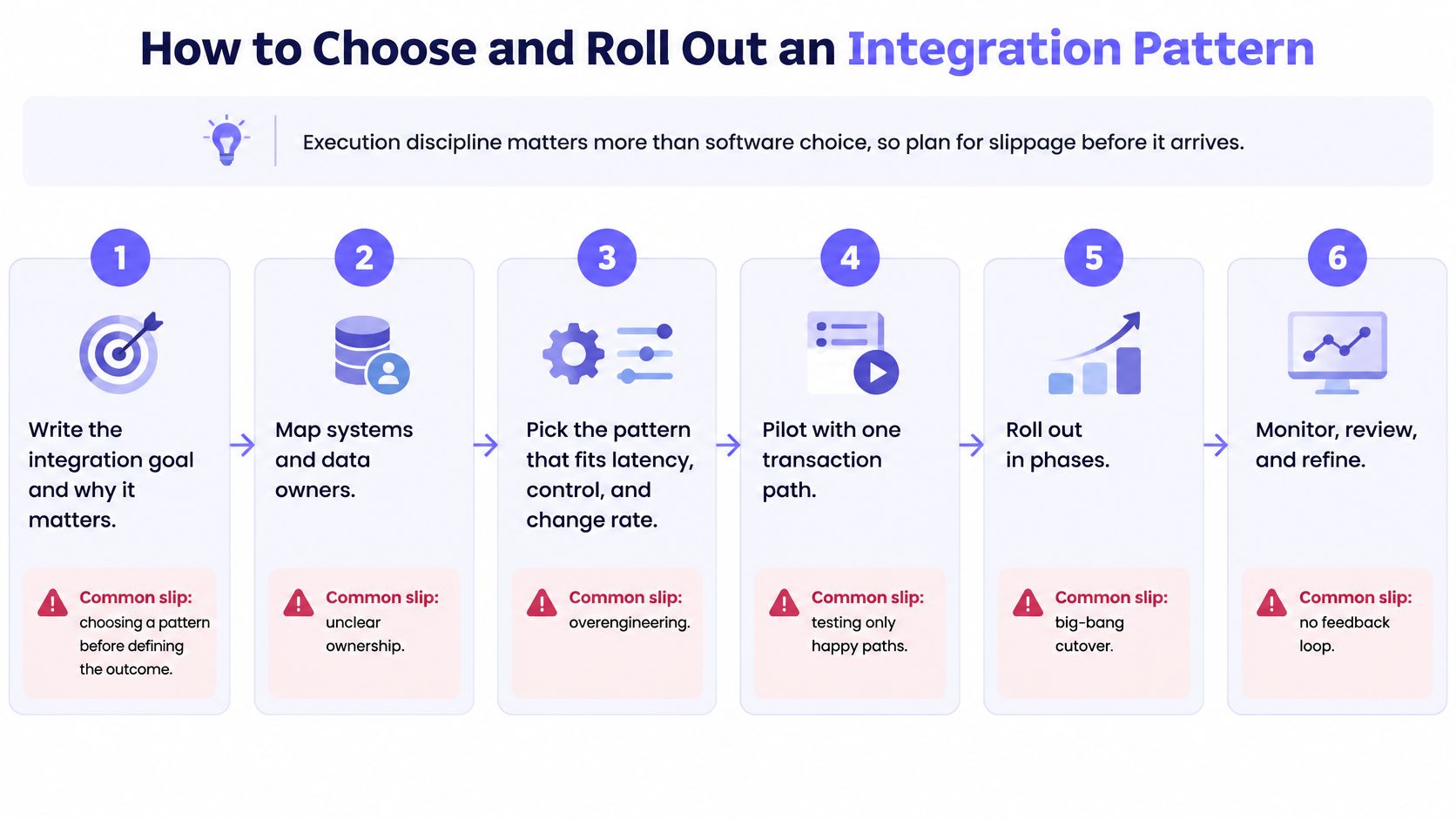
ERP systems integration rollouts succeed when execution discipline comes before software selection. Your team should define the outcome, map ownership, assign a pattern per workflow and prove reconciliation before release. Plan for slippage before it arrives.
The six steps below show the sequence and the common slip at each step.
Six Steps From Outcome to Production
- Write the business outcome. State the result in finance terms, such as a two-day close or zero unexplained variance. Loopfour workflow design starts with the business outcome rather than the list of integrations. Skipping this step produces connectors nobody needs.
- Inventory each system. Record whether it exposes a stable API, a supported connector or only a user interface. Note owners, release cycles and test environments. Guessing here creates late surprises.
- Define canonical entities. Agree shared definitions for customer, supplier, invoice, payment, currency and legal entity. Name one owner for each definition. Unowned definitions drift first.
- Assign a pattern to each workflow. Use latency, control risk and change rate to choose. Don’t force middleware onto a simple two-system flow. Don’t force a native connector to carry custom revenue logic it can’t express.
- Pilot with replayable test transactions. Run happy paths and failure paths. Reconcile source totals to ERP postings before release. Skipping reconciliation lets wrong postings look clean.
- Require dual approval for rule changes. Any change to a mapping or business rule needs a second approver. Record who changed it, why and which tests ran.
A pilot that only tests successful invoices proves very little. Test duplicates, partial payments, credit memos, currency differences and rejected approvals.
Scope One Workflow First
Choose one workflow, such as cash application or quote to cash, not the whole operation. A bounded pilot limits blast radius. Your team learns the exception patterns before scaling them.
One Salesforce-to-ERP billing customer went from decision to production in 6 weeks. That timing depends on API access, the number of exception rules and master-data quality. It is a benchmark for a focused flow, not a promise for a full replatform.
The short walkthrough below shows how a governed rollout looks in practice.
Three Go-Live Checks
Don’t release until three checks pass. Each check needs a named owner and retained evidence.
- Reconciliation ties: Source totals match ERP postings within your defined tolerance.
- Exception owner acknowledges the queue: A named person accepts routing, response time and escalation.
- Change history records every rule: Mappings, thresholds and approvals are versioned and reviewable.
Finish with a one-page pattern decision record. Name the workflow owner, the chosen pattern, the system of record and the evidence produced. Then hold a scoping discussion with Loopfour to test the pattern on your own data before committing to a wider rollout.
Why Integrations Drift After Go-Live
Integrations drift after go-live because systems stay connected while meanings change. An interface can report success and still post the wrong account, tax code or customer status. That semantic drift is the hidden cost your close team pays.
Recent research in the World Journal of Advanced Research and Reviews reports that 81.3% of enterprises have critical information trapped across an average of 19.4 disconnected systems. The same research reports an average of 16.2 data models and 74.8% semantic inconsistency between systems. A separate 2025 survey cited there found 73% of retail leaders struggle with data inconsistency caused by fragmented integration across finance, inventory, and point-of-sale systems.
Integration Symptoms, Causes and Controls
| Symptom | Likely cause | Control to add |
|---|---|---|
| Totals match but postings are wrong | Mapping changed an account or tax code | Dual approval and replay tests for mapping changes |
| Duplicate invoices after a timeout | Retries sent without an idempotency key | Idempotency key on every write |
| Exceptions pile up after an upgrade | A canonical field changed upstream | Versioned interface contract and regression tests |
| Two systems disagree on customer status | Each system defines the entity differently | Canonical definition with a named master-data owner |
More Connections Can Mean Less Control
Adding point-to-point connections increases apparent automation while adding control complexity. Each new link carries its own mapping, retry logic and definition of done. Your team gets more syncs and less certainty.
Consider an illustrative scenario based on a known pattern. A global travel technology company replaced a fragile in-house middleware layer with an auditable, repeatable close process. The gain wasn’t more connections. The gain was a close your controllers could repeat and explain.
Weak automatic data synchronization moves records fast and questions them later. Loopfour does predefined checks, exception routing and transformation evidence instead.
Track five measures to detect drift early.
- Canonical definitions: Review entity definitions when any connected system changes.
- Master-data owner: Escalate definition disputes to one named owner.
- Reconciliation tolerances: Investigate variances outside tolerance before close lock.
- Exception routing: Send each failure to an owner with source context attached.
- Transformation evidence: Retain the rule and input behind each changed value.
Measure ERP systems integration by fewer unexplained variances and defensible evidence. Don’t measure it by connector count.
Browser Automation for Systems Without APIs
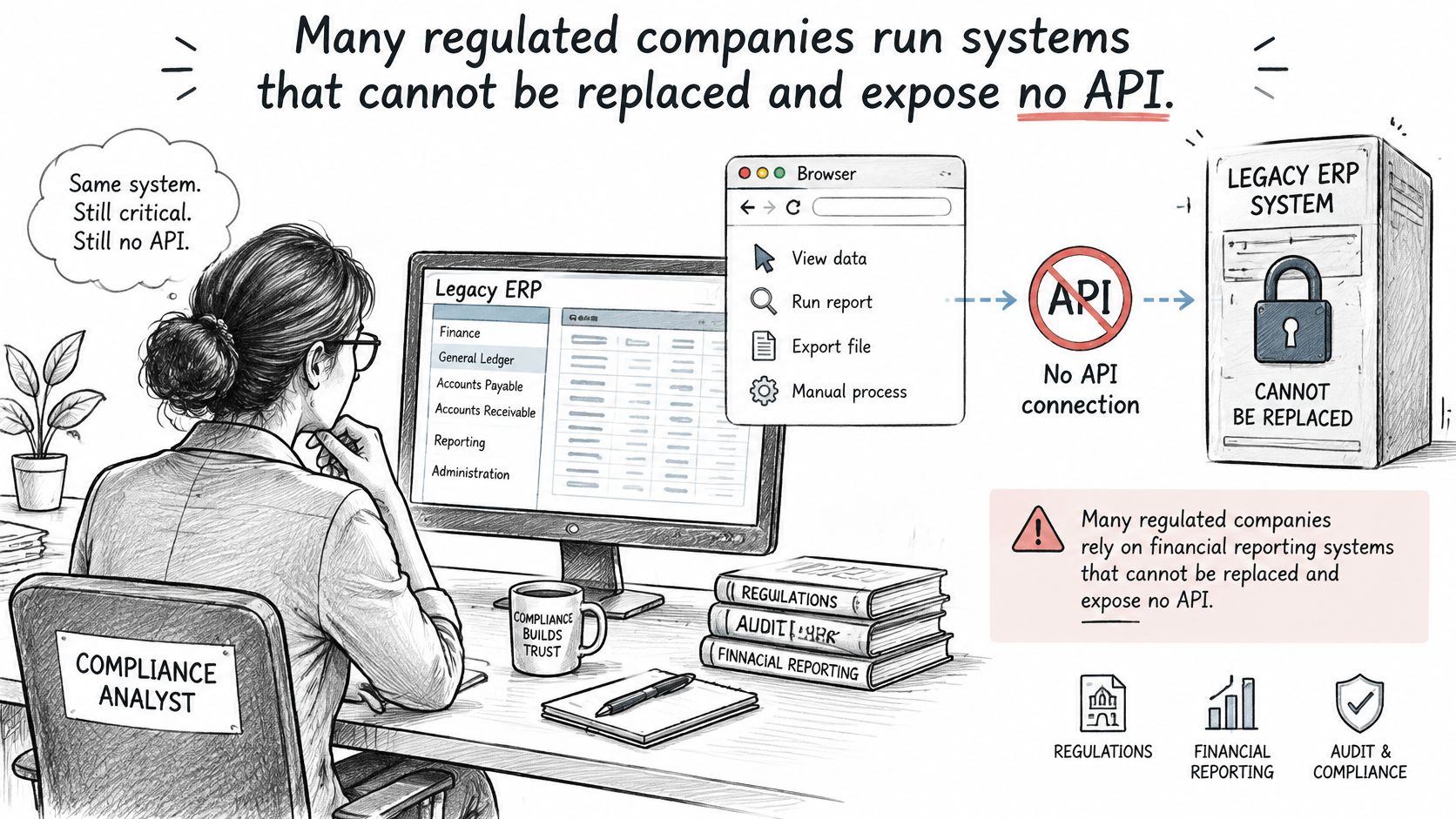
Browser automation is appropriate when a regulated system has no usable API and can’t be replaced safely. It passes audit only when execution is constrained, approved and fully logged. Uncontrolled scripts don’t meet that bar. Your auditors want it to hold up.
The legacy problem is common. A 2025 Queensland Audit Office report found that half of the systems reviewed for financial reporting were legacy systems operating beyond their expected lifespan and no longer supported by technology providers. The same source notes another industry report citing 86% of organizations experiencing ERP-integration delays, with insufficient integration expertise identified as the leading reason.
The image below shows the operating reality behind that finding, a finance user working in a legacy interface with no modern integration path.
The Control-Preserving Pattern
Use a least-privilege service account with a scoped session for each workflow. Limit the account to the screens and actions that workflow needs. Segregation of duties stays intact because the automation can’t wander.
Run predefined, versioned steps rather than ad hoc scripts. Capture a step-level record with screen state, input, output and result. Route any write that fails a rule to an approver before it posts.
API-first is a preference, not a control. A deterministic browser run with evidence can be safer than a custom API script nobody reviews.
Separate Interpretation From Execution
AI Copilot can classify a document or extract contract terms when confidence clears a threshold, with human fallback below it. The system write itself stays policy-bound and reproducible. Interpretation can be probabilistic. Execution must not be.
As an illustrative scenario, an approximately $85M legal marketplace automated billing from a homegrown system with no API through secure browser automation. Loopfour connects to ERP, billing, and bank systems, including systems with no API.
Start a pilot with a tight checklist. List the screens, define allowed actions, test in a non-production environment and monitor for interface changes. Add screen-change alerts before adding more workflows.
Governance, Versioning and Observability That Pass Audit
Governance passes audit when every ERP systems integration run produces complete, reviewable evidence. A posted result tells an auditor what happened at the end. The evidence around it shows what happened, when, where, from what source, with what outcome and under whose identity, and that is what makes the result defensible.
NIST SP 800-53 Rev. 5 defines six required elements for audit records: the event type, event time, event location, event source, event outcome, and the identity of associated individuals, subjects, or entities. The checklist below maps those elements to integration capture.
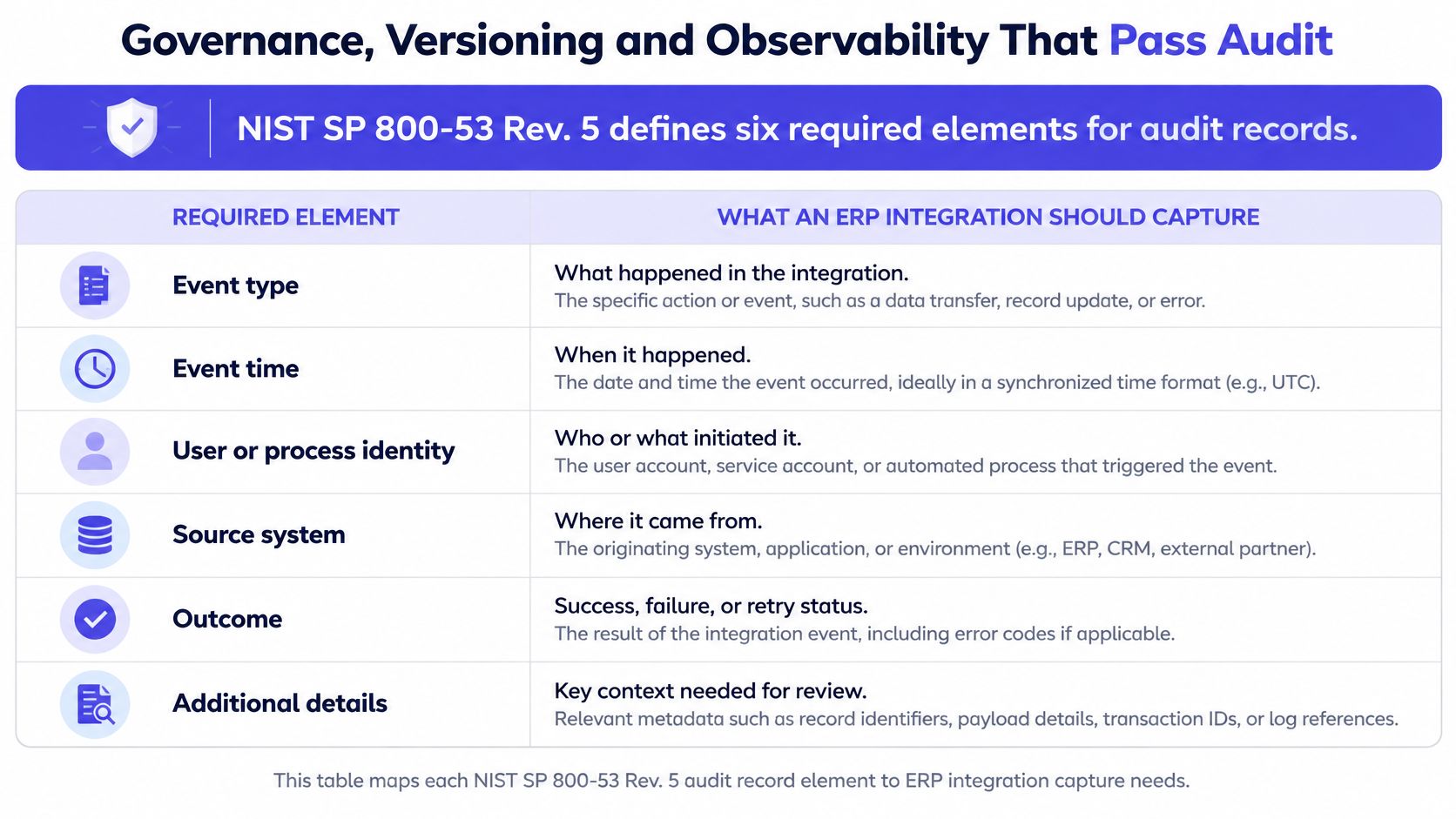
Audit Record Elements for ERP Integration
| Audit element | What the integration log should capture |
|---|---|
| Event type | Workflow name and step ID |
| Event time | Timestamp for each action with its time zone |
| Event location | Source and target system identifiers |
| Event source | Process or service identity that initiated the write |
| Event outcome | Success, failure, rejected or manually overridden |
| Associated identity | Approver or service account, attributed and timestamped |
An integration that records only a synchronized status produces weaker evidence than one recording the source document, validation result, destination record and every exception along the way. Auditors test the path an entry took through the pipeline. Weak logs force your team to reconstruct events from emails and screenshots, and reconstructed evidence rarely survives control testing.
Versioning and Monitoring With Named Reviewers
Version every interface contract. Run impact analysis before release. Require dual approval for mapping and rule changes, and keep a complete change history so any number can be traced back to the workflow definition that produced it. Versioned definitions also remove the key-person risk that comes with ad-hoc scripts: the definition survives the person who wrote it.
Monitoring only works when someone reviews it. Assign each metric to a role and evidence the remediation.
- Controller: Reviews exception rate by rule and unmatched-record counts. Unexplained variances should trend down over time, and a flat trend signals a mapping that needs attention.
- AP lead: Reviews failed runs and time to resolve exceptions.
- Integration owner: Reviews latency, successful runs and reconciliation variance.
A healthcare technology company replaced a 4,000-row manual reconciliation spreadsheet with a deterministic four-way match across pricing, orders, GL, and invoices. Cleared matches post back to the customer’s ERP system of record, with the audit trail attached.
Spreadsheets hide who changed a match and why. Loopfour workflows run versioned, auditable execution with retained evidence instead, logging every action, approval, exception and system write for review. That evidence is what separates a number that looks right from a number your team can defend.
Frequently Asked Questions About ERP Systems Integration
The questions that matter after selection are about control, evidence and failure modes. Judge answers by whether they produce fewer unexplained variances and defensible records, not by connector count.
Is Secure Browser Automation Safe for a SOX-Controlled ERP
It can be, when each session is scoped, least-privilege and attributable to a service account or named approver. Failed writes should stop and route to an owner instead of retrying blindly into the ledger. Keep step-level evidence, change history and monitoring so control testing can replay what happened.
Can AI Write Directly to an ERP
AI should stay out of direct ERP writes unless policy controls bind every action. Loopfour scopes AI to interpretation tasks such as document parsing, which may classify documents or extract contract terms when confidence clears a threshold, with human fallback below it. System writes stay policy-bound, reviewable and reproducible.
What Should an ERP Integration Audit Record Contain
Capture event type, event time, location, source, outcome and associated identity, plus source and destination record references. That ties the originating application, governing rule and posted result to one reviewable trail. A status field is a summary; evidence is the path.
What Is a Canonical Data Model
A canonical data model is the shared definition for customer, invoice, legal entity, currency and similar entities, with one named owner each. Connected systems translate into that definition rather than building a new pairwise mapping every time. It limits semantic drift, but only if changes pass impact analysis and approval before release.
Why Do Integrations Post Wrong Results While Still Showing Synced
Because transport can succeed while meaning has moved. A mapping edit, retry without an idempotency key, changed upstream picklist or late-arriving reversal can all post cleanly to the wrong value. Reconciliation, replay tests and variance investigation catch what uptime checks miss; success is a posted number your team can trace and defend.
Loopfour builds deterministic, auditable finance workflows across your existing ERP, CRM, billing and document systems, including systems without APIs. Bring one workflow, such as quote to cash or cash application, and test the pattern against your own reconciliation and audit evidence. Visit Loopfour to scope a governed pilot for your stack.