
An end-to-end accounts payable automation process should post matched invoices to the ERP with complete evidence, while only true exceptions reach a human reviewer. Best-in-class teams process invoices at about $2.78 each, complete the cycle in 3.1 days, and reach 49.2% touchless processing, compared with $9.40, 9.2 days, and 32.6% for average teams.
The situation is familiar. A supplier emails a PDF to AP. An analyst rekeys the invoice, searches for a purchase order, asks someone whether the goods arrived, forwards an approval email, and later reconstructs the entire chain for the auditor. The invoice may be paid correctly, but the process remains fragile.
The right design treats AP as FinOps infrastructure, not as a faster typing tool. Loopfour, the deterministic finance workflow automation platform, turns predefined finance rules into governed execution across the systems already in use. AI Copilot can interpret documents, but deterministic rules must control matching, approvals, posting, reversals, and evidence.
Table of Contents
- What the Accounts Payable Automation Process Actually Is
- How the AP Automation Process Should Be Measured
- Intake and Validation in the AP Automation Process
- Approval Routing and ERP Posting in AP Automation
- Exception Handling That Stops Eating Your Gains
- Month-End and Audit-Evidence Capture for Automated AP
- Your AP Automation Rollout Checklist
What the Accounts Payable Automation Process Actually Is
The accounts payable automation process is a deterministic workflow that converts an arriving invoice into a posted accounting record with attached evidence. It captures the document, validates fields, matches purchasing records, routes approvals, posts to the ERP, manages exceptions, and preserves the complete execution history.
The target state is simple: matched invoices move straight through, while humans review only rule failures, policy breaches, or suspected fraud. AP automation fails when a company automates OCR but leaves matching, approval logic, exception ownership, and audit reconstruction in separate manual queues.
The seven stages of a controlled workflow
A defensible process contains these stages:
- Intake channel capture: Receive invoices through monitored email, portals, folders, or electronic invoice channels.
- OCR and field validation: Extract invoice number, supplier, dates, amounts, tax, purchase order, and line items. Validate each field against master data.
- Two-way and three-way matching: Compare the invoice with the purchase order and, where required, the goods receipt.
- Approval routing: Apply predefined thresholds, ownership rules, policy checks, and delegation logic.
- ERP posting: Create the AP transaction, update the vendor subledger, and post the corresponding general ledger entry.
- Exception handling: Route failed captures, mismatches, policy failures, and approval timeouts to named owners.
- Audit-evidence capture: Preserve source documents, match decisions, approvals, timestamps, ERP responses, and reversals.
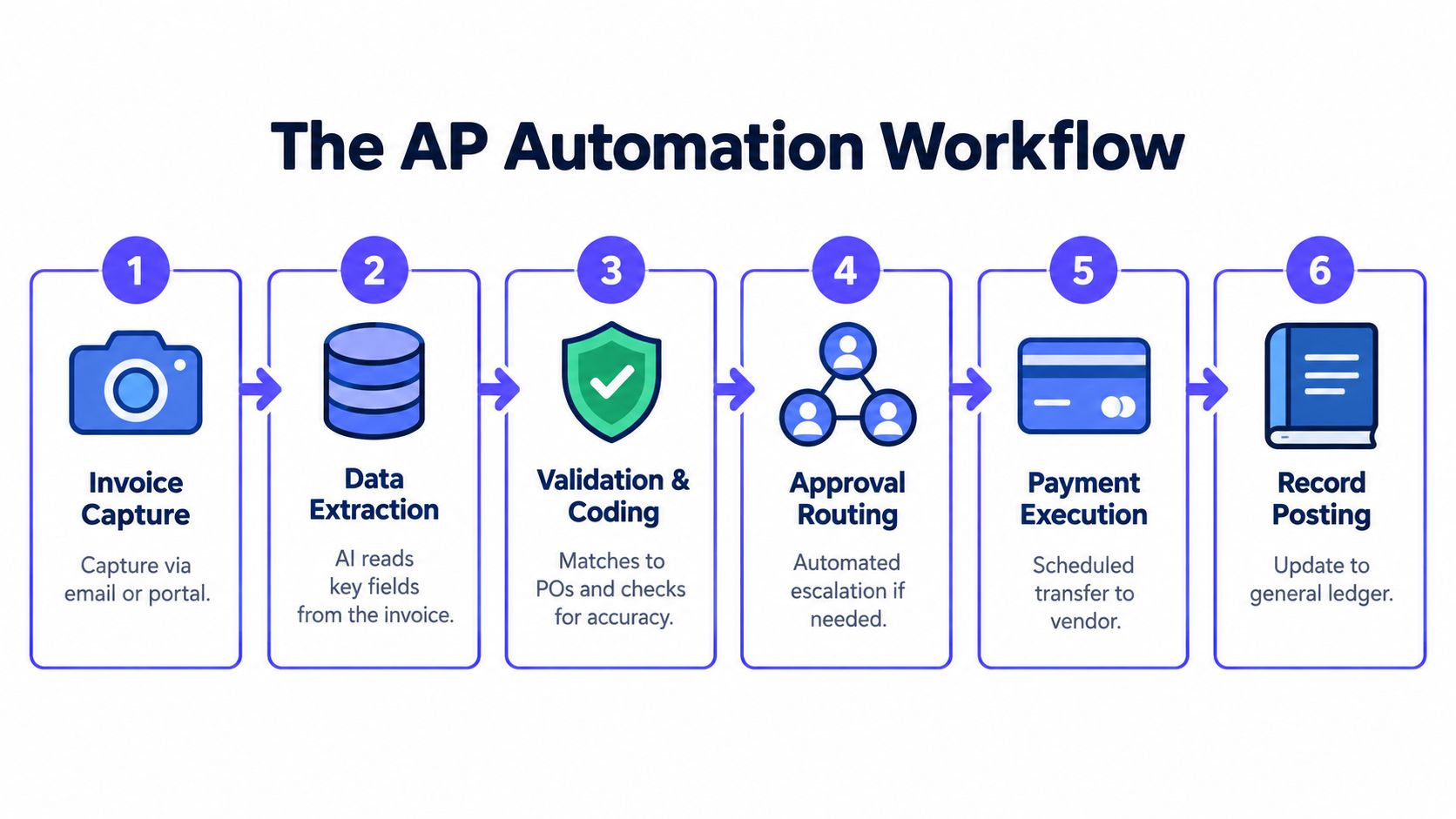
The distinction matters during control testing. A black-box tool may say an invoice looks valid. An auditable workflow records which rule passed, which data was compared, who approved the exception, and what the ERP accepted. Teams evaluating implementation options can also review this practical guide to cut AP costs with automation, provided the cost model includes exception work and control evidence.
How the AP Automation Process Should Be Measured
Control quality and human workload should drive AP automation measurement. A useful scorecard tracks cost per invoice, cycle time, touchless rate, exception rate, matching outcomes, and posting integrity at each workflow stage. Measure the evidence produced by the workflow, not just the documents it processes.
Average invoice processing costs about $9.40, compared with $2.78 for best-in-class teams, according to the digital invoice processing benchmark. Average cycle time is 9.2 days, versus 3.1 days for best-in-class operations. Touchless processing reaches 32.6% on average and 49.2% among top performers.
AP automation benchmarks by stage
| Stage | Benchmark | Control Reason |
|---|---|---|
| Invoice processing | $9.40 average, $2.78 best-in-class | Shows whether automation reduces human handling cost |
| Invoice cycle time | 9.2 days average, 3.1 days best-in-class | Exposes approval and exception delays |
| Touchless processing | 32.6% average, 49.2% best-in-class | Measures whether automation reaches the posting stage |
| PO-invoice touchless processing | 38.3% average, 96.3% best-in-class | Tests matching and upstream purchasing discipline |
| PO-invoice cycle time | 11.6 days average, 1.4 days best-in-class | Reveals friction between purchasing, receiving, and AP |
| Invoice exception rate | 19.9% average, 11.8% best-in-class | Identifies the queue that consumes automation gains |
The PO-invoice benchmarks come from Ardent Partners AP metrics summarized by Medius. They expose a common failure: accurate field extraction cannot compensate for incomplete purchase orders, missing receipts, or vague approval rules.
Track exception volume by root cause, owner, rule, and resolution time. A falling exception rate matters only when approvals, match decisions, and ERP responses remain reviewable after posting.
Probabilistic extraction has a role in suggesting values. The control layer still needs deterministic fallbacks, confidence thresholds, reproducible rule versions, and a human decision when evidence conflicts.
Control rule: A model may propose a value. A predefined rule must decide whether the invoice can post.
Intake and Validation in the AP Automation Process
Invoice intake should create one canonical record, not another email attachment. A monitored AP inbox or supplier portal captures the document, extracts its fields, validates supplier identity, and prepares the invoice for deterministic matching.
Consider supplier ACME-3344 sending invoice INV-9021 for $11,250 against PO-45001 for $11,250. The connector receives the PDF, assigns a workflow identifier, and stores the original image before extraction begins.
From document to canonical invoice
An intake pipeline performs these actions:
- Capture: A dedicated email parser or supplier portal receives the invoice. The workflow records sender, receipt time, file hash, and source channel.
- Extract: OCR and document parsing identify the invoice number, supplier ID, PO reference, line items, totals, tax, currency, and payment terms.
- Normalize: Formatting variants map to one supplier and one canonical schema. Date formats, decimal separators, tax labels, and unit descriptions become consistent.
- Validate: The system checks required fields, supplier status, duplicate indicators, PO existence, and mathematical consistency.
- Enrich: Predefined coding rules propose the GL account, cost center, tax code, and entity using the PO, requester, supplier master, and purchasing category.
The ACME-3344 example passes the gate when the three received line items reconcile to the PO and invoice. The invoice then becomes eligible for auto-posting or approval according to policy. Three-way matching compares the purchase order, goods receipt, and supplier invoice, with failed comparisons held as exceptions, as defined in this three-way matching explanation.
Tolerances need owners
Exact matching isn’t always practical. Organizations commonly define tolerance bands, such as a 2% or $50 price variance and a 1% quantity variance, before routing an invoice for review, as described in the AP matching tolerance guide.
The tolerance must be explicit by field. Price variance may route to procurement. Quantity variance may route to the receiver. Tax inconsistency may route to tax or AP. A missing PO should never be silently “fixed” by an analyst changing the invoice record.
The validation gate should release only records with complete evidence. Teams documenting the broader invoice processing automation workflow should connect capture, matching, coding, and ERP status rather than measuring OCR as the finished outcome.
Approval Routing and ERP Posting in AP Automation
Approval routing should operate as a deterministic decision tree, not an email chain. The workflow evaluates amount, GL account class, cost-center ownership, vendor risk tier, contract status, and match result, then assigns the correct approver role and service-level target.
A $48,200 service invoice matched to its PO within tolerance can follow a clean path. The workflow confirms the vendor, checks the contract flag, routes the invoice to the cost-center owner, records approval, and posts the transaction with an audit packet.
Build the decision tree
Each rule needs four defined properties:
- Condition: For example, amount range, vendor tier, account class, or match status.
- Owner: The accountable approver role, not merely a named employee.
- Service level: A defined response target, such as 24 hours.
- Boundary action: Auto-approve, queue for review, or route to procurement.
Two-way matching compares the invoice with the PO. Three-way matching adds the goods receipt. A finance team may allow narrow price and quantity tolerances, but the boundary behavior must be deterministic. Microsoft Dynamics 365 documents a specific three-way rule: for items requiring three-way matching, the invoice line quantity must match the quantity on the matched product receipt, as described in its three-way matching policy documentation.
Post atomically and reverse explicitly
ERP posting should behave as one controlled transaction:
- The invoice header and lines create the AP liability.
- The vendor subledger receives the payable.
- The corresponding journal entry updates the general ledger.
- The source invoice, approval decision, match result, and ERP response remain attached.
An idempotency key should combine stable identifiers such as entity, supplier, invoice number, and source record. A retry must return the existing posting result rather than create a second liability. Reversals also need explicit patterns. The system should record the original transaction, reversal reason, approver, timestamp, and replacement entry.
A long approval chain creates fatigue and delay. Cap approver layers, deduplicate overlapping rules, and use controlled delegation. Guidance on automated journal entries is most useful when posting logic includes retries, reversals, and evidence rather than only journal creation.
Exception Handling That Stops Eating Your Gains
Exception queues are where automation gains go to die. Design each queue around a distinct control failure, with a named owner, response target, required evidence, and limited human actions. Generic inboxes hide accountability and make audit reconstruction harder.
| Exception Queue | Typical Failure | Owner | Human Task |
|---|---|---|---|
| Capture failures | Damaged scan, missing field, duplicate indicator | AP operations | Correct or request the missing document |
| Match failures | Price, quantity, or receipt variance | Requester and buyer | Confirm receipt or resolve commercial variance |
| Policy failures | Blocked vendor, missing tax form, spend limit | Procurement and master data | Correct supplier or policy data |
| Approval failures | Timeout or overloaded approver | Department head with controller oversight | Reassign, delegate, or escalate |
Give every queue one work screen with three actions: inspect the evidence, select a predefined resolution, and submit the decision. The workflow should retain the decision, actor, timestamp, and supporting record, then resume at the failed control point. Staff should never retype invoice details across email, spreadsheets, and the ERP.
Practical rule: Route by failure type before assigning a person. A general AP analyst should not decide whether a receiving issue belongs to procurement, operations, or finance.
Reduce exceptions upstream
Supplier enablement prevents more rework than another review queue. Use a supplier portal, enforce PO-required flags for relevant spend, require digital invoices from major suppliers, and issue weekly vendor scorecards covering missing fields, duplicate submissions, and match quality.
Benchmark data is summarized in the rollout checklist. Set the operational target from the control model, then investigate any exception rate above the internal tolerance. Track capture, matching, policy, and approval queues separately, because a single blended rate conceals the failing control.
Fraud alerts also require their own path. A quantity variance is not automatically fraud, and a blocked supplier is not automatically a duplicate. Preserve the signal that triggered review, the checks performed, the decision, and the escalation outcome. Teams investigating suspicious payment behavior may need a specialist perspective on forensic accounting for AP fraud.
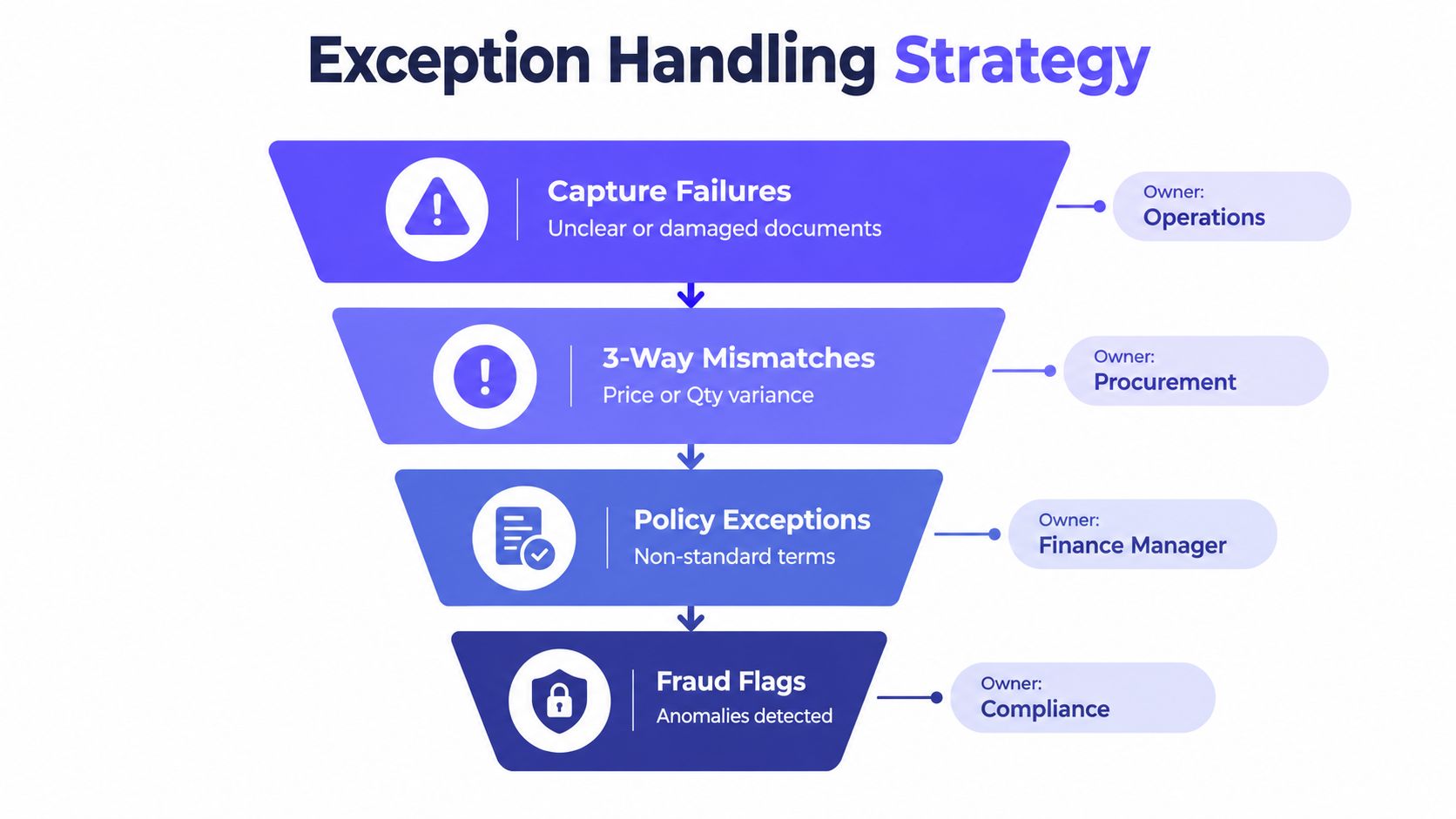
Measure exception handling by more than closure speed. Record first-touch resolution, reopenings, aging by queue, and the percentage of cases resolved from existing evidence. A fast closure that lacks a documented reason creates a control gap. A slower case with complete evidence can withstand review and improve the match or routing rule that caused it.
Month-End and Audit-Evidence Capture for Automated AP
Month-end is a scheduled replay of the AP workflow, not a separate manual exercise. The close must reconcile invoice status, goods received not invoiced, AP subledger balances, and the general ledger while preserving evidence for every judgment.
Treat the close as a controlled replay
Configure the month-end run to cover:
- Invoice receipt cut-off and late-document review.
- GRNI identification for goods received but not invoiced.
- Three-way match status for open invoices.
- Accrual journal entries for unposted purchase orders.
- AP subledger reconciliation to the GL.
- Failed postings, reversals, and period assignments.
Every control needs a corresponding artifact. The match log records compared values and the rule version applied. The approval record identifies the approver and timestamp. The invoice image proves the source document, while the ERP receipt proves the write. An immutable event log records the sequence.
Evidence pack by control objective
| Control Objective | Evidence Artifact | Where It Lives | Retention Guidance |
|---|---|---|---|
| Invoice authenticity | Original invoice image and file hash | Immutable document storage | Retain under the finance records policy |
| Matching control | Two-way or three-way match log | Workflow evidence store | Preserve rule version and decision outcome |
| Approval authority | Approval event and delegation record | Workflow event log | Keep role, timestamp, and decision |
| Posting accuracy | ERP response and journal identifier | ERP and linked workflow record | Retain successful and failed attempts |
| Segregation of duties | Requester, approver, and payer identities | Identity and workflow records | Preserve role history and access changes |
| Period cut-off | Receipt, approval, and posting timestamps | ERP and event log | Support fiscal-period testing |
Write-once storage, including S3 Object Lock, Azure Immutable Blob, or GCS bucket lock, protects retained artifacts from ordinary alteration. Cryptographic hashes help prove that the stored PDF matches the document received. Event-sourced records with sequence numbers show what happened, in which order, and under which workflow definition.
Auditors commonly test vendor master changes, duplicate-payment prevention, segregation of duties, and posting timing. The system should answer each question from retained evidence instead of a spreadsheet assembled under pressure. Use a structured month-end close checklist to schedule these controls before the close window. Benchmark targets are defined in the rollout checklist, section 7.
Run a mock close during the final week of the month. A tested replay exposes missing artifacts, period-assignment errors, and unresolved queues before the live close turns them into audit requests.
Your AP Automation Rollout Checklist
A controller can start with process evidence before selecting a tool. The rollout should move from observation to deterministic controls, then to posting and audit validation.
Phased AP automation rollout benchmarks
| Phase | Weeks | Primary Deliverable | Target Benchmark | Sign-off Owner |
|---|---|---|---|---|
| Process mapping and invoice shadowing | 1 | Current-state map and invoice inventory | Baseline cost, cycle time, touchless rate, and exceptions | Controller |
| Capture and OCR tuning | 2 to 3 | Monitored channels and canonical fields | Required fields extracted and validated | AP lead |
| Match configuration | 4 | Two-way and three-way rules | Defined tolerance and escalation behavior | Procurement |
| Approval routing | 5 to 6 | Threshold and ownership matrix | Automated match rate above 80% by week six | Finance operations |
| ERP posting and reversals | 7 to 8 | Posting, retry, and reversal tests | Idempotent writes with successful rollback tests | IT and accounting |
| Exception and supplier enablement | 9 to 10 | Named queues and supplier controls | Exception rate below 12% by week ten | AP and procurement |
| Close and audit validation | 11 to 12 | Evidence pack and mock close | Cost trending toward $3 and cycle time toward under 48 hours | Controller and audit |
The rollout targets above are implementation goals, not universal benchmark facts. Mature benchmark data shows why the direction matters: best-in-class teams reach 49.2% touchless processing, while average teams reach 32.6%, according to the digital invoice processing benchmark. A separate benchmark reports that manual invoicing processes about 6,082 invoices per FTE annually, compared with roughly 20,934 to 23,333 in highly automated environments, with error rates near 2% manually and 0.8% with automation, as reported in the AP metrics guide.
Go-live gates
- Finance: GL coding, tax treatment, tolerance rules, payment controls, reversals, and period cut-off pass testing.
- Audit: Evidence is complete, immutable retention is configured, SoD is demonstrable, and exceptions have accountable owners.
- IT: ERP integration is idempotent, access is role-based, failures alert the right team, and workflow changes are versioned.
- Procurement: PO policy, receiving discipline, supplier enablement, and commercial variance ownership are operational.
- AP operations: Users can resolve each exception in one screen without rekeying data.
AP automation is ready for production when the workflow can explain every posting and every non-posting. Speed is useful. Reproducible evidence is what holds up.
Loopfour offers deterministic AP workflows for invoice capture, matching, approval routing, ERP posting, exception ownership, and retained execution evidence. Finance leaders can review the Loopfour platform to connect this accounts payable automation process to existing ERP, document, and collaboration systems without replacing the core stack.