
An AP aging report is a point-in-time schedule of unpaid supplier balances grouped by vendor and payment-age bucket: Current, 1–30 days past due, 31–60 days, 61–90 days, and more than 90 days overdue.
The oldest invoice isn’t automatically the next invoice to pay. The 2025 AFP Payments Fraud and Control Survey highlights report that invoice fraud affected 24% of organizations in 2024, up from 14% in 2023. Age establishes urgency, not legitimacy.
A controller needs more than overdue totals. A defensible report connects each balance to a contractual due date, an action owner, and evidence supporting payment or a continued hold.
Table of Contents
- What an Accounts Payable Aging Report Is
- Columns Every Detailed AP Aging Report Needs
- How Days Past Due Is Calculated
- Standard Aging Buckets and the Action Each One Triggers
- How to Build and Reconcile the Report Each Close
- Aging KPIs and Quick-Lookup Formulas
- Reconciliation Breaks and How to Fix Them
- Common Questions About the AP Aging Report
What an Accounts Payable Aging Report Is
An accounts payable aging report is a point-in-time schedule of unpaid supplier balances, grouped by vendor and payment-age bucket. The report combines upcoming obligations with overdue exposure, giving finance teams a dated view of recorded payables.
The Ramp overview of accounts payable reports describes the conventional grouping as Current, 1–30, 31–60, 61–90, and 90+ days. For an operational report, 91+ is a clearer final label because it doesn’t overlap with the preceding bucket.
The report produces distinct outputs:
- Vendor exposure: Total unpaid amounts by supplier and aging bucket.
- Delinquency: Open invoices that have crossed their contractual due dates.
- Action priorities: Liabilities requiring payment scheduling, investigation, or escalation.
A cash schedule and a control record
An accounts payable aging report supports payment planning and period-end accounting control. Those jobs require the same underlying invoices, but different decisions.
For payment planning, AP and Treasury need to know which obligations are approaching their due dates. They also need approval status, payment terms, disputes, and expected payment timing. A bucket total alone doesn’t establish which payments can actually proceed.
For accounting control, the controller needs a reproducible population of open items. The report must tie to the relevant ledger balances and preserve explanations for unresolved exceptions.
| Reporting purpose | Decision supported | Evidence needed |
|---|---|---|
| Payment scheduling | Which eligible obligations should enter a payment run? | Due dates, approvals, terms, holds |
| Close control | Does recorded open AP reconcile to the ledger? | Report parameters, reconciliation, review |
| Working-capital oversight | Does payment timing match the intended policy? | Aging trends, supplier terms, documented exceptions |
Understanding the underlying accounts payable liability prevents a common mistake: treating the aging report as an independent source of accounting truth. The report organizes recorded obligations. Reviewers still need to validate the underlying transactions.
Control principle: Invoice age determines the review priority. Supporting evidence determines whether payment is appropriate.
The useful distinction is between what remains unpaid, what is contractually late, and what is authorized for payment. A reliable report keeps those questions separate rather than assuming they have the same answer.
Columns Every Detailed AP Aging Report Needs
A detailed accounts payable aging report needs document-level fields that connect every bucket total to its source. A vendor summary isn’t enough to investigate a dispute, validate a partial payment, or reproduce a historical balance.
The Nimblechapps AP aging specifications describe the underlying requirements for due dates, open balances, signed adjustments, currency context, and entity-level reporting. The following template combines those accounting fields with exception ownership information.
Required columns in a detailed AP aging report
| Field | What it holds | Why reviewers need it |
|---|---|---|
| Supplier ID and name | Vendor master identifier and legal name | Groups balances by vendor and supports statement matching |
| Invoice number and installment | Document reference and payment slice | Traces each open item to its source |
| Invoice date | Date the invoice was issued | Provides document context, not delinquency |
| Contractual due date | Due date established by payment terms | Determines the aging bucket |
| Payment terms | Terms such as Net 30 or 2/10 net 30 | Explains payment and discount deadlines |
| Original amount | Face value at posting | Supports comparison with the original invoice |
| Remaining open balance | Unpaid amount after applied activity | Establishes the amount that ages |
| Currency and exchange rate | Transaction currency and applicable rate | Explains the reporting-currency balance |
| Credit and debit memos | Signed adjustments tied to the supplier | Preserves the effect of each adjustment |
| Legal entity and AP control account | Entity and general-ledger liability account | Connects the report to the correct ledger |
| Bucket assignment | Current or the applicable overdue interval | Supports consistent review routing |
| Exception status | Hold, dispute, approval pending, or none, with reason | Explains why an item remains unpaid |
Open balances and signed adjustments
An accounts payable aging report should age the remaining unpaid balance, not the original invoice value. Otherwise, partial payments leave the report overstating the amount still owed.
Credits must retain their sign. A credit reduces supplier exposure; converting every amount to a positive value defeats the reconciliation. A negative vendor balance also deserves review rather than silent exclusion.
Debit memos and credit memos shouldn’t be treated as interchangeable reductions. The report must retain their accounting direction and the relationship to the supplier’s open items.
- Illustrative template line: Supplier: supplier legal name from the vendor master; invoice number: source-document reference; invoice date: issue date; due date: contractual deadline; terms: agreed terms; original amount: posted face value; open balance: unpaid remainder; currency: transaction currency; bucket: calculated due-date category.
This template deliberately avoids invented monetary amounts. A production example should use a permitted, traceable invoice from the organization’s own records.
Scope belongs beside the detail
An accounts payable aging report also needs a visible as-of date. Reviewers can’t reproduce a historical report from an unlabeled export.
Multi-entity reporting requires separate legal-entity and AP control-account dimensions. Currency and exchange-rate context must remain attached to the balances. Adding amounts from different currencies without a defined translation basis doesn’t produce a useful total.
Missing fields create predictable investigation problems. Without a due date, delinquency is uncertain. Without an installment reference, separate payment obligations can collapse into one misleading line.
How Days Past Due Is Calculated
Days past due = As-of date − Contractual due date. The contractual due date, not the invoice date, determines whether an open amount is overdue.
The SplashBI explanation of AP aging calculations gives this formula and the example of an invoice due June 10 appearing 20 days past due at a June 30 cutoff. Payment terms differ, so invoice-date aging can label an obligation old even when it remains contractually current.
The calculation should use calendar dates consistently. The same cutoff must apply to every item in the report.
For an illustrative June 30 cutoff, the requested invoice references classify as follows:
- INV-1042: Due June 10. June 30 minus June 10 equals 20 days past due, assigned to 1–30.
- INV-1057: Due June 30. The difference is 0 days, assigned to Current.
- INV-1063: Due May 15. The difference is 46 days past due, assigned to 31–60.
- INV-1071: Due April 20. The difference is 71 days past due, assigned to 61–90.
These are worked date calculations, not company results. A spreadsheet check should confirm each date subtraction before the calculation enters a recurring reporting workflow.
Edge cases that change the result
An accounts payable aging calculation needs explicit rules for partial payments, installments, and credits. An undocumented system default isn’t an accounting policy.
- Partial payments: Reduce the remaining balance. A payment doesn’t reset the original contractual due date; the unpaid remainder continues aging against that date.
- Installments: Age each installment separately using its own due date. A single invoice can therefore have balances in different buckets.
- Due today or later: Assign a zero or negative result to Current. Due today means payment may require immediate attention.
- Related credits: Apply a credit against the associated invoice and preserve its sign. Unapplied credits should remain identifiable rather than being forced against an unrelated item.
- Historical cutoffs: Use the selected reporting date and the open balance applicable at that date. Today’s remaining balance may differ from the historical balance.
A partial payment changes the amount outstanding. It doesn’t, by itself, change when the remainder became due.
Re-running a prior report with today’s date changes the day counts. Re-running it with today’s transaction state can also change the population.
A reproducible report therefore needs both fixed date logic and historically appropriate balances. Saving only the final spreadsheet formula isn’t enough.
Standard Aging Buckets and the Action Each One Triggers
Standard AP aging buckets are Current, 1–30, 31–60, 61–90, and 91+ days past due, counted from the contractual due date. Each bucket should trigger a predefined review action, not automatic payment.
The table below is a proposed controller review policy. Its escalation assignments are operating recommendations, not universal accounting requirements.
Standard AP aging buckets and triggered actions
| Bucket | Days past due | What it usually signals | Action to trigger |
|---|---|---|---|
| Current | Zero or not yet due | Within terms, or due today | Schedule against the due date or discount deadline |
| 1–30 days | 1 to 30 | Recently overdue, potentially subject to a documented exception | Confirm inclusion in the next eligible payment run |
| 31–60 days | 31 to 60 | Missed run, pending approval, or unresolved hold | Check approval status and dispute reason with the owner |
| 61–90 days | 61 to 90 | Persistent exception or supplier friction | Escalate to the AP manager and request a supplier statement |
| 91+ days | More than 90 | High-priority exposure requiring explanation | Obtain controller review and documented disposition |
The bucket-to-action relationship can also be used as a review aid.
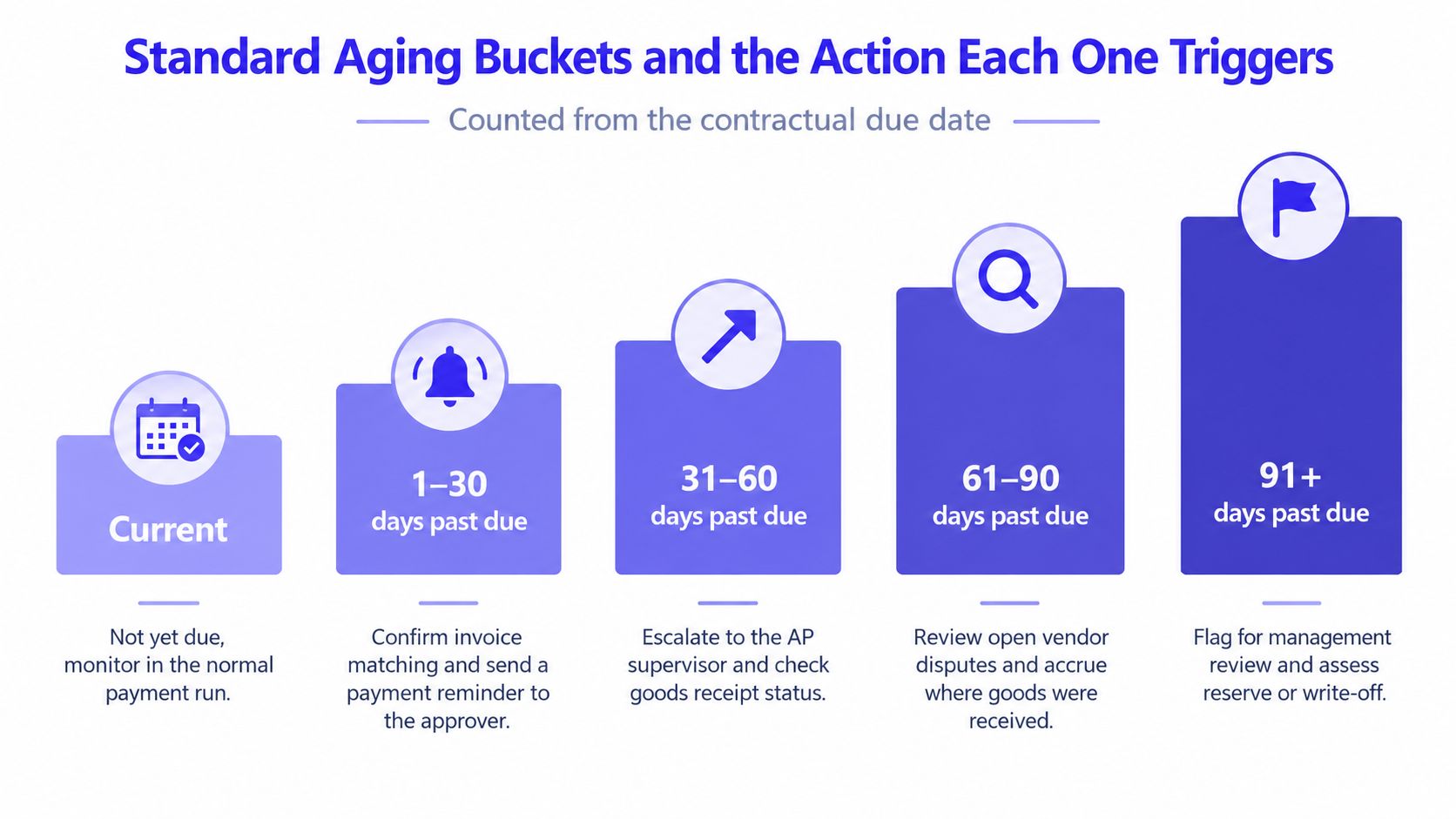
Due-date aging and invoice-age aging aren’t interchangeable
An accounts payable aging bucket means different things depending on the date basis. Reviewers must establish that basis before interpreting a label.
The Fit Small Business guide to accounts payable aging discusses conventional intervals, payment terms, and recurring review. Its payment-term context matters particularly when a report groups invoices by time outstanding rather than contractual lateness.
Under invoice-date aging, an invoice in an early-age category may remain within agreed Net 30 terms. Under due-date aging, a positive days-past-due result is already overdue. A grace period may change the agreed response, but it doesn’t erase the displayed date difference.
Current also doesn’t mean safe to ignore. An invoice due today belongs in Current under the calculation above and may need immediate payment.
Escalation should resolve a named problem
An accounts payable aging review should begin with scheduling and move toward investigation as exceptions persist. The reviewer should record why the obligation remains open, not merely confirm its age.
For recently overdue invoices, AP should verify payment-run timing and eligibility. For intermediate buckets, the owner should identify missing approvals, receipt issues, or disputes.
For prolonged items, the AP manager and controller should establish a documented disposition. That might be payment after validation, continued hold with a reason, correction of an error, or another approved accounting treatment.
Old age alone doesn’t justify a reserve, accrual, or write-off. The visual’s shorthand actions require separate assessment of the underlying facts. An existing recorded liability shouldn’t be accrued again merely because it appears in an old bucket.
A supplier statement helps establish what the supplier believes remains unpaid. It doesn’t replace the invoice, matching evidence, or payment authorization.
How to Build and Reconcile the Report Each Close
A defensible close requires agreement among the AP aging subledger, AP trial balance, and general-ledger AP control account at period end. Matching totals are necessary, but reviewers must also establish that the reports use consistent scope and accounting status.
The reconciliation relationship is straightforward. The controlled execution requires more discipline.
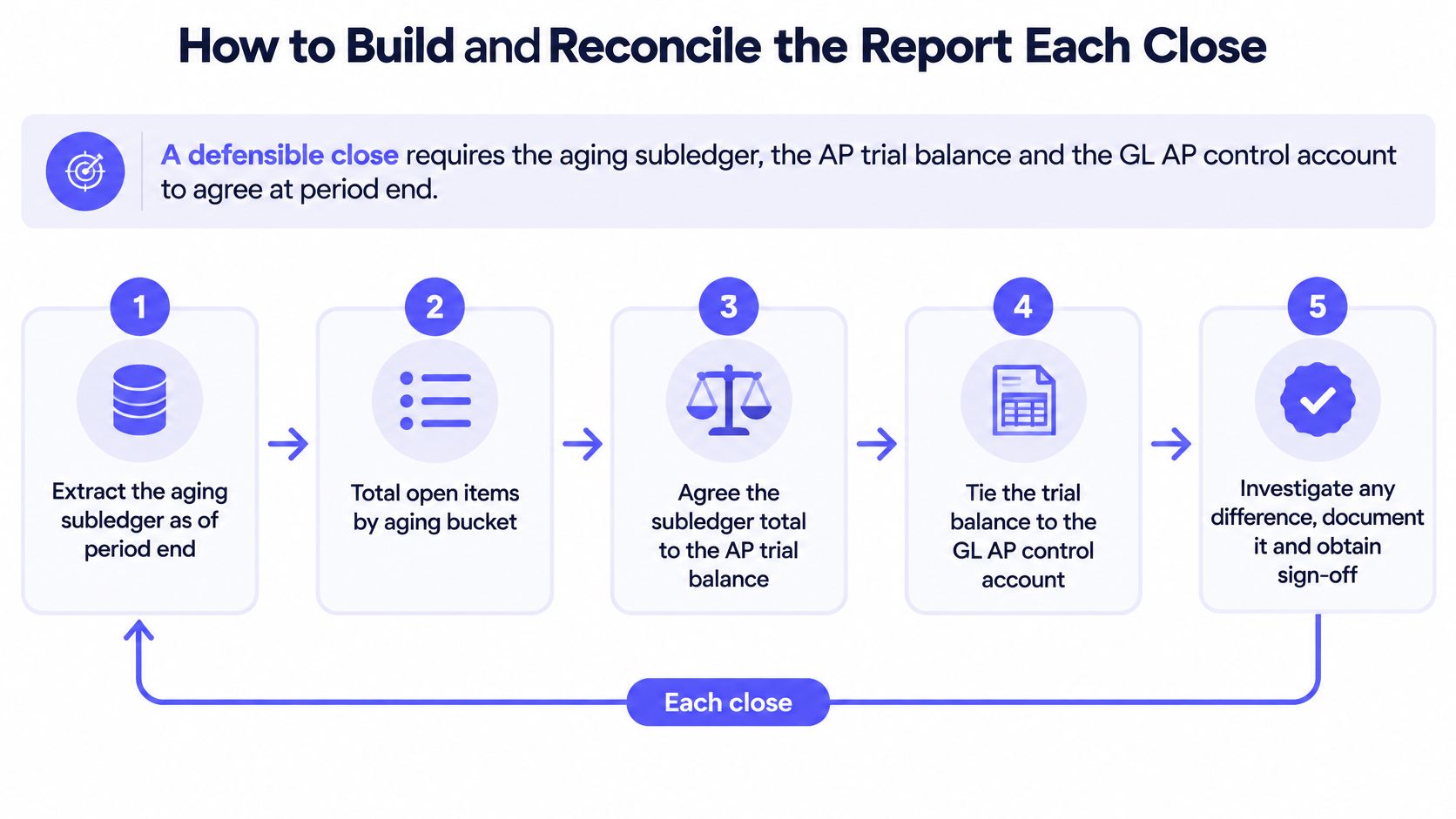
- Freeze the cutoff and parameters. Record the as-of date, entities, accounts, currencies, and inclusion rules before extracting data.
- Verify posting completeness. Confirm relevant invoices, credit memos, payments, and posting batches are complete. Record unresolved posting exceptions.
- Extract the open-item population. Preserve legal entity, currency, and AP control account on each record.
- Calculate and classify. Validate contractual due dates, determine remaining balances, and apply mutually exclusive bucket rules.
- Reconcile the reports. Agree the aging total to the AP trial balance and the corresponding GL control balance.
- Investigate differences. Identify transaction-level causes. A matching grand total doesn’t excuse offsetting errors.
- Route exceptions. Assign a named owner, record the hold reason, and establish the next review action.
- Approve and retain. Obtain preparer and reviewer sign-off. File the final report, reconciliation, and supporting evidence with the close package.
The Cleverence AP trial-balance guidance supports the reconciliation approach, including monthly agreement of open-payables aging to the related GL liability account. It also identifies prolonged outstanding items and negative vendor balances as review subjects. No publication year is established here, so a dated attribution would be inappropriate.
Cadence and retained evidence
An accounts payable aging report should run at least monthly at close, with weekly operational reviews where finance teams actively manage due dates and cash. Posting completeness and report purpose should determine the run conditions.
The broader month-end close process should assign responsibility for the reconciliation rather than leaving it as an informal AP export. A report without a reviewer isn’t a completed control.
- Report identity: Cutoff date, legal entity, currency, and AP control account.
- Calculation definition: Bucket logic, exchange-rate context, and system filters.
- Accountability: Preparer, reviewer, approval record, and exception owners.
- Resolution evidence: Investigations, corrective entries, unresolved items, and final approval.
Practical rule: Retain enough evidence for another qualified reviewer to reproduce the conclusion without asking the preparer what happened.
The following video provides an additional reference alongside the documented close procedure.
Monthly review should include prolonged outstanding items and negative vendor accounts, not only net liabilities. Offsetting balances can hide problems even when the total agrees.
A controller should approve the completed reconciliation, not merely acknowledge that a report was generated.
Aging KPIs and Quick-Lookup Formulas
An accounts payable aging total shows exposure, but it doesn’t explain payment performance or control quality. A focused KPI set separates delinquency, exceptions, discount decisions, supplier concentration, and reconciliation integrity.
The following formulas are management definitions for consistent internal reporting. No universal benchmark is established here for the operating ratios; each organization should assess trends against its terms and approved policies.
AP aging KPIs with formulas and what each one tells the controller
| KPI | Formula | What it tells the controller | Benchmark |
|---|---|---|---|
| Past-due share | Past-due balances ÷ total open AP | Portion of recorded payables already overdue | No universal benchmark |
| Balance over 90 days | 91+ day balances ÷ total open AP | Relative size of prolonged exposure | No universal benchmark |
| Days payable outstanding | (Accounts payable ÷ cost of goods sold) × days in period | Average payment timing at an aggregate level | Evaluate against terms and context |
| Discount capture rate | Discounts taken ÷ discounts available | Share of available early-payment discounts captured | Assess against approved payment policy |
| Exception share | Items on hold ÷ total open items | Extent of the held-item population | Segment by reason and owner |
| Largest vendor past-due share | Largest vendor past-due balance ÷ total past-due balance | Concentration of overdue exposure | Assess supplier criticality |
| Report-to-GL variance | Aging subledger total minus GL control balance | Whether the report agrees with the ledger | Zero unexplained variance at close |
DPO measures aggregate payment timing
Days payable outstanding, or DPO, uses accounts payable divided by cost of goods sold, multiplied by the days in the period. DPO isn’t the average days-past-due value of the currently open invoice population.
A controller should document the AP balance convention used and apply it consistently. Period alignment matters: the denominator and day count must describe the same reporting period.
DPO belongs beside aging, not in place of it. An aggregate payment measure can’t identify which supplier has a disputed invoice or which approval owner has left a payment blocked.
Discounts and exceptions require denominators
The discount capture rate compares discounts taken with discounts genuinely available. The accounts payable reference on payment economics explains 2/10, net 30: a 2% discount applies when payment occurs within 10 days, with the full amount due on day 30.
The eligible discount population must therefore be defined before calculating the rate. Counting invoices without discount terms in the denominator would answer a different question.
Exception share needs similar care. A held-item count describes volume, not necessarily the cash value blocked or the share of delay that AP can control.
- Approval holds: Identify the person responsible for authorization.
- Disputed amounts: Separate commercial disagreements from internal processing delays.
- Documentation holds: Record the missing evidence and the party expected to supply it.
- Policy decisions: Distinguish deliberate, approved scheduling from accidental delay.
The report-to-GL variance is different from a performance target. The close objective is zero unexplained difference. Any reconciling gap requires a documented cause and an approved resolution.
Reconciliation Breaks and How to Fix Them
An accounts payable aging discrepancy often reflects posting, cutoff, duplication, or report-scope problems. Reviewers should test those causes before assuming the aging arithmetic is wrong.
The following table is a diagnostic guide. A likely cause isn’t a proven cause, and corrective entries require transaction-level support.
Aging report symptoms, likely causes and fixes
| Symptom | Likely cause | Fix |
|---|---|---|
| Subledger total differs from GL control | Direct journal posted to the AP control account | Validate the entry; reverse and reclassify an inappropriate posting with approval |
| Total moves after close | Backdated invoice or credit posted after cutoff | Assess the correct accounting period; reopen only through the approved close policy |
| Paid invoices still show as open | Unposted payment run | Verify payment status, post the valid batch, and rerun |
| Duplicate balance for one vendor | Duplicate invoice entry | Confirm duplication, void the erroneous entry, and retain matching evidence |
| Totals change between runs | Changed filters or entity scope | Lock parameters and retain them with the evidence |
| Negative vendor balance | Overpayment or unapplied credit | Reconcile the supplier account; apply a valid credit or request a refund |
| Aged items with no owner | Unrouted exception or dispute | Assign an owner, reason, and review date |
A reconciliation review needs both the ledger and the supporting transaction trail.
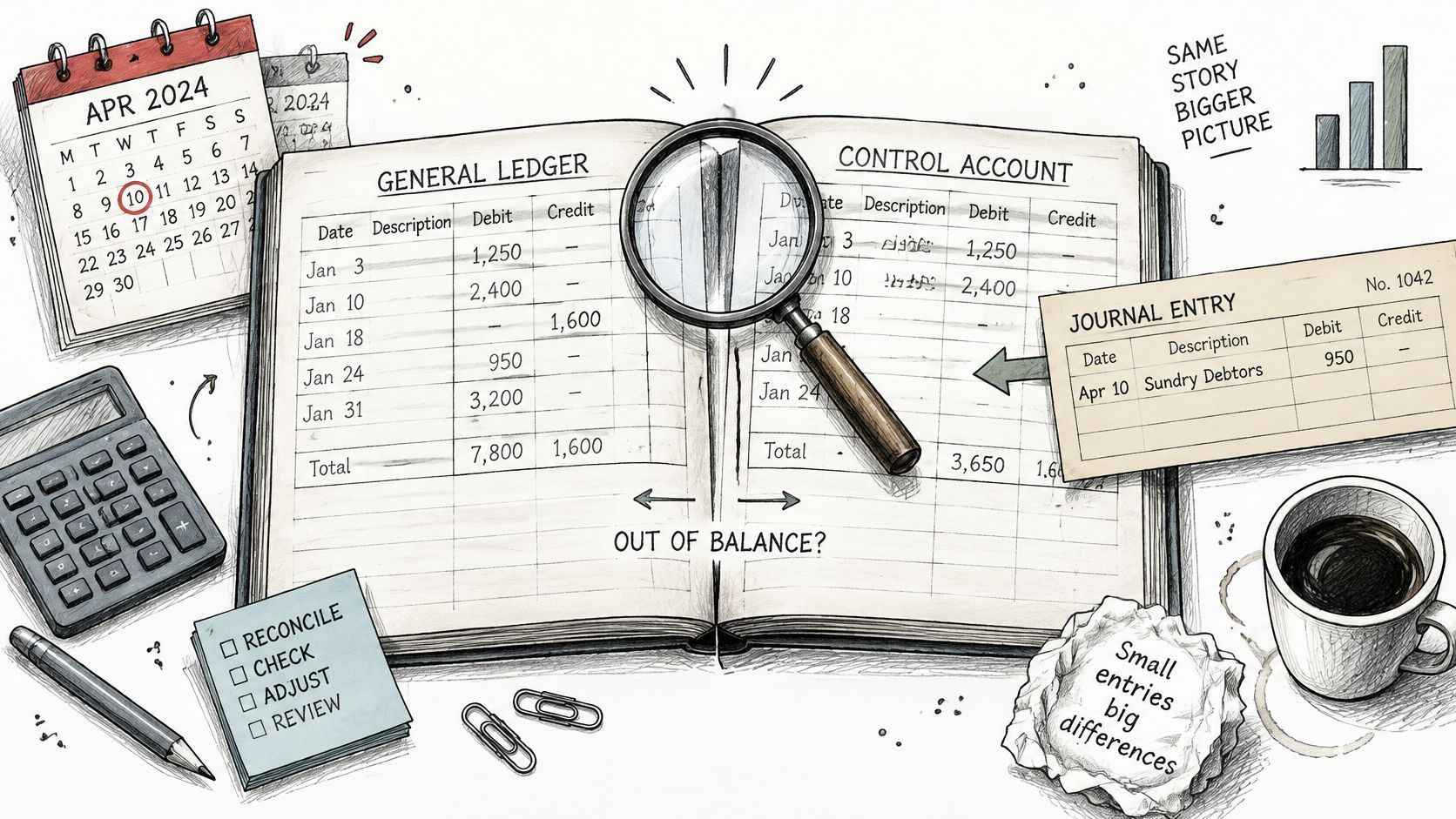
A structured accounts payable reconciliation should preserve the original discrepancy, the investigation, and the approved correction. Replacing the first export with a clean rerun loses part of the evidence.
A backdated document requires particular care. The document date alone shouldn’t determine whether a closed period is reopened; the controller must apply the organization’s cutoff and correction policy.
Accounting age isn’t operational age
An accounts payable aging report describes recorded balances relative to contractual deadlines. It doesn’t necessarily show how long an invoice waited before entering the ledger.
An invoice can appear current in the accounting report while having spent substantial time awaiting capture or approval. Another can remain severely overdue because an unresolved dispute was never formally cleared.
Separate operational status fields help distinguish those cases. Reviewers should retain approval state, dispute reason, payment status, and the relevant owner beside the accounting bucket.
The fraud evidence cited at the opening supports a further warning: an aged balance isn’t proof of a valid payment instruction. Before releasing payment, reviewers should examine:
- Source evidence: The invoice and supporting purchase-order or receipt records.
- Supplier integrity: Vendor identity and supplier-master change history.
- Authorization: The identity and authority of the approver.
- Payment status: Whether the obligation was already settled or included in another run.
- Disposition: The documented reason for paying, correcting, or continuing the hold.
Automation should preserve the control
An accounts payable aging workflow should execute predefined accounting rules and retain evidence of every exception. Automation that merely accelerates an unvalidated payment queue leaves the underlying control gap intact.
Manual exports separate the report from the review trail. Loopfour does the governed workflow instead. Loopfour, the deterministic finance workflow automation platform, runs predefined, versioned steps, routes exceptions through Slack, Microsoft Teams, or email, and retains execution evidence. Its finance workflow automation approach connects the cutoff, calculation, reconciliation, approval, and system activity into an auditable record. Auditors need that record to hold up, not merely a successful run notification.
Common Questions About the AP Aging Report
An accounts payable aging report supports payment decisions only when its dates, scope, and supporting evidence are understood. The following answers address common questions about cadence, Current balances, reconciliation, payment order, and DPO.
How often should an accounts payable aging report run?
At least monthly at close, with weekly reviews common where teams manage due dates and cash actively. The accounts payable aging report should follow completion of relevant postings. A close report needs a fixed cutoff and retained evidence; an operational report needs a clearly identified as-of date.
Is an invoice in the Current bucket always safe to delay?
No. Current in an accounts payable aging report includes items due today as well as items due later. The contractual due date and payment terms determine the next action. A discount deadline can also require attention before the final payment due date.
Why doesn’t an AP aging total match the general ledger?
Posting and scope differences are common causes. An accounts payable aging report can differ from the GL because of direct control-account journals, backdated documents, unposted payments, or inconsistent filters. The reviewer should identify the specific transactions, document the cause, and approve the correction rather than force the totals to agree.
Should the oldest supplier invoices be paid first?
No, not automatically. An accounts payable aging report establishes review priority, not payment validity. The liability, supplier details, approval, and payment status still require verification. An old duplicate or disputed invoice may need correction or continued investigation rather than accelerated payment.
How is days past due different from days payable outstanding?
Days past due measures an individual obligation; DPO measures aggregate payment timing. An accounts payable aging report calculates lateness against each contractual due date. DPO uses accounts payable divided by cost of goods sold, multiplied by days in the period. The measures answer different questions and shouldn’t be substituted for each other.
Loopfour offers deterministic finance workflow automation across existing ERP, document, and collaboration tools, with predefined steps, exception routing, and retained execution evidence. Visit Loopfour to discuss an AP aging workflow that connects report extraction, reconciliation, approval, and the close evidence package.