
A purchase approval is waiting in Slack, an invoice exception is sitting in email, and the controller needs evidence before close. Eight Slack workflows finance teams can run without losing control cover purchase approvals, AP exceptions, close sign-offs, collections, failed payments, contracts, billing handoffs, and expenses. A Slack workflow is a predefined sequence of steps that collects information, routes decisions, and posts status updates.
Most finance teams start with approvals and alerts. The key test comes at audit, when auditors ask who approved what, which information they reviewed, and whether the approved action reached the ledger.
Useful Slack workflow examples connect a clear trigger to an accountable owner and a controlled system update. Slack handles the conversation. The ERP, billing platform, or accounting platform must retain the authoritative financial record.
Each workflow below pairs the Slack build with its downstream sync, approval evidence, and failure boundary. Speed matters, but a green completion message isn’t proof that an invoice posted correctly.
Control principle: An approval is complete only when the approved record, the approver’s authority, and the downstream result can be traced together.
Table of Contents
- 1. Purchase Request Approval Workflow
- 2. Accounts Payable Invoice Exception Routing
- 3. Month-End Close Task Reminders and Sign-Off
- 4. Overdue Invoice Collections Escalation
- 5. Failed Payment Alerts from Stripe to the Billing Team
- 6. Contract Intake to Legal and Finance Approval
- 7. Salesforce Closed-Won Handoff to Billing Setup
- 8. Expense Receipt and Policy Exception Approval
- How each Slack workflow example triggers, connects, and keeps evidence
- Frequently Asked Questions
- Start With One Workflow Your Auditors Can Test
1. Purchase Request Approval Workflow
A purchase request workflow collects spending details, routes the request to authorized approvers, and returns the decision to the requester’s thread. The ERP or procurement system must separately record the approved commitment.
Slack’s Workflow Builder announcement reported that 80% of workflow builders came from non-technical backgrounds. Accessibility helps procurement teams replace email intake, but it doesn’t establish approval authority.
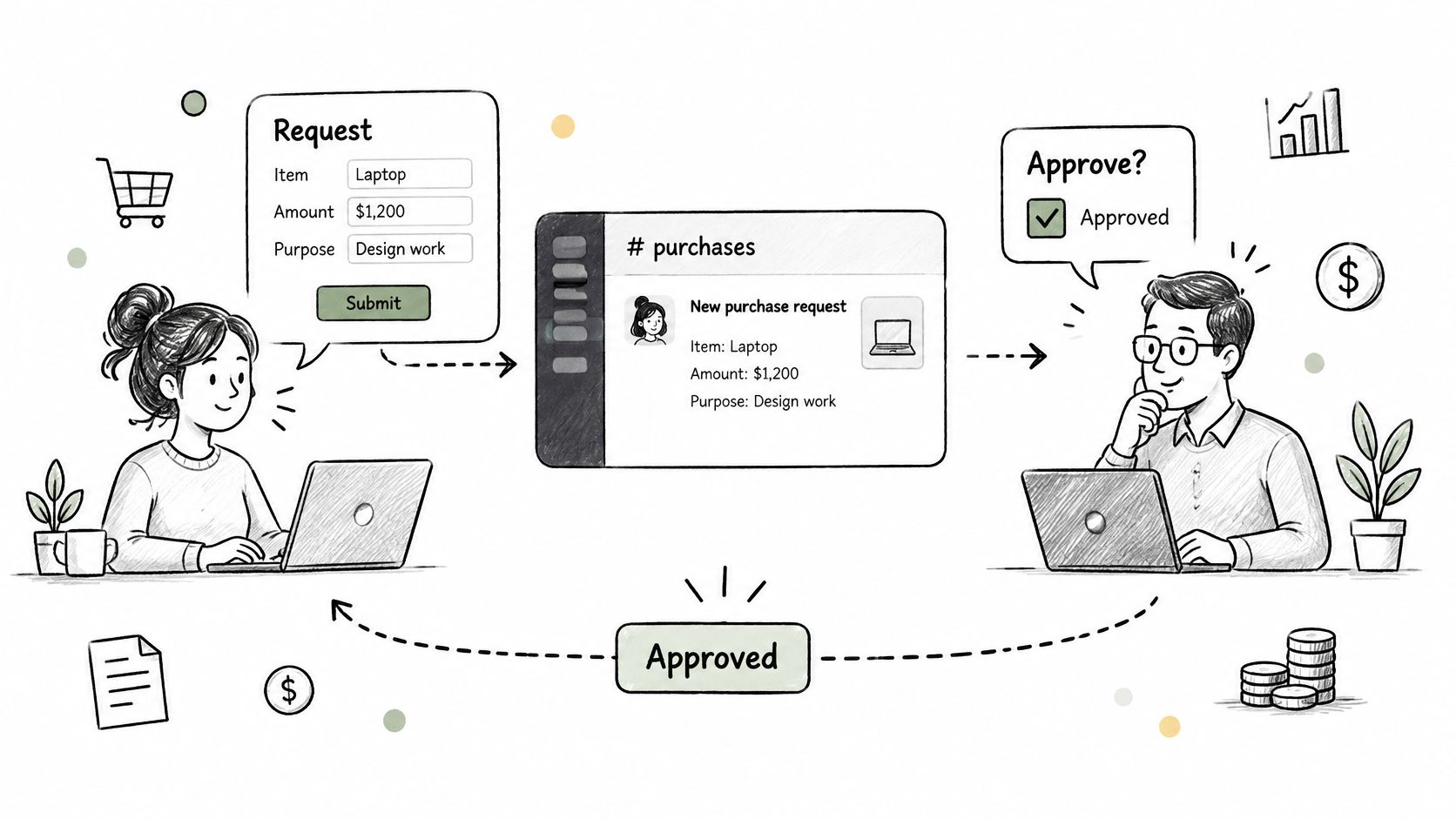
Consider a SaaS company routing software purchases to the department head and controller according to an approved threshold matrix. An equipment request can follow the same pattern through a dedicated procurement channel.
- Slack build: Collect vendor, entity, amount, currency, cost center, business purpose, and supporting documents.
- ERP sync: Create the approved requisition or purchase order, then return its identifier to Slack.
- Approval evidence: Retain the submitted values, approver identity, decision time, policy version, and resulting ERP record.
- Practical setup: Document thresholds before building and give the controller a reviewable decision feed.
Loopfour, the deterministic finance workflow automation platform, adds approval gates, versioned definitions, and retained execution evidence to this pattern. A lightweight Slack flow captures the decision. Loopfour executes the predefined downstream steps instead of leaving staff to reconstruct them.
Workflow Builder stops being enough when requests change after approval, delegation becomes ambiguous, or a failed ERP write still produces a success message. Material changes must invalidate the earlier approval.
2. Accounts Payable Invoice Exception Routing
An AP exception workflow sends a failed invoice match to the person authorized to resolve it. Slack presents the exception; the ERP retains the invoice, hold status, and final disposition.
A services firm could route purchase order, receipt, and invoice mismatches to project managers. A marketplace could send suspected duplicate invoices to the AP lead before the payment run.
The alert needs more than a vendor name. Include the invoice identifier, entity, amount, exact mismatch, source-record link, and required decision.
Preserve the exception through resolution
An AP exception record must connect the original failure to the decision and the eventual ERP result. Closing the Slack thread isn’t a substitute for clearing or retaining the ERP hold.
- Slack build: Receive an integration event and offer approve, reject, or request-information actions.
- ERP sync: Write the authorized disposition back and confirm the resulting invoice status.
- Approval evidence: Preserve the mismatch details, supporting documents, decision reason, and write response.
- Recovery rule: Keep failed updates open with an owner, rather than marking them resolved.
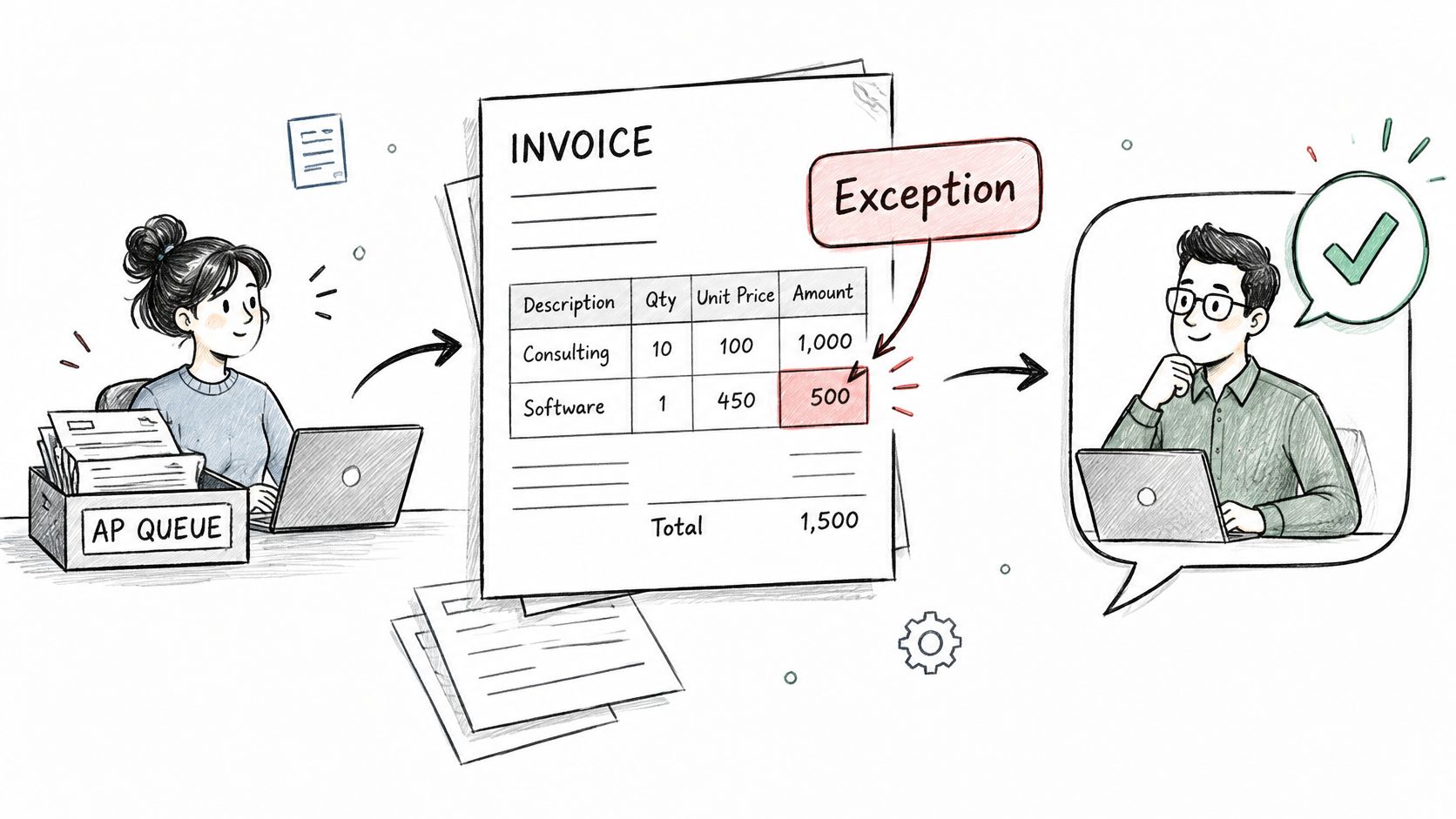
A Slack-only routing flow leaves downstream verification to AP staff. Loopfour records each predefined routing step and system write in an execution tree instead.
Workflow Builder needs additional orchestration when events repeat, approvals expire, or invoice values change during review. AP should review unresolved exceptions weekly, including approved exceptions that haven’t successfully synced.
3. Month-End Close Task Reminders and Sign-Off
A close workflow schedules reminders, names task owners, and collects sign-offs. The close record must also prove that the underlying reconciliation or review occurred.
Slack’s Workflow Builder FAQ describes workflows as a trigger followed by ordered, sequential steps. That structure suits predefined reminders, but task sequence alone doesn’t prove accounting completeness.
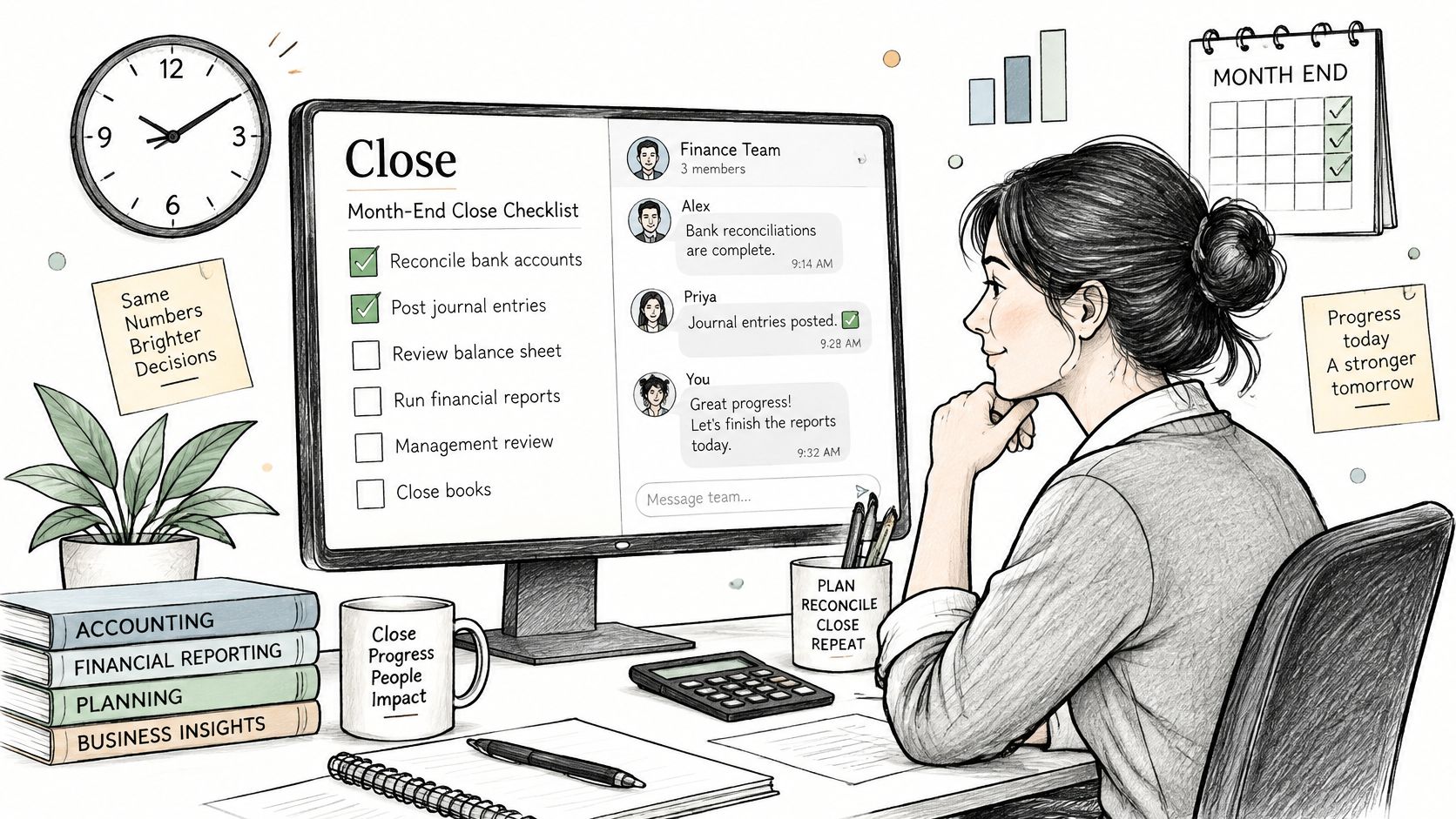
Consider a multi-entity group posting entity-level close tasks to a shared finance channel. Each owner receives a due-time reminder and submits a reconciliation link before the reviewer signs off.
- Slack build: Schedule task notifications and collect completion acknowledgments.
- ERP sync: Associate each task with the relevant period, entity, account, and reconciliation result.
- Approval evidence: Retain the workpaper version, preparer, reviewer, timestamps, and unresolved differences.
- Ownership: Assign a primary owner and backup, with a fixed controller reporting cutoff.
A version-controlled month-end close checklist should define dependencies and required evidence. Completed tasks must reopen when supporting balances or workpapers materially change.
A reminder proves that someone was prompted. A sign-off must prove what someone reviewed.
A reminder-only workflow leaves the controller to verify ERP completion manually. Loopfour runs defined close steps against connected systems and retains the execution record instead.
Workflow Builder reaches its boundary when dependencies, reopened periods, or failed reconciliations require controlled recovery rather than another notification.
4. Overdue Invoice Collections Escalation
A collections workflow routes overdue invoices to account owners and escalates unresolved balances under predefined rules. The billing system must remain authoritative for balances, disputes, promises to pay, and customer communications.
Consider a SaaS business escalating invoices through account ownership, collections, and sales leadership as overdue status persists. A services firm can add partner review for balances above an internally approved materiality threshold.
Recheck the balance before escalating
A collections escalation must use the current receivable, not the balance captured when the workflow first started. Payments, credits, and disputes can make an earlier alert obsolete.
- Slack build: Receive aging updates and route the account summary to the next responsible owner.
- Billing sync: Record collection ownership, dispute status, promises, and approved actions.
- Approval evidence: Preserve escalation-rule versions and authorization for concessions, credits, or write-offs.
- Operating cadence: Review aging weekly with finance and sales, including stalled handoffs.
The collections from accounts receivable guide provides a starting point for defining the operating process. Teams seeking to stop chasing payments manually should still keep customer-facing messages and their delivery history in the billing tool.
A Slack reminder prompts follow-up. Loopfour applies triggered escalation rules and synchronized billing updates instead of relying on an owner to copy the outcome across systems.
Workflow Builder isn’t enough when a queued reminder survives a payment, dispute, or account reassignment. Revalidate financial state immediately before each escalation.
5. Failed Payment Alerts from Stripe to the Billing Team
A failed-payment workflow turns a payment event into an owned billing task. Slack provides visibility; Stripe or the billing system must retain the payment attempt and resolution state.
An integration can receive the Stripe event and pass a normalized alert into Slack. The message should contain the customer reference, amount, failure reason when available, retry status, and source-record link.
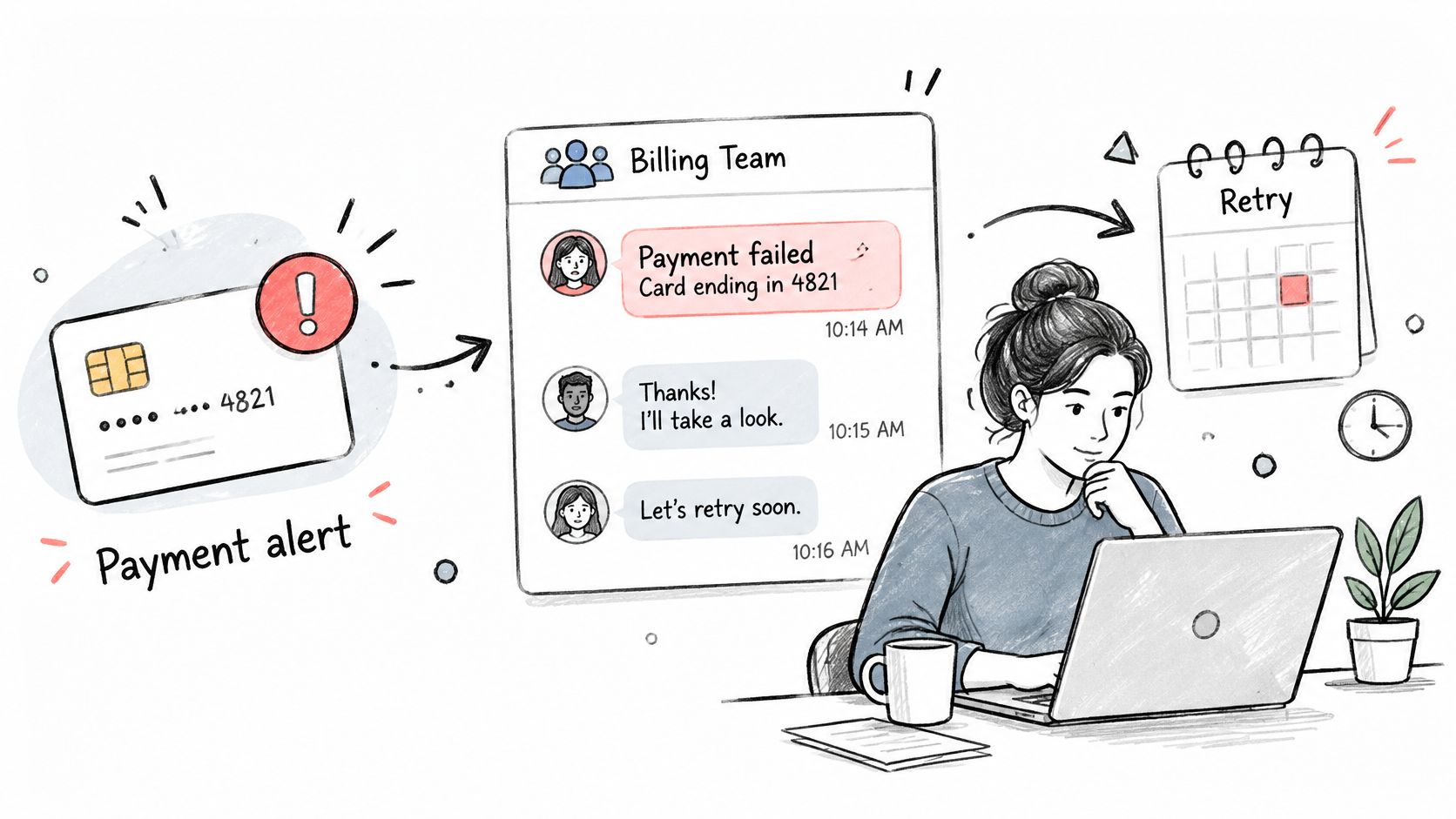
For a subscription business, priority accounts can route to a billing specialist. Marketplace payout failures need a separate queue because payout remediation isn’t the same process as collecting a customer invoice.
- Slack build: Filter alerts by approved criteria and assign an owner.
- Billing sync: Record investigation status, permitted remediation, and final payment outcome.
- Approval evidence: Capture authorization for credits, cancellations, or manual collection actions.
- Noise control: Update the existing case for repeated events rather than opening duplicate tasks.
Teams evaluating ways to reduce churn with smart retries should separate retry policy from internal alert routing. An owner must see the current retry schedule before taking manual action.
An alert-only workflow leaves resolution tracking to the billing team. Loopfour routes failures to owners and records the resolution steps instead.
Workflow Builder needs additional safeguards when events arrive out of order or repeat. Deduplicate by event identifier, refresh payment state, and never infer successful recovery from an acknowledged Slack message.
6. Contract Intake to Legal and Finance Approval
A contract intake workflow collects the proposed agreement and routes commercial terms to legal and finance. The signed document must then drive controlled billing, CRM, and ERP updates.
Consider a SaaS company routing non-standard redlines to legal while finance checks payment terms and billing dates. A services firm can route signed statements of work to billing for project setup.
The embedded walkthrough provides additional workflow context.
Bind approval to the document version
Contract approval must identify the exact agreement reviewed. A signature-status message doesn’t prove that finance approved the final commercial terms.
- Slack build: Collect the request and post review status with restricted document links.
- System sync: Connect DocuSign or Ironclad status to approved CRM, ERP, and billing updates.
- Approval evidence: Retain the document version, reviewed terms, reviewer decisions, and signature event.
- Privacy boundary: Keep sensitive clauses and personal information in the permissioned document system.
Slack’s Workflow Builder guide explains that connector steps may require authentication and workspace or organization approval. Connector access should match the reviewer’s actual authority.
A status-posting workflow leaves billing setup as a separate handoff. Loopfour connects contract events to term extraction, policy checks, and synchronized system writes instead.
Workflow Builder stops being sufficient when extracted terms need validation or a revised agreement must invalidate earlier approval. Interpretation can assist intake; predefined checks must govern financial posting.
7. Salesforce Closed-Won Handoff to Billing Setup
A closed-won handoff workflow sends an approved sales record to billing for customer and invoice setup. Slack should expose missing information, not turn an incomplete opportunity into a billing instruction.
Salesforce’s support organization used structured Slack escalation forms and source-ticket links, with a reported 19% increase in same-day case resolution, according to Slack’s Salesforce support case study. The transferable design is structured intake and source traceability, not a promised billing improvement.
A SaaS company could route closed-won deals meeting its approved review criteria to billing. A marketplace could send executed seller agreements to finance operations for account setup.
- Slack build: Post account, product, contract value, currency, start date, billing contact, and contract link.
- System sync: Create or update billing and ERP records, then return their identifiers to Salesforce.
- Approval evidence: Retain the opportunity snapshot, signed agreement, policy-check results, and billing acknowledgment.
- Validation: Block incomplete handoffs and route missing fields to sales operations.
The Salesforce integration guide can help frame the CRM-to-finance handoff. Billing acknowledgment needs a defined service target, while sales operations should review failed handoffs monthly.
A channel notification leaves staff to copy deal fields. Loopfour executes predefined setup and synchronization steps instead.
Workflow Builder reaches its limit when amendments, duplicate customer records, or partial writes require reconciliation across Salesforce, billing, and the ERP.
8. Expense Receipt and Policy Exception Approval
An expense exception workflow routes missing receipts and out-of-policy spending to authorized reviewers. The expense platform must retain the approved reimbursement, policy exception, and accounting treatment.
A professional services firm could route travel above its approved category limit to the practice lead. Missing-receipt submissions can go to the expense team for documented review.
Keep policy decisions testable
An expense exception must retain the rule that failed and the authority used to override it. A manager’s approval doesn’t automatically satisfy finance policy.
- Slack build: Collect the expense reference, category, amount, missing evidence, and requested exception.
- System sync: Return the disposition and reason code to the expense platform and ERP.
- Approval evidence: Preserve the policy version, reviewer authority, supporting material, and reimbursement status.
- Review practice: Publish policy guidance in the channel and review exception trends quarterly with the controller.
Slack’s Workflow Builder administration guidance states that Workflow Builder is accessible by default to members except guests. Finance workflow creation and modification therefore need explicit administrative controls.
Audit test: The reviewer should be able to explain why the exception was permitted without relying on the employee’s Slack history.
A basic approval flow records a response. Loopfour applies predefined policy checks and retains the associated execution evidence instead.
Workflow Builder needs stronger controls when submitters can approve their own claims, policies change mid-review, or reimbursement proceeds before the exception sync succeeds.
How each Slack workflow example triggers, connects, and keeps evidence
| Item | Trigger | Core Systems | Human Decision | Best For |
|---|---|---|---|---|
| Purchase Request Approval Workflow | Employee submits a purchase request | Slack Workflow Builder; finance systems | Budget owner approves or rejects; finance may review above thresholds | Routing and tracking purchase approvals |
| Accounts Payable Invoice Exception Routing | Invoice fails a match check | Slack; ERP or AP system | AP specialist or budget owner resolves the exception | Clearing invoice exceptions and reducing payment delays |
| Month-End Close Task Reminders and Sign-Off | Scheduled close tasks reach their due dates | Slack; close checklist; ERP | Task owners mark completion; controller reviews overdue items | Tracking close tasks, owners, and deadlines |
| Overdue Invoice Collections Escalation | Invoice passes its due date | Slack; billing system | Account owner follows up; collections lead or executive handles escalations | Coordinating internal follow-up on overdue invoices |
| Failed Payment Alerts from Stripe to the Billing Team | Stripe reports a failed payment | Stripe; Slack; billing system | Billing team triages and resolves the payment issue | Responding quickly to failed payments |
| Contract Intake to Legal and Finance Approval | Contract request is submitted or signature status changes | Slack; DocuSign or Ironclad | Legal and finance review and approve contract terms | Tracking contract reviews and signature progress |
| Salesforce Closed-Won Handoff to Billing Setup | Salesforce opportunity moves to closed-won | Salesforce; Slack; billing system | Billing confirms receipt and reviews custom pricing as needed | Handing new deals from sales to billing |
| Expense Receipt and Policy Exception Approval | Expense violates a policy rule | Slack; expense platform or ERP | Manager and expense reviewer approve or reject the exception | Reviewing and documenting expense policy exceptions |
Frequently Asked Questions
Slack finance workflows work best when their responsibilities are explicit. These answers distinguish interaction features from financial controls.
Can Slack Workflow Builder automate finance approvals without code?
Slack Workflow Builder can support no-code intake and approval coordination. Finance teams still need to define approval authority, preserve evidence, and verify downstream updates. No-code configuration doesn’t remove the need for control design.
Which Slack plans support conditional approval routing?
Slack’s workflow automation page lists Workflow Builder for Pro, Business+, and Enterprise subscriptions, with conditional branching on Business+ and Enterprise+. Teams should confirm available features before designing branching approval paths.
Can Slack replace an ERP approval record?
Slack shouldn’t replace the authoritative ERP approval or financial state record. A controlled implementation links the Slack decision to the approved record version and confirms the ERP update. Channel history alone doesn’t establish posting completeness.
What should happen when an ERP update fails after Slack approval?
The workflow should retain the approval, mark the downstream action as failed, and assign recovery to an owner. Retries must prevent duplicate postings. Material record changes should trigger renewed approval rather than reuse an outdated decision.
Start With One Workflow Your Auditors Can Test
The strongest starting point is a high-volume process with a clear rule and an identifiable system of record. AP exception routing or a close checklist often offers that combination.
Before implementation, document the trigger, approver, required evidence, and destination system. Define what counts as completion. A Slack acknowledgment and a confirmed ERP write are different events.
The initial control design should answer these questions:
- Authority: Who can approve, delegate, change thresholds, and publish workflow changes?
- Record integrity: Which values were approved, and what happens when those values change?
- Recovery: Who owns rejected writes, expired approvals, duplicate events, and unavailable approvers?
- Traceability: Can a reviewer move from the source record to the decision and final system state?
Testing should include failure paths, not only the expected approval. Reject a downstream write, replay an event, remove an approver, and modify the source record during review. Confirm that the workflow stops safely and leaves an understandable record.
The operating owner should also review exceptions that appear complete in Slack but remain unresolved in the ERP or billing platform. Those mismatches deserve an explicit queue. Otherwise, staff can mistake conversational closure for financial completion.
A workflow isn’t finished when the channel looks tidy. It is finished when the authorized action and the financial record agree.
Measurement should cover completion time, human touch time, unresolved exceptions, failed writes, and evidence completeness. Faster routing has limited value if the controller must rebuild the approval trail before testing.
Loopfour’s finance workflow automation approach separates human interaction from deterministic execution. Slack remains the familiar approval and exception surface. Versioned workflow definitions, approval gates, and retained system responses provide the governed execution layer.
The practical objective isn’t to automate every finance conversation. It is to make a recurring process predefined, auditable, and recoverable without depending on undocumented personal knowledge. When auditors can trace a decision from the channel to the ledger, the workflow has a defensible completion standard.
Loopfour offers deterministic finance workflows across existing ERP, CRM, billing, and document systems, with Slack-based approvals and retained execution evidence. Finance teams can visit Loopfour to discuss a scoped workflow covering approval authority, downstream synchronization, and failure recovery.