
The first week of close has arrived. Bank reconciliations are waiting, journal entries sit in inboxes, and a reviewer is asking which balances are complete. The checklist says “done” in several places, but the supporting evidence is scattered across Excel, email, ERP screens, and shared folders.
Month end close software standardizes, automates, and governs period-end workflows. It coordinates tasks, reconciliations, approvals, dependencies, and audit evidence in a finance-owned environment, rather than leaving close status to a shared checklist.
The distinction matters because close speed varies sharply between finance teams. APQC-based benchmarking summaries report a median close of about 6.4 calendar days, while top-quartile organizations close in 4.8 days or fewer and bottom-quartile organizations need 10 days or more. The figures are summarized with supporting context in APQC-based month-end close benchmarking.
A faster close doesn’t come from checking boxes sooner. It comes from making upstream data ready, enforcing dependencies, routing exceptions, and writing approved results back into the ERP through controlled steps. Loopfour, the deterministic finance workflow automation platform, approaches the close as governed execution across the finance stack.
Excel-heavy workflows create delay. Loopfour does predefined orchestration instead. This guide explains what close software does, which capabilities shorten cycle time, why deterministic workflows matter, how buyers should evaluate vendors, and how implementation can preserve auditability.
Table of Contents
- Introduction That Answers What Month End Close Software Does
- What Month End Close Software Is and How It Works
- Critical Features That Actually Shorten Cycle Time
- Why Deterministic Governed Workflows Beat Checklists and AI Agents
- How to Evaluate Month End Close Software Without Getting Burned
- Implementation Best Practices That Preserve Auditability
- Frequently Asked Questions About Month End Close Software
Introduction That Answers What Month End Close Software Does
Month end close software gives the accounting team one controlled operating layer for period-end work. The layer connects close tasks with reconciliations, approvals, source documents, exceptions, and system updates, so the team can see what is blocked and why.
A close process typically includes bank reconciliations, revenue and expense review, accruals and deferrals, payroll checks, journal entries, internal review, and a final period lock. The standard month-end closing workflow describes these activities as connected steps rather than isolated administrative tasks.
The practical problem is familiar. A preparer finishes a reconciliation, but the reviewer can’t find the support. A billing export arrives late. A subledger balance doesn’t agree with the general ledger. Someone posts an adjustment, but the close tracker doesn’t show who approved it.
Controller’s test: A close task isn’t complete because someone marked it complete. It’s complete when the required evidence, review, and system state are all present.
The operational need remains significant. A 2025 benchmark summary reports that only 18% of finance teams close in three business days or less, while 50% take more than six business days and 27% take more than seven business days, as summarized by Ledge’s 2025 close benchmarks. The same summary says that 94% of finance teams still use Excel during month-end close, and 50% cite Excel as a reason the close takes too long.
Month end close software matters when manual dependencies remain high. A platform should not merely display status. It should determine which step may run, require a preparer and reviewer, preserve the evidence, and stop downstream reporting when a prerequisite fails.
The result is a deterministic and auditable close. Deterministic means the same approved rules produce the same execution path. Auditable means the system preserves who acted, what changed, which evidence supported the action, and when approval occurred.
What Month End Close Software Is and How It Works
Month end close software is a finance-owned control system for coordinating period-end workflows. It brings tasks, reconciliations, approvals, supporting evidence, and status reporting into one governed environment.
A shared checklist tells people what someone expects them to do. Close software adds logic. It knows that a reviewer shouldn’t approve a reconciliation before the preparer attaches support, and that management reporting shouldn’t advance while a required account remains unresolved.
An air-traffic control tower is a useful analogy. The tower doesn’t fly the aircraft or make every judgment for the pilot. It sequences movement, exposes conflicts, and prevents one action from creating an unsafe dependency. Close software performs a similar coordination role for accounting work.
The core jobs of close software
A capable platform performs several distinct jobs:
- Sequence work: Dependencies determine which tasks can start and which remain blocked.
- Assign accountability: Preparers, reviewers, owners, and escalation paths are explicit.
- Coordinate reconciliations: The system connects account work with balances, support, exceptions, and sign-off.
- Capture evidence: Documents, comments, timestamps, and version history remain tied to the relevant step.
- Surface bottlenecks: Controllers see late inputs, failed runs, unresolved exceptions, and pending approvals.
- Protect the ledger: Approved outputs can be written back through controlled ERP actions.
The difference between visibility and control is important. A checklist can show that cash reconciliation is late. An orchestration engine can identify the missing bank file, notify the owner, escalate the delay, and prevent a dependent review from being marked complete.
Finance leaders evaluating broader data movement may also benefit from an analytics architecture guide, especially when close reporting depends on ERP, billing, banking, and subledger data.
Month end close software should therefore be judged by its execution model. A system that only stores tasks may improve coordination. A system that governs dependencies, evidence, approvals, and writeback can change the control surface of the close.
Critical Features That Actually Shorten Cycle Time
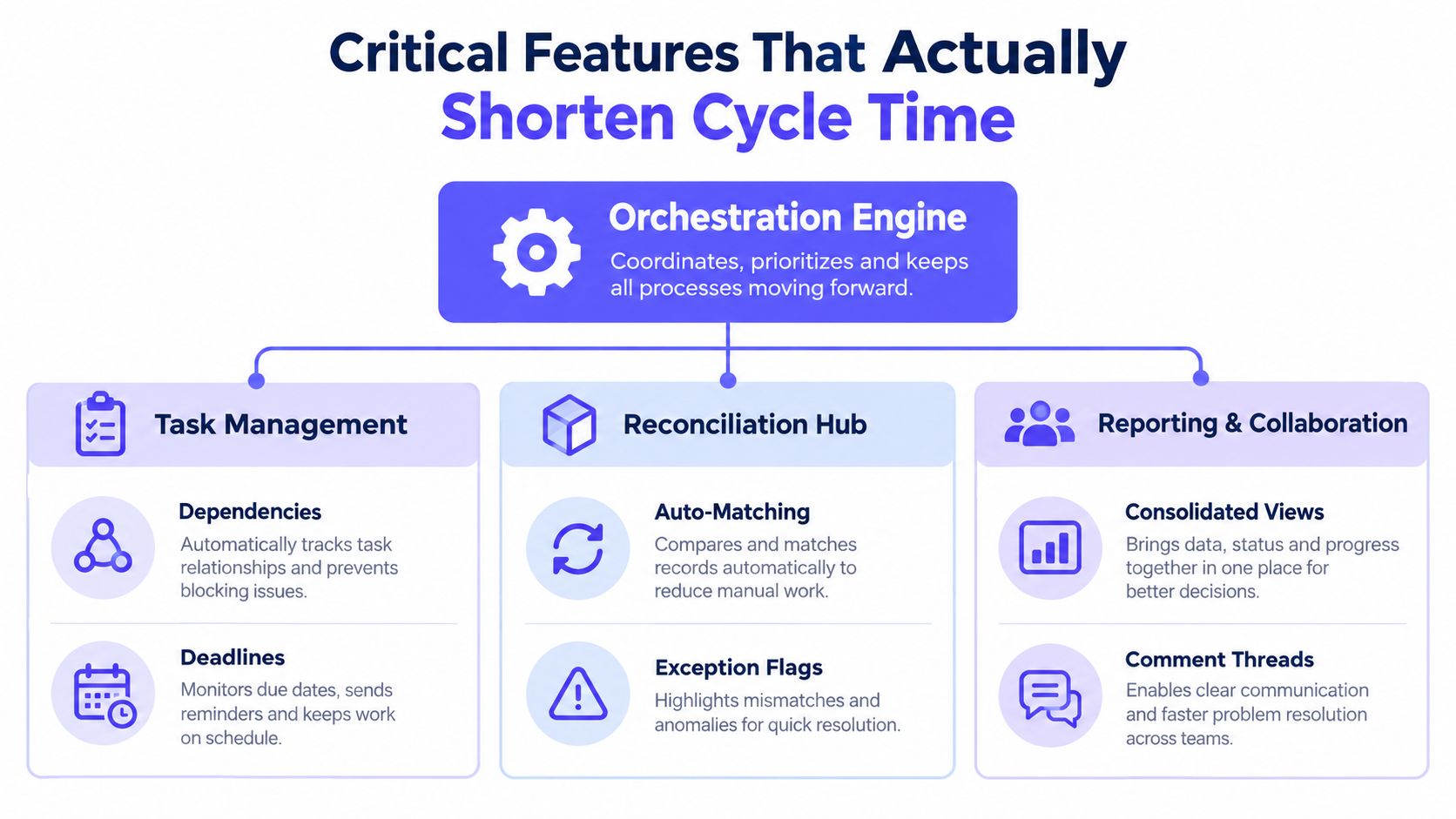
The features that shorten close time are the ones that remove waiting, rework, and uncontrolled handoffs. Task visibility helps, but orchestration across the ERP, billing systems, banks, subledgers, and document repositories determines whether the close moves.
Task orchestration and escalation
Task orchestration makes ownership and sequencing explicit. Good software supports recurring templates, predefined deadlines, preparer and reviewer roles, dependencies, and escalation rules for late items.
A late bank statement should create a visible exception. It shouldn’t remain a silent gap in a checklist. The workflow should route the issue to an owner, notify the relevant reviewer, and preserve the escalation history.
Reconciliation automation
Reconciliation automation compares expected balances or transactions and routes differences for review. Straightforward matches can follow predefined rules, while unmatched or unusual items require human attention.
Cash reconciliation deserves particular focus. Ledge’s benchmark summary identifies cash reconciliation as the most time-consuming close activity and reports that less than 40% of close work is automated. Buyers should ask whether a vendor automates data preparation and matching, or merely provides a place to upload the final reconciliation.
Evidence capture and audit trails
Evidence capture connects every accounting action to its support. The system should retain approval timestamps, user-level activity logs, version history, supporting documents, and period-specific records.
Xenett’s description of financial close software audit trails identifies these records as a common control requirement. Your auditors want the workflow to hold up after the period has closed, not just look organized during the close.
Cross-system connectivity
Connectors reduce rekeying and expose upstream readiness. Native integrations should cover the relevant ERP, billing, banking, payroll, subledger, communication, and document systems.
Some environments lack usable APIs. Secure browser automation can still execute controlled steps in legacy or homegrown systems, provided the workflow preserves permissions, logs, and evidence. Compatibility isn’t just a procurement concern. It determines whether the automation reaches the actual bottleneck.
Exception routing and human approval
Exception routing keeps judgment-heavy decisions with accountable people. Materiality assessments, final approvals, period lock, and unusual accounting treatment shouldn’t disappear into an autonomous process.
Accounting workflow automation guidance emphasizes dependencies, required sign-offs, escalation, and linked evidence. Those controls turn a task list into a governed close system.
Observability
Observability shows how each run behaved. Useful records include run logs, execution trees, latency, success and error states, changed inputs, and downstream writes.
| Feature | What It Must Do | Why It Shortens Close |
|---|---|---|
| Dependency engine | Block downstream work until prerequisites pass | Prevents premature review and rework |
| Reconciliation hub | Match expected items and flag exceptions | Reduces manual comparison |
| Evidence layer | Retain support, timestamps, comments, and versions | Cuts audit reconstruction |
| ERP and system connectors | Pull source data and write approved results back | Removes duplicate entry and waiting |
| Exception routing | Assign unresolved items and escalate delays | Prevents blockers from remaining invisible |
| Execution observability | Show run history and failed steps | Speeds diagnosis and controlled recovery |
The evaluation question is simple. Does the feature change system state, or does it only display information? Display is useful. Controlled execution is where cycle time changes.
The following video provides additional context on governed close workflows:
Why Deterministic Governed Workflows Beat Checklists and AI Agents
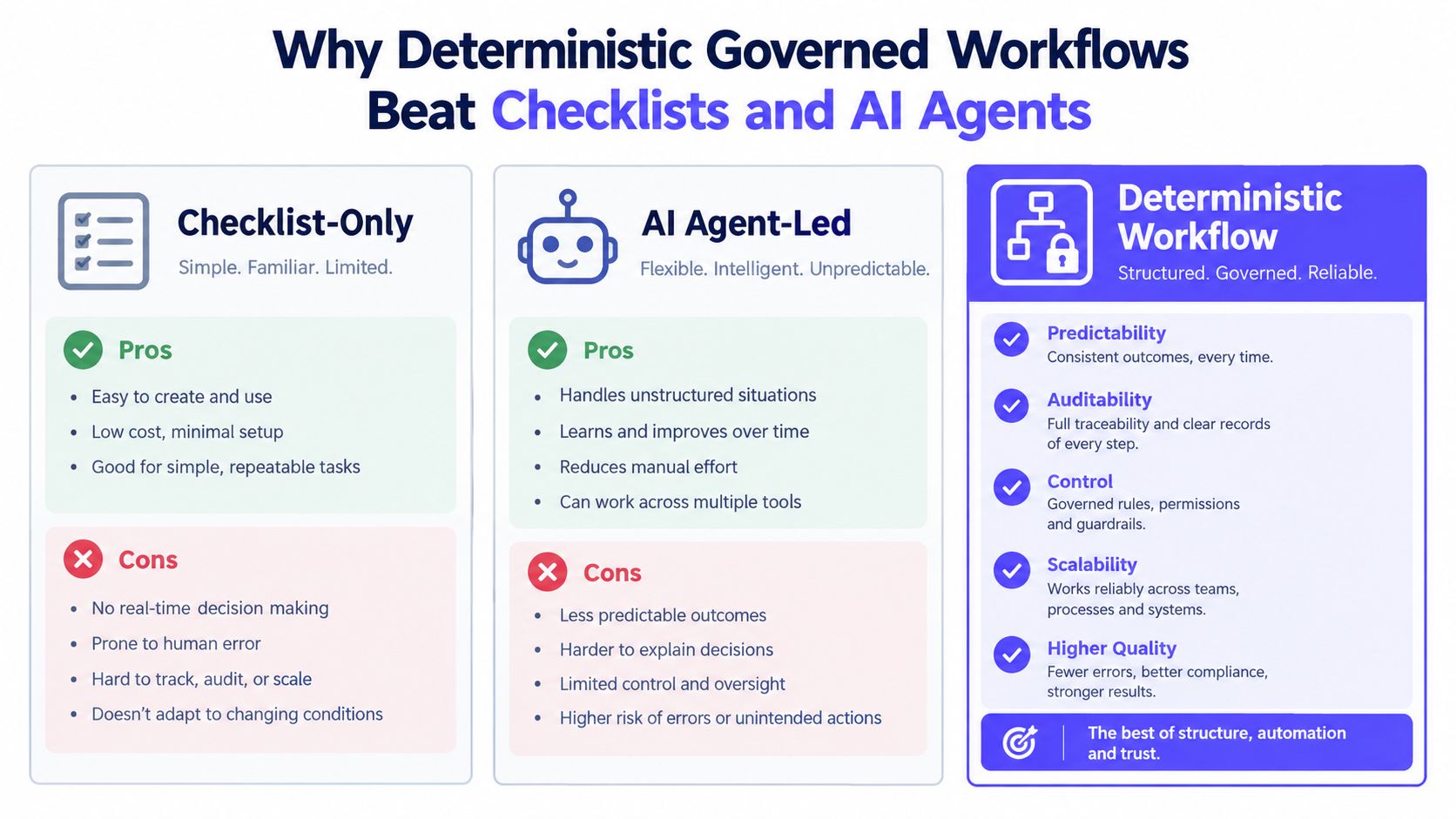
Deterministic governed workflows make the close reproducible and inspectable. Checklist-only tools leave system dependencies unresolved, while unrestricted AI agents can produce actions that are difficult to reproduce or defend.
A checklist solves coordination at the human level. It doesn’t necessarily retrieve the right source data, verify completeness, or prevent a report from advancing while a prerequisite remains open. The team may gain a cleaner dashboard while the underlying close remains fragmented.
AI agents solve a different problem. They can interpret documents, draft explanations, identify anomalies, or suggest matches. But a finance team needs defined boundaries around what an AI system may decide, what confidence is acceptable, and when a human must intervene.
Three operating models
| Operating model | Strength | Control risk |
|---|---|---|
| Checklist-only | Simple visibility and familiar adoption | Missed dependencies and weak evidence linkage |
| AI agent-led | Flexible interpretation and preparation | Non-reproducible actions and unclear decision boundaries |
| Deterministic workflow | Predictable execution, versioning, and audit evidence | Requires disciplined process design and governance |
Checklist-only does visibility. Loopfour does controlled execution instead. Loopfour Studio can represent recurring finance operations as predefined workflows, with versioned definitions, permissions, approval gates, and evidence retained for each action.
AI still has a place. Finance automation guidance recommends using automation for evidence gathering, completeness checks, recurring journal prompts, and exception routing, while keeping final approval, materiality assessment, and period lock manual for segregation of duties and SOX-compatible control design. That distinction is covered in governed month-end close automation guidance.
Control boundary: AI may prepare or interpret. A designated finance professional approves the accounting conclusion.
Governed workflows also address change risk. A versioned workflow shows which logic ran during a period. Impact analysis identifies affected processes before a change is approved. Change history explains who authorized the update.
This model fits skeptical controllers because it doesn’t ask them to trust an opaque decision. It gives them a deterministic path, scoped interpretation, explicit fallback, and an execution tree that can be reviewed later.
Further detail on the category appears in this finance workflow automation overview. The relevant buying question isn’t whether a tool contains AI. It’s whether every automated action has an owner, a rule, an approval boundary, and retained evidence.
How to Evaluate Month End Close Software Without Getting Burned
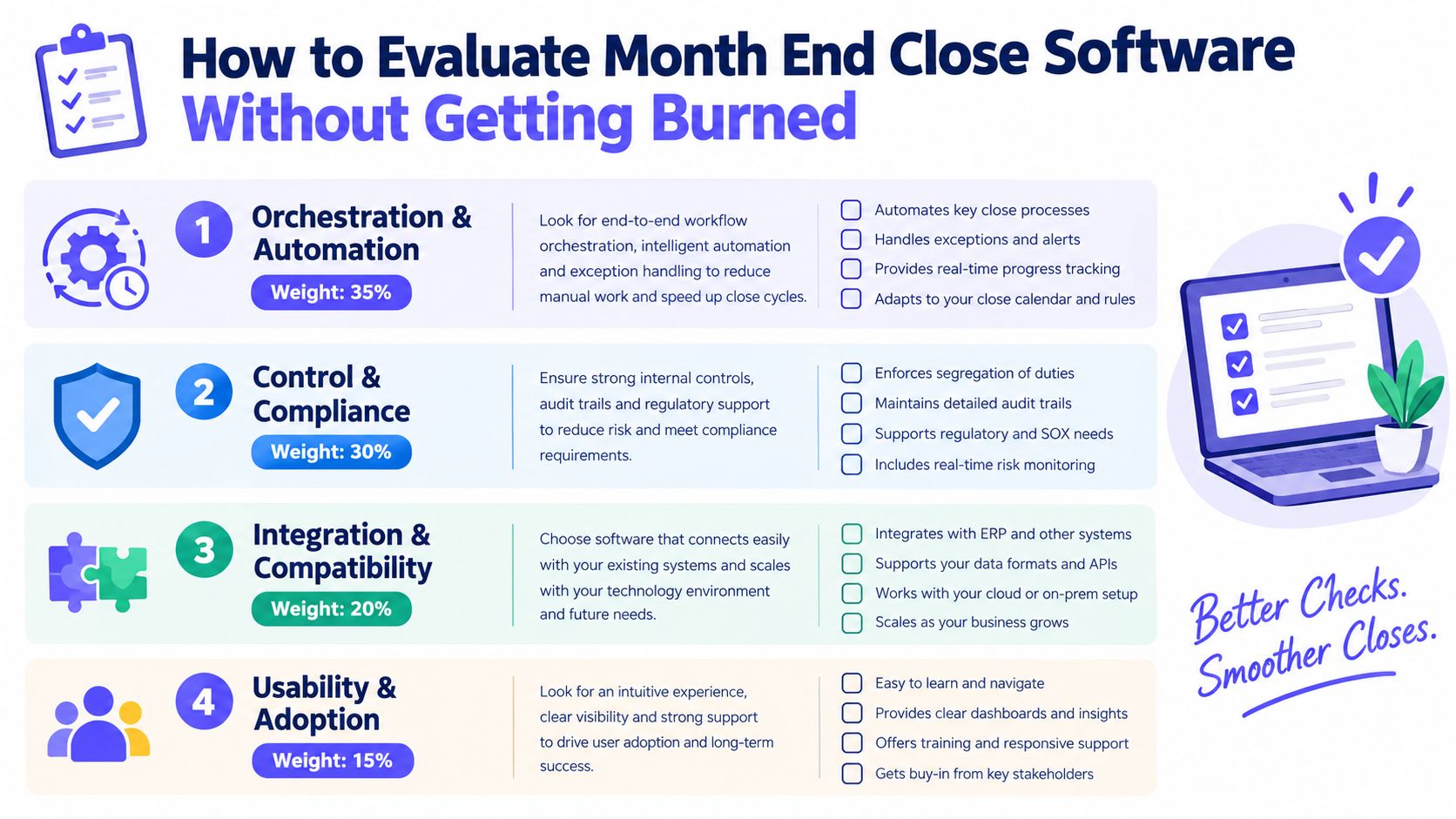
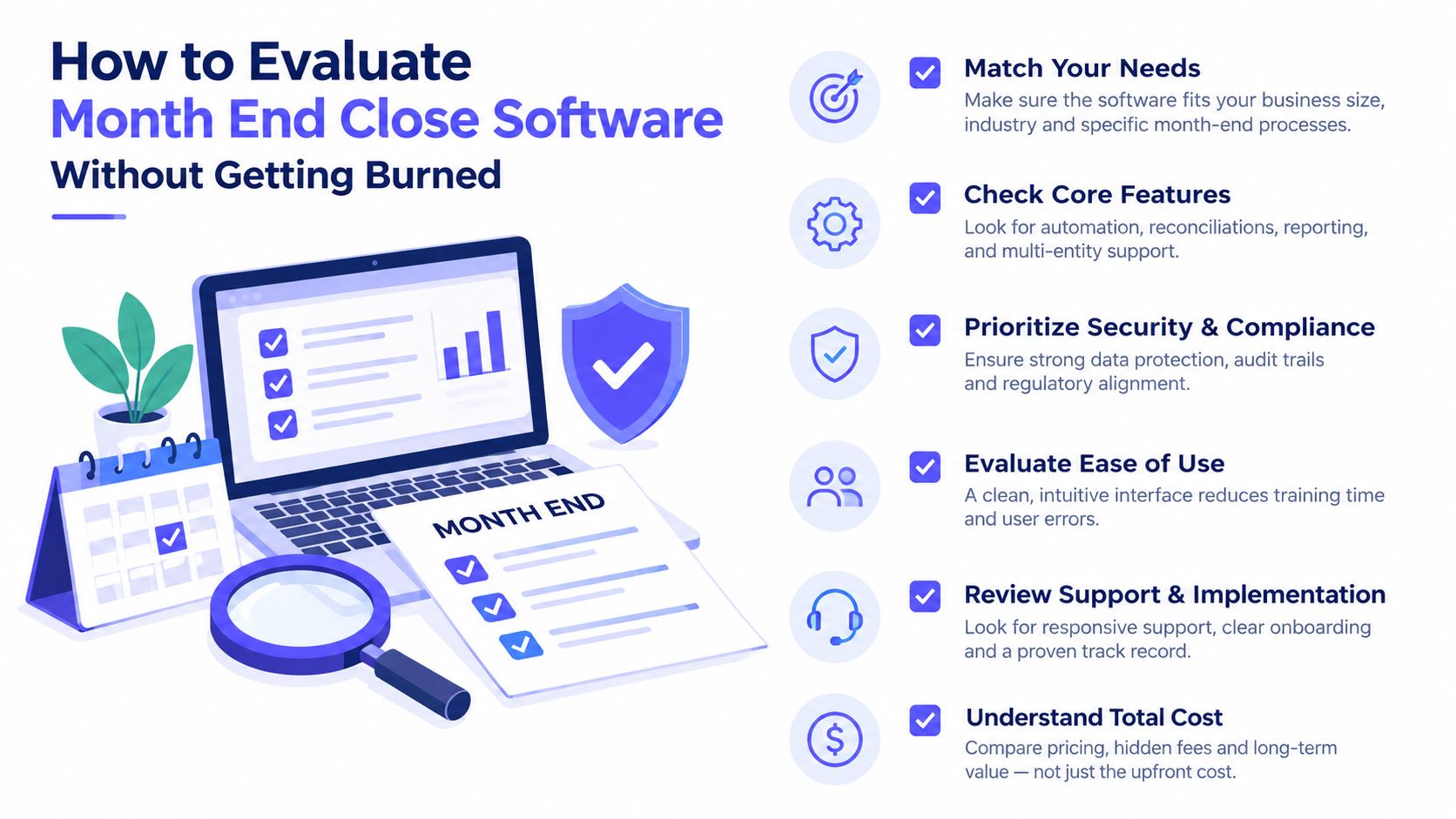
Buyers should evaluate month end close software as an orchestration layer, not as a prettier checklist. The highest-value test is whether the platform can prepare upstream data, manage cross-system dependencies, and write approved outputs back into the ERP with evidence.
A 2026 CFO Dive summary reports that nearly 8 in 10 corporate finance professionals associate close delays with waiting for data from other systems or departments. More than half cite reconciliation across multiple platforms. The findings are summarized in Datarails’ analysis of month-end close automation.
That evidence changes the buying framework. Task visibility matters, but upstream readiness and controlled writeback deserve greater weight.
A practical scoring framework
| Evaluation area | Suggested weight | Vendor proof to request |
|---|---|---|
| Orchestration and automation | 35% | Demonstrate dependencies, triggers, retries, and escalation |
| Control and compliance | 30% | Show permissions, approvals, evidence, version history, and period controls |
| Integration and compatibility | 20% | Run a real workflow across ERP, bank, billing, and subledger systems |
| Usability and adoption | 15% | Let preparers and reviewers complete a representative close task |
The weights above form a decision framework, not a verified industry benchmark. They force the buying team to prioritize control and execution rather than demo polish.
Questions that expose weak fit
- Data readiness: Can the platform detect missing or stale source data before a close task begins?
- Integration depth: Does the connector retrieve transaction detail, or only a trial balance snapshot?
- Writeback control: Can approved journals or status changes return to the ERP with a recorded authorization?
- Exception behavior: What happens when a match fails, an API returns an error, or a reviewer rejects support?
- Evidence retention: Can auditors inspect the exact inputs, actions, approvals, and versions for a period?
- Change governance: Can administrators test and approve workflow changes before production execution?
The financial closing software guide offers related context for assessing close platforms. The useful vendor demonstration isn’t a happy path. It’s a failure path.
Ask the vendor to show a missing bank file, a mismatched subledger balance, a rejected journal, and a changed workflow definition. If the platform can’t explain each state, recovery action, and audit record, the checklist may be doing more work than the software.
Implementation Best Practices That Preserve Auditability
Implementation should begin with a controlled slice of the close, not a wholesale redesign. The safest path starts with repeatable work, encodes the existing process as versioned workflows, and expands only after evidence and exception handling are reliable.
Start with repeatable work
Reconciliations, cash application, completeness checks, and recurring journal prompts are suitable early candidates. These activities have clear inputs, repeatable rules, and identifiable exceptions.
Recurring journal entries deserve special treatment. A guide to automated journal entries can help finance teams distinguish repeatable preparation from the judgment required for approval and materiality.
A phased rollout can follow this sequence:
- Map the current close: Document systems, inputs, owners, reviewers, dependencies, and approval points.
- Select a narrow workflow: Choose an area where manual handoffs create visible rework.
- Define evidence requirements: Specify required support, comments, timestamps, and reviewer actions.
- Encode deterministic steps: Use predefined, versioned logic for retrieval, checks, routing, and approved writeback.
- Test failure states: Simulate missing data, rejected approvals, mismatches, and connector errors.
- Measure control health: Track cycle time alongside unresolved exceptions, approval completeness, and execution failures.
Preserve the human control points
Continuous close doesn’t mean every accounting decision should run continuously. Monitoring, evidence gathering, data completeness checks, and exception detection can operate throughout the period.
Final approval, materiality assessment, unusual accounting treatment, and period lock require designated human control. The workflow should preserve the full execution tree when those steps occur.
Implementation rule: Move preparation earlier. Don’t move accountability out of the finance control framework.
Notifications can route exceptions through Slack, Microsoft Teams, or email. The communication channel can change. The approval record must remain attached to the governed workflow.
The practical endpoint is a close that becomes progressively less dependent on the last few days of the month. Upstream data arrives earlier, exceptions receive owners sooner, and approved writes reach the ERP through controlled paths. Cycle time improves because the system removes waiting, while auditability improves because the system records execution.
Frequently Asked Questions About Month End Close Software
How does month end close software differ from an ERP close module?
Month end close software coordinates the workflow around the ERP. An ERP remains the accounting system of record, while close software manages dependencies, reconciliations, evidence, approvals, and exceptions across the wider stack. Loopfour Studio is designed to operate on existing systems, including ERP, billing, document, and communication tools, rather than requiring a rip-and-replace program.
How long does month end close software implementation take?
Implementation time depends on workflow complexity, integration depth, data quality, and governance requirements. A controlled pilot can begin with one repeatable process, then expand after testing. Vendors should demonstrate failure handling and audit evidence before production use, not only a successful happy-path run.
Does month end close software replace Excel?
Month end close software doesn’t need to eliminate Excel. Teams may continue using approved spreadsheets for analysis or workpapers, while the workflow platform governs inputs, reviews, evidence, and writeback. The important change is that Excel no longer acts as the untracked system of record for close status.
How does month end close software handle multi-entity closes?
Month end close software can apply predefined templates across entities while preserving entity-specific owners, accounts, currencies, approvals, and exceptions. A governed design should show which entity ran, which source systems supplied data, and which reviewer approved the resulting work.
What do auditors review in month end close software?
Auditors typically need evidence that controls operated as designed. That includes user-level activity, approval timestamps, supporting documents, version history, exception resolution, and period-specific records. A platform should make those records available without reconstructing the close from inboxes and disconnected files.
Loopfour provides deterministic finance workflow automation for reconciliations, journal entries, approvals, and cross-system close execution, with retained evidence for every governed action. Finance leaders can evaluate the approach and request a workflow discussion through Loopfour.